
Preview




Description
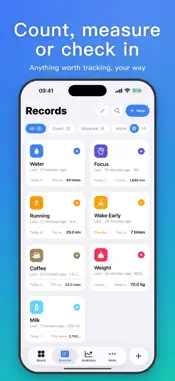
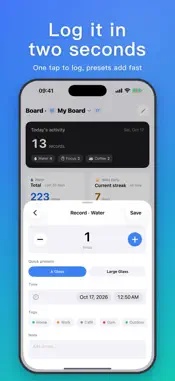
Tracely is a minimalist personal tracker: anything you want to follow can become a record type you define yourself. Every feature is free — no ads, no limits. [Three Ways to Record] - Count — cups of coffee, sets of push-ups - Measure — weight, focus time, running distance, with built-in time / mass / length / volume unit conversion, plus your own custom units; values like body weight can be summarized by average - Check-in — early nights, reading, meditation: one tap a day [Log It in Two Seconds] - The "+" in the tab bar jumps straight to entry, with preset steps and a number pad - Check-in and single-preset types log with a single tap on the Records page, with instant undo - A short welcome guide with ready-made templates gets you started in a few taps [Timers and Reminders] - Start a timer for any duration type; the Dynamic Island and a Lock Screen Live Activity show the running time, and stopping it logs a record - Scheduled, goal, and rhythm-based smart reminders, all handled on your device [Boards: Your Data at a Glance] - Pin the metrics you care about as cards: today's count, goal ring, mini trend, current streak… Drag to reorder, switch sizes, and keep multiple boards - Share any board card or chart as an image [Analytics: See Your Patterns] - 7 metric families, 42 indicators: totals and averages, trends, time-of-day distribution, interval patterns, streaks and longest records, goal completion, and a calendar heatmap — auto-fitted to each record type - An overview at the top sums up changes versus the previous period, streaks, goal progress, and peak times - Compare several types on one chart to see how they rise and fall together - For types with a goal, streaks count consecutive days, weeks, or months in which you hit it [Widgets, Siri, and Apple Watch] - Home Screen and Lock Screen widgets, a Quick Log widget, and a Control Center timer toggle - Siri and Shortcuts: log once, ask for today's or this week's stats, start or stop a timer - Log from your wrist on Apple Watch, with watch-face complications and Smart Stack widgets [Privacy and Data Safety] - Stored on your device and synced through your private iCloud database; the developer can never access your data - Privacy Lock with Face ID, Touch ID, or passcode; optionally hide details in widgets and Siri while locked - Full backup export/import with optional AES encryption, plus CSV import and export for moving data in and out - Automatic safety snapshots before clearing, replacing, or deleting a type — all undoable - No ads, no third-party analytics SDKs [iPad] - Native iPad layout: sidebar navigation, a "Types | Details" two-column records area, and pages that flow into multiple columns as the screen widens; keyboard shortcuts and pointer hover supported ------------------- Support the Developer (entirely optional): - If Tracely helps you, you can buy the developer a coffee (one-time) or become a monthly supporter (auto-renewable subscription) under More → Support the Developer - Tips and monthly support do not unlock any features — everyone gets the same complete Tracely - Monthly support renews automatically and can be canceled anytime in your App Store account settings; payment is charged to your Apple Account at confirmation of purchase ------------------- - Terms of Use: https://www.apple.com/legal/internet-services/itunes/dev/stdeula/ - Privacy Policy: https://app.lonelyman.site/tracely/privacy
What's New
Version 1.2.0 2026-10-16
What's new: - Everything is free: no more limits on record types, records, or boards — all charts, tag filters, multiple boards, backup and restore, and Apple W...What's new: - Everything is free: no more limits on record types, records, or boards — all charts, tag filters, multiple boards, backup and restore, and Apple Watch are open to everyone - New Support the Developer page (More → Support the Developer): buy the developer a coffee or become a monthly supporter — entirely optional, and it unlocks no features - If you subscribed to Pro, you no longer need it — cancel anytime in Settings → Apple Account → Subscriptions - New local reminders: scheduled, goal, and rhythm-based smart reminders, set per device; they stay quiet once you've checked in or hit your goal - New welcome guide with ready-made type templates to get you started in a few taps - New Quick Log widget; check-in and single-preset types now log with one tap on the Records page, with undo - New duration timer: the Dynamic Island and a Lock Screen Live Activity show the running time, and stopping it logs a record; add a timer toggle to Control Center - Apple Watch now has watch-face complications and Smart Stack widgets that update as soon as you log on the watch - New Privacy Lock: unlock with Face ID, Touch ID, or passcode, with an optional grace period; content is hidden in the app switcher. You can also hide details in widgets and Siri while locked, and keep record types out of system search - New CSV import and export: preview column mapping, match or create types automatically, skip duplicates, and undo the import - Select multiple entries in the log to delete, retag, or move them to another type in one go, with undo - New Analytics overview that sums up changes versus the previous period, streaks, time since last entry, goal progress, and peak times; plus a new cross-type comparison - New Siri and Shortcuts actions: log once, open a type, ask for today's or this week's stats, and start or stop a timer - Share board cards and charts as images - Values like body weight can now be summarized by average instead of sum - For types with a goal, streaks now count consecutive goal periods (day / week / month) met; completion rate starts from the period the goal was set - New number pad for entry; press and hold ± to adjust continuously - Automatic safety snapshots before clearing data, replacing on import, or deleting a type, all undoable; deleting a single entry can be undone too - Widgets support tinted and clear Home Screen styles and open straight to Analytics; improved Dark Mode and color legibility - iPad keyboard shortcuts (⌘N to log, ⌘1–⌘4 to switch tabs) and pointer hover - Stronger encryption for backups; encrypted backups from this version need the updated app to open, so please update all your devices Fixes: - Fixed boards, widgets, and Apple Watch still showing the previous day's numbers after midnight - "Last N days" now means N calendar days including today, so some numbers may differ slightly from before - Trends and running totals for count types now consistently count entries; fixed average rates, goal progress, and unit conversions - Fixed the sync status display, and duplicates created by sync are now merged automatically - The app no longer crashes if its database can't be opened; it shows a notice and keeps your data - Fixed rapid taps on Save creating duplicate entries, and failed saves being reported as successful - Weekly stats in widgets and on Apple Watch now follow the in-app first-day-of-week setting - Entry times can no longer be set in the future, and counts must be at least 1 Technical Analysis
Package Overview Basic metadata
Bundle ID
site.lonelyman.app.freqtracker Current Version 1.2.0
Minimum iOS 18.0
Package Size App Store Size
Package Metadata 0 / 3 version records
Detailed binary, privacy manifest, framework, and Info.plist results have not been indexed for this package yet. The verified App Store and archive metadata above remains available.
Developer Information
Known Version Records
0 version records with stored package metadata • 3 known version records
Stored metadata does not guarantee a package is currently available to download.
| Details | Version / IDs | Version date | Action |
|---|---|---|---|
| Not archived | App Store ID: 887102958 | Unknown | Request Version |
| Not archived | App Store ID: 886966373 | Unknown | Request Version |
| Not archived | App Store ID: 886683814 | Unknown | Request Version |