
Preview






Description
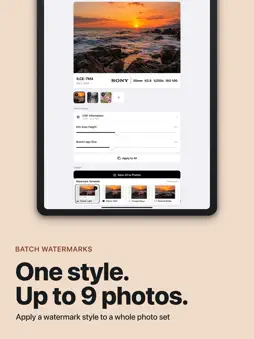
Frame your photos. Show your shooting settings. Edit the metadata behind the image. EXIF Frame brings camera watermarks, creative photo layouts and a dedicated metadata editor together on iPhone and iPad. CAMERA WATERMARKS Read camera, lens, focal length, aperture, shutter speed, ISO and capture time automatically. Choose from 12 styles, adjust the information band and logo, and apply a style to up to 9 photos at once. Changes here control the text shown in the watermark. 32 CREATIVE TEMPLATES Create gallery borders, film-style frames, signature layouts and multi-photo compositions. Adjust the controls available in each template, including text, date, logo, colors and aspect ratio. Preview your composition, rearrange photos in collage templates and export a PNG. A DEDICATED METADATA EDITOR Import up to 20 photos, supported RAW files or videos from Photos or Files. Inspect EXIF, GPS, IPTC and supported video metadata. Edit dates, locations, camera details, exposure settings, captions, creator and copyright fields where supported. Select which fields to apply in a batch, undo changes or return to the original values. PREPARE COPIES FOR SHARING Set a location on the map, remove GPS, or clear shooting and descriptive information from an exported copy. Originals are kept unchanged. Watermark editing and file metadata editing are separate tools, so you can choose the workflow you need. ON-DEVICE MEDIA PROCESSING Photos, videos and metadata are processed on your device without a developer upload service or an account. Map searches use Apple's map services. FORMAT SUPPORT Supports common image formats including JPEG, PNG and HEIF. RAW reading depends on device support; RAW and other images that cannot be written in their source format are exported as JPEG or PNG. Image exports are re-encoded; animated and multipage images export only the first frame. Video export depends on system format support. EXIF FRAME PRO Try the camera-watermark and metadata tools before purchasing. Creative templates marked Pro require Pro. Saving and sharing require Pro, available as weekly, monthly or yearly auto-renewable subscriptions, or a lifetime purchase. Manage or cancel subscriptions in your Apple Account settings and restore purchases in the app. Choose a frame or open the metadata editor to prepare your next photo. Privacy Policy: https://exifframewebsite.musicgo.cc/privacy/?lang=en Terms of Use: https://exifframewebsite.musicgo.cc/terms/?lang=en
What's New
Version 1.0.6 2026-10-23
EXIF Frame now adapts to iPhone Duo, so you can continue working with your photos as you move between its inner and outer displays. Improved for iPhone Duo: • ... Technical Analysis
Package Overview Basic metadata
Bundle ID
com.zpf.exifframe Current Version 1.0.6
Minimum iOS 15.0
Package Size App Store Size
Package Metadata 0 / 0 version records
Detailed binary, privacy manifest, framework, and Info.plist results have not been indexed for this package yet. The verified App Store and archive metadata above remains available.
Developer Information
Known Version Records
0 version records with stored package metadata
Stored metadata does not guarantee a package is currently available to download.
| Details | Version / IDs | Version date | Action |
|---|