
Preview





Description
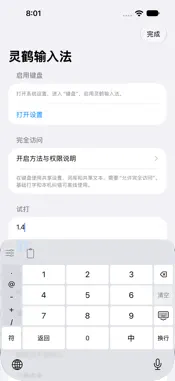
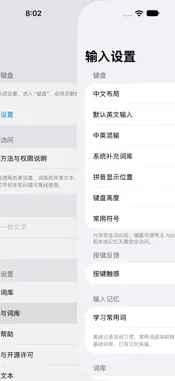
Linghe Input is a Chinese Pinyin and English keyboard for iPhone and iPad. The app interface is Simplified Chinese. • Choose Chinese nine-key or QWERTY and switch to English in place. • Use full Pinyin, initials, English completions and supported typing corrections. Confirm the candidate you want. • Swipe candidates or expand them into a scrollable list within the keyboard. • Manage personal dictionary entries, quick phrases, pinned candidates and local word-frequency learning. • Type numbers and decimals with a dedicated number panel and categorized symbols. • Adjust keyboard height and feedback, hold Delete to erase continuously, and follow the system light/dark appearance. • Optionally configure a trusted HTTPS relay for encrypted device sync. Pair devices with an expiring code or in-app QR scan. Learning/dictionaries and shared text have separate opt-in switches. Basic typing and local correction work offline without Full Access or a developer account. Full Access enables sharing settings and dictionaries with the containing app and inserting received shared text. Local suggestions do not use cloud AI. Inline Pinyin depends on the host app. The store version has no built-in private relay service and does not promise continuous background reception. To enable: Settings → General → Keyboard → Keyboards → Add New Keyboard → Linghe Input. Switch using the globe key. Support and privacy: https://www.linghe.live/apps/linghe-input/
Technical Analysis
Package Overview Basic metadata
Bundle ID
live.linghe.privateinput Current Version 1.0.0
Minimum iOS 16.0
Package Size App Store Size
Package Metadata 0 / 0 version records
Detailed binary, privacy manifest, framework, and Info.plist results have not been indexed for this package yet. The verified App Store and archive metadata above remains available.
Developer Information
Known Version Records
0 version records with stored package metadata
Stored metadata does not guarantee a package is currently available to download.
| Details | Version / IDs | Version date | Action |
|---|