
Preview









Description
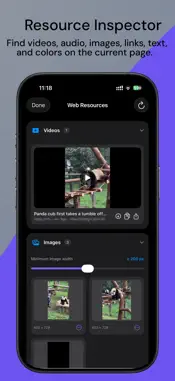
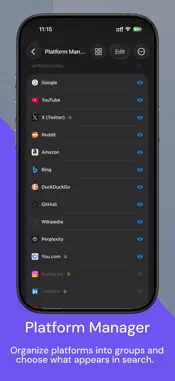
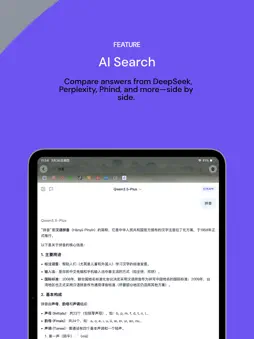
Soulo is a multi-search browser for iPhone and iPad. Enter a query once and switch between search, social, video, shopping, knowledge and AI platforms without typing it again. Choose Soulo as your default browser in Settings to open links from other apps. Recently used tabs and website groups appear first, and the overview opens at the top. Recent-use order is preserved after restarting. BT downloads: import .torrent files or magnet links, choose files, pause and resume. On iOS 26, downloads can continue in the background while the system permits; earlier versions pause and save progress. Play supported BT media while downloading and open MKV files. Import ed2k/thunder links. Downloads need available sources; playback depends on codecs. Choose up to five optional home shortcuts to open Downloads, Files, Bookmarks, History, Wallpaper and other pages. The Library tab bar becomes compact as you scroll. Find information, read articles, play media and manage downloads in one browser. Keep your place with multiple tabs, voice search, search history and platform groups. Switch platforms from the home screen, and continue translating after following a page link. Resource detection finds common video, audio and image files on webpages; save supported files and manage their progress in Downloads. Desktop and mobile site modes, pull to refresh, sharing and links from other apps make everyday browsing easier. • Search your way: Switch among search, social, video, shopping, knowledge and AI platforms. Add or hide platforms, organize groups and reorder them. Search selected text in a new tab, use voice input or return to search history. • Ads and privacy: Filter ads, subscribe to third-party rules and mark unwanted ads yourself. Manage filtering and tracking protection by site. Private browsing does not save history; you can also clear browsing data. • Audio and video: Playback speed, repeat, landscape fullscreen, floating mini-player, Picture in Picture, background playback and AirPlay. Capture video frames, mirror the picture and press and hold for a temporary speed boost. Play supported webpage video and HLS streams. • Downloads and files: Find images, audio, video and documents on webpages, and save files when the site permits. Save images in batches, check download progress and organize files. Browse in a list or cover grid, rename files, import from Photos and transfer over Wi-Fi. • Archives: Extract ZIP, RAR and 7z files. Create ZIP and 7z archives with optional password protection. • Books and reading: Read TXT, PDF, EPUB and supported DRM-free MOBI, AZW and AZW3 books. Adjust reading fonts, text size, line spacing and backgrounds. Reflowable books support simplified/traditional Chinese display conversion; webpage reading mode extracts articles and lets you continue to the next page. • Extensions: Import, edit and run JavaScript userscripts, manage site matching and permissions, and install compatible WebExtensions. • Web tools: Page translation that continues after following links, find in page, full-page screenshots, image text recognition, desktop/mobile modes, custom user agent and site certificate details. • Bookmarks and sharing: Organize bookmarks in folders and import or export HTML bookmarks used by Chrome, Edge and other browsers. Create webpage QR codes with the site's icon, then share, save or copy them. • Make it yours: Choose a light or dark appearance; customize wallpapers, the toolbar and app icon quick actions. Reach common tools through widgets, Shortcuts and URL schemes. Optionally sync settings with iCloud. Media, ebook and extension availability depends on file formats, website restrictions and system version. Protected or restricted media may not be detected, played or downloaded. Support: [email protected]
What's New
Version 1.2.7 2026-11-02
1.2.7 • BT downloads: import .torrent files or magnet links, choose files, pause and resume. On iOS 26, downloads can continue in the background while the syst... Technical Analysis
Package Overview Basic metadata
Bundle ID
com.dkluge.Soulo Current Version 1.2.7
Minimum iOS 17.0
Package Size App Store Size
Package Metadata 1 / 5 version records
Detailed binary, privacy manifest, framework, and Info.plist results have not been indexed for this package yet. The verified App Store and archive metadata above remains available.
Price History (USA store)
3 recorded price change points. These are historical observations, not a guarantee of the current price.
| Recorded at | Price | Currency |
|---|---|---|
| 0.99 | USD | |
| 0.0 | USD | |
| 0.99 | USD |
Developer Information
Known Version Records
1 version record with stored package metadata • 5 known version records
Stored metadata does not guarantee a package is currently available to download.
| Details | Version / IDs | Version date | Action |
|---|---|---|---|
| 24.31 MB | v1.1.4 App Store ID: 887472660Build: 1.1.4 | 2026-08-27 10:05:16 | Paid / Arcade |
| Not archived | App Store ID: 886780380 | Unknown | Paid / Arcade |
| Not archived | App Store ID: 884440060 | Unknown | Paid / Arcade |
| Not archived | App Store ID: 883995675 | Unknown | Paid / Arcade |
| Not archived | App Store ID: 883781246 | Unknown | Paid / Arcade |