Preview






Description
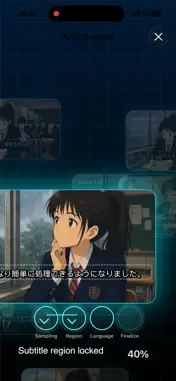
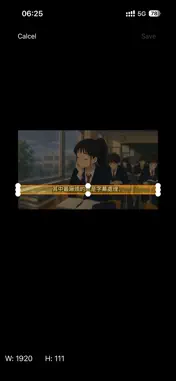
OCR Subtitle is a practical utility designed to extract hard-coded subtitles from videos using Optical Character Recognition (OCR). It automatically converts on-screen text into standard SRT files, saving hours of manual transcription for editors, educators, and content creators. Driven by an optimized layout-parsing architecture and a high-performance multimedia backend, version 3.0 introduces intelligent auto-detection workflows while retaining full manual precision controls for professional creators. (Note: Recognition accuracy is subject to video resolution, font styles, and background contrast.) 【What is New in v3.0: Automation & AI Workflows】 Intelligent Auto-Detection with Manual Controls The smarter layout engine automatically detects the subtitle region (ROI), locks text bounding boxes, and auto-identifies the video's spoken language upon import for a zero-configuration experience. Users can seamlessly switch to manual mode to custom-adjust the scanning area or specify languages for highly complex, non-standard video layouts. Seamless AI Subtitle Translation Workflow The app intelligently packages your extracted SRT text with tailored translation prompts. On iOS, leverage the native Share Sheet to route text directly to preferred AI assistants. On macOS, the app formats text into your system clipboard for a frictionless paste-and-go experience into any web assistant. AI Video Copilot (Instant Video Q&A) Utilize built-in high-frequency AI prompt templates to instantly bundle your transcript and send it to an AI to perform advanced tasks: Fact-Checking: Verify claims or detect clickbait within the video content. Instant Summary: Condense long-duration footage into structured bullet points. Copywriting & Titles: Generate high-CTR titles, video descriptions, and marketing hooks. Thumbnail Inspiration: Brainstorm detailed visual prompts to design compelling video cover art. Integrated Standard Format Video Previewer Natively supports system-compatible standard formats (MP4, MOV, M4V), allowing you to play media with the newly created subtitle track overlaid right inside the app. (Note: Advanced formats like AV1 are fully supported for OCR layout scanning, but localized in-app video playback may be restricted by native system framework limitations.) 【Free Evaluation Tier & Weekly Ultra Subscription】 This application is free to download and offers a baseline evaluation tier: Free Version Limitation: Access core OCR scanning and AI workflows for free, capped at extracting the first 60 seconds of any single video file. Weekly Ultra Subscription: To remove all duration caps and process full-length footage or high-volume batches, users can unlock unrestricted, unlimited access via an in-app subscription to Weekly Ultra. 【Core Performance & Privacy Security】 Strict Sandbox Framework: Operating strictly within the Apple Sandbox, the application processes video files on-the-fly in active memory. It never duplicates, caches, or stores your video files in local containers or remote servers. Temporary Access Lifecycle: Transient, read-only media access is securely requested via system-secured tokens (Security-Scoped URLs) in memory. Once the security token expires, the resource is automatically revoked. Robust Codec Support: Delivers ultra-stable decoding for modern codecs including H.265 (HEVC), AV1, VP9, and more. Advanced memory management prevents crashes, ensuring flawless processing for 4K Ultra-HD footage and long films. Workflow Integration: Exported standard SRT files are fully editable and 100% compatible with YouTube, VLC, Final Cut Pro, Adobe Premiere, and DaVinci Resolve. 【Support & Feedback】 Email: [email protected] Web: www.hanmingjie.com Terms of Use: https://www.apple.com/legal/internet-services/itunes/dev/stdeula/
What's New
Version 3.1 2026-08-06
1. New Whisper Voice Recognition Mode Integrated the Whisper speech-to-text framework. When videos lack on-screen text or have highly cluttered backgrounds, us... Technical Analysis
Package Overview Basic metadata
Bundle ID
com.hanmingjie.OCR-Subtitle-Free Current Version 3.1
Minimum iOS 17.6
Package Size App Store Size
Package Metadata 2 / 6 version records
Detailed binary, privacy manifest, framework, and Info.plist results have not been indexed for this package yet. The verified App Store and archive metadata above remains available.
Known Version Records
2 version records with stored package metadata • 6 known version records
Stored metadata does not guarantee a package is currently available to download.
| Details | Version / IDs | Version date | Action |
|---|---|---|---|
| 26.64 MB | v3.1 App Store ID: 889007335Build: 3.1 | 2026-08-06 22:26:12 | Get Version |
| 26.64 MB | v3.1 App Store ID: 887019352Build: 3.1 | 2026-08-06 22:26:12 | Get Version |
| Not archived | App Store ID: 886657412 | Unknown | Request Version |
| Not archived | App Store ID: 886081996 | Unknown | Request Version |
| Not archived | App Store ID: 885641752 | Unknown | Request Version |
| Not archived | App Store ID: 883571979 | Unknown | Request Version |