
Preview




Description
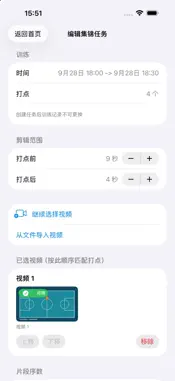
ShotMarker helps basketball players turn training videos into highlight clips. During a shooting workout, use the Apple Watch app to mark the moments you want to keep. After training, the session syncs to iPhone. Select the matching training videos from Photos, review the clips around your marker times, and generate a highlight video to save to Photos. Features: - Mark training moments quickly from Apple Watch - Sync completed training sessions to iPhone - Select videos from Photos and align markers with video timestamps - Preview and adjust each clip's start and end times, and choose which clips to keep - Customize clip number labels, including position, size, and opacity - Save highlight tasks and return to edit videos, settings, and clips - Keep your previous highlight until a new video is generated successfully - Generate highlights with original audio and save them to Photos - Export diagnostic logs for troubleshooting Keep ShotMarker in the foreground while generating a video. If generation stops, you can restart it manually. No account or sign-in is required. Training records and video processing stay on your devices. The iPhone app sends limited usage analytics and error/crash diagnostics as described in the Privacy Policy. The current app interface is in Simplified Chinese.
What's New
Version 1.3.1 2026-10-27
Improved diagnostics for training sync, highlight generation, and saving to Photos. Stability improvements for video editing and highlight tasks. Upgrading fro... Technical Analysis
Package Overview Basic metadata
Bundle ID
com.heji.ShotMarker Current Version 1.3.1
Minimum iOS 26.4
Package Size App Store Size
Package Metadata 0 / 0 version records
Detailed binary, privacy manifest, framework, and Info.plist results have not been indexed for this package yet. The verified App Store and archive metadata above remains available.
Known Version Records
0 version records with stored package metadata
Stored metadata does not guarantee a package is currently available to download.
| Details | Version / IDs | Version date | Action |
|---|