
Preview








Description
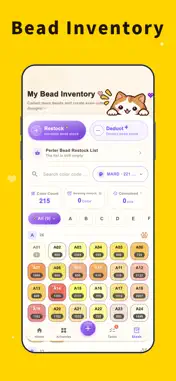
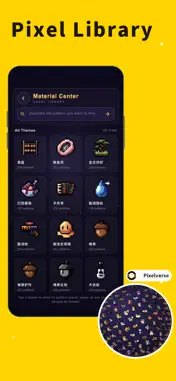
Design it. Bead it. Perler Beads Club is an all-in-one studio for fuse bead makers, pixel artists, and crafters. Start from a photo, an illustration, or a blank canvas; turn it into a bead chart you can actually build; manage your bead inventory and progress; then share your work with the community. ■ PHOTO TO BEAD CHART • Turn portraits, pets, landscapes, anime, logos, and everyday photos into pixel art • Auto-match popular bead palettes such as MARD, COCO, DMC, Youken, and Mixiaowo • Generate charts sized for standard pegboards, including multi-board layouts • Smart color limits reduce isolated beads and messy color noise • Remove backgrounds, add outlines, reduce colors, repaint areas, and clean up noise ■ PROFESSIONAL PIXEL EDITOR • Pencil, eraser, paint bucket, line, rectangle, ellipse, eyedropper, text, gradient, and pattern stamps • Layers, animation frames, selection flip/rotate, symmetry drawing, guides, and reference images • Undo/redo, canvas zoom, grid, and coordinate display • Works from small 16×16 pieces to large 104×104 canvases ■ AI CREATIVE TOOLS (some features require membership) • Text to pixel: describe an idea and generate pixel art or a bead chart • AI edit: change the background, colors, or elements with one prompt • Local repaint: redraw only the selected area and keep the surrounding pixels • Prompt suggestions and style presets: game character, scene, icon, sticker, retro arcade ■ IMPORT EXISTING CHARTS • Photograph or import a printed bead chart; the app detects the grid, color codes, and colors • Fix low-confidence cells directly in the editor • Automatically map the chart to your current bead palette • Stop copying charts cell by cell—old patterns become editable again ■ BEAD INVENTORY & TASKS • Track stock by brand color code, with stock-in, stock-out, refills, and corrections • Low-stock alerts and pending-arrival records • Create a bead task from any finished project and check off progress by color • See completed beads, remaining beads, time spent, and inventory used • Group tasks, plan dates, and batch-manage multiple projects ■ BEAD BOARD VIEWER • View charts board by board with coordinate guides • Full-color and grayscale modes make the current color and finished areas easy to see • Built for large, multi-color projects with fewer mistakes ■ EXPORT & SHARE • Export print-ready charts with grids, coordinates, color codes, legends, and supply lists • Export PNG, PXA project files, GIF animations, and palette sheets ■ COMMUNITY • Browse the latest and hottest bead projects by category, tag, or search • Inspiration feed: follow creators, like, comment, and save • Collections, project details, and one-tap import to the editor • Color-by-number challenges and leaderboards • Profiles with project walls, favorites, follows, and followers • Publish projects and inspiration posts; public/private, comments, replies, reports ■ PROJECTS & DATA • Draft, finalized, and published statuses; categories, tags, search, and bulk actions • Version history so you can roll back a bad edit • Local and cloud backup; restore on a new device after signing in ■ MADE FOR • Fuse bead, ironing bead, and melty bead hobbyists • Pixel art, 8-bit, and retro game art creators • Anyone who wants a custom bead pattern from a photo, pet, or portrait • Bead shop owners and heavy users who need serious inventory control ■ MEMBERSHIP Core drawing, inventory, bead tasks, and community features are free. Some AI tools, advanced guides, community chart downloads, and custom chart exports require a membership. Membership includes monthly and yearly auto-renewable subscriptions. Prices are shown in the App Store. Subscriptions renew automatically and can be canceled anytime in Settings; benefits remain active until the end of the current period. Privacy Policy: https://windpix.com/privacy.html Terms of Use: https://windpix.com/terms.html Contact: [email protected] Website: https://windpix.com
What's New
Version 1.1.13 2026-11-17
This update introduces Homework Showcase, a bead requirements calculator, author promo kits and redesigned share posters. Homework Showcase · A new showcase on...This update introduces Homework Showcase, a bead requirements calculator, author promo kits and redesigned share posters. Homework Showcase · A new showcase on artwork details where makers upload real photos and notes about their finished work · Multiple photos, likes and comments; authors can feature up to 3 submissions per artwork · AI checks that photos show a real finished bead piece matching the artwork before publishing · New "original vs finished" comparison poster, ready to save and share · Edit or delete your own submission; your submitted status is shown on the artwork Bead Requirements · New calculator in Tasks: select multiple tasks to total the beads you need · Totals by color code, with completed amounts, stock and shortages at a glance · Filter by group, select all, copy in multiple formats, export CSV or share the list · Separates multiple bead brands and flags colors not yet stocked or non-palette colors Promo Kit · Authors can generate a 3:4 background poster, front and mirrored blueprints, and AI copy in one go · Save all 3 images at once, with configurable watermark; free for members, credits for others Share Posters · Artwork share posters now use a cream sticker style with an adaptive frame and refined stickers · Poster copy plus homework, interaction and requirements screens now support 15 languages · Fixed share links and improved poster layout and sharpness Editor · New Assist Mode: the canvas becomes read-only to prevent accidental edits while checking a chart · Mutually exclusive with drawing tools and exits automatically when you pick a tool · Assist panel is a member feature; non-members see the entry and are guided to subscribe · Unified export poster composition and fixed oversized watermarks on small charts Tasks & Inventory · Task stats, stock history and restock threshold settings · Artwork details show inventory gaps and a list of beads to restock · Fixed an issue when closing the restock threshold dialog Community & Languages · New notifications entry in the sidebar with an unread badge · Redesigned My Works tabs and view icons in a minimal pixel style, with cloud list and poster export improvements · Fixed artwork timestamps on the home feed to use the local time zone Technical Analysis
Package Overview Basic metadata
Bundle ID
com.windpix.app Current Version 1.1.13
Minimum iOS 16.0
Package Size App Store Size
Package Metadata 0 / 4 version records
Detailed binary, privacy manifest, framework, and Info.plist results have not been indexed for this package yet. The verified App Store and archive metadata above remains available.
Developer Information
Known Version Records
0 version records with stored package metadata • 4 known version records
Stored metadata does not guarantee a package is currently available to download.
| Details | Version / IDs | Version date | Action |
|---|---|---|---|
| Not archived | App Store ID: 886520508 | Unknown | Request Version |
| Not archived | App Store ID: 886429563 | Unknown | Request Version |
| Not archived | App Store ID: 886385258 | Unknown | Request Version |
| Not archived | App Store ID: 886063515 | Unknown | Request Version |