
Preview




Description
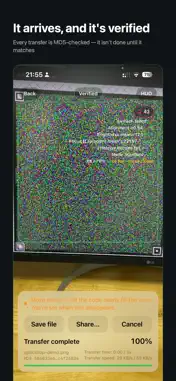
App Name OpticDrop Subtitle (30 chars) Receive files without network Keywords (100 chars) offline,file transfer,air gap,no wifi,cross platform,privacy,no account,camera,receive,qr Promotional Text (170 chars) Transfer files with light. Your computer shows an animated color code, your camera reads it. No network, no pairing, no trace — for when AirDrop can't help. Description (4000 chars) OpticDrop transfers files using light. Your computer displays an animated color barcode. You point your iPhone's camera at it. The file arrives. No network, no Bluetooth, no account, no cable. ■ For when AirDrop can't help AirDrop only works between Apple devices, and only with radios turned on. OpticDrop covers what it structurally cannot: · Cross-platform — send from Windows, Linux or Mac to iPhone with no drivers and no sign-in · No network — works when you're offline, on a network you don't trust, or with no Wi-Fi at all · Radio-restricted areas — server rooms, secure facilities, medical and industrial sites where Wi-Fi and Bluetooth are not allowed · No trace — no IP records, no pairing history, no cloud logs ■ How it works The sender (a browser page or desktop app on your computer) encodes your file into a dense animated color code. Your camera films it and decodes in real time. Fountain coding means dropped frames, hand shake and brief focus loss are recovered automatically from later frames — you never have to start over. The channel is the air between two screens. Data can only travel from screen to camera: it is physically one-way, so nothing can be injected back. ■ Privacy by default, not as an option · Fully offline — the app makes no network requests at all · No sign-up, no login, no account system of any kind · Collects and uploads nothing (our privacy label reads "Data Not Collected") · Received files are written with full file protection — unreadable while the device is locked · File names are hidden in the list by default, so a glance at your screen reveals nothing ■ Who it's for · Anyone moving files between an iPhone and a Windows or Linux machine · Engineers and operators working on isolated or offline networks · Journalists and lawyers who need to move material without leaving a trail · Cold wallet users passing offline signing data · Anyone who doesn't want to sign into a cloud service just to move one file ■ OpticDrop Pro The free version receives files of any size, without limits on how many: · Small files (under 1 MB) always arrive at full speed · Large files include 5 free high-speed transfers · After that, large files still arrive — just at standard speed. You are never blocked Upgrade to Pro for: · Unlimited high-speed receiving for large files · Supporting an independent developer who keeps making it faster Available as monthly, yearly, or a one-time lifetime purchase. All three unlock exactly the same features — pick whichever way you prefer to pay. ■ What you need This app is the receiver. On your computer, open the OpticDrop sender (web or desktop). The app's home screen shows the three steps. —— Subscriptions renew automatically unless cancelled at least 24 hours before the end of the current period. Manage or cancel anytime in your App Store account settings. Terms of Use (EULA): https://www.apple.com/legal/internet-services/itunes/dev/stdeula/ Privacy Policy: https://opticdrop.app/privacy
Technical Analysis
Package Overview Basic metadata
Bundle ID
app.opticdrop Current Version 1.0.6
Minimum iOS 16.0
Package Size App Store Size
Package Metadata 0 / 0 version records
Detailed binary, privacy manifest, framework, and Info.plist results have not been indexed for this package yet. The verified App Store and archive metadata above remains available.
Developer Information
Known Version Records
0 version records with stored package metadata
Stored metadata does not guarantee a package is currently available to download.
| Details | Version / IDs | Version date | Action |
|---|