Preview






Description
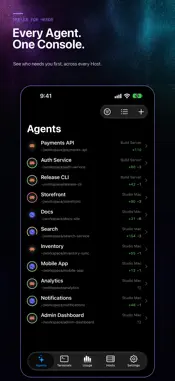
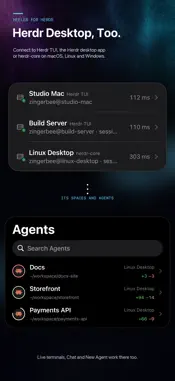
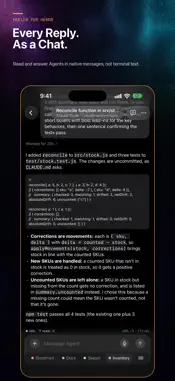
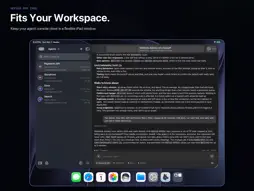
Heeler is a native iPhone and iPad companion for herdr, an agent-first terminal runtime, and for tmux. Follow your coding agents in Herdr TUI, the Herdr desktop app, herdr-core or tmux, on your own machines over SSH. See every Agent on every Host in one console, sorted by who needs you first. Open an Agent to steer its live terminal, or read its conversation as Chat and reply from the Composer. FEATURES • One Agent Console across all your Hosts, updated live • Herdr desktop app and herdr-core on macOS, Linux and Windows, following the desktop app's spaces and tabs • tmux 3.3 or later on macOS and Linux, with sessions, windows and panes as Workspaces, Tabs and Panes • Live terminal rendered by libghostty, with native scrollback and touch scrolling • Chat for Claude Code, Codex, Antigravity CLI, Pi, Oh My Pi, Grok Build and OpenCode, with buttons for Blocked prompts • Composer with the full iOS keyboard, Agent control keys and Agent Skills • Voice Input on the device from iOS 26, or with your own OpenAI, DeepInfra, SiliconFlow or compatible speech service • Changes: every uncommitted file in the Agent's checkout • Shell Terminals for every Workspace, with iOS Password AutoFill for password prompts • Photos and files staged onto the Host, with their paths in your draft • New Agent with Worktrees, Accounts and Launch Presets • Usage: Claude Code, Codex and Antigravity CLI Usage Limits and up to 30 days of Token Usage, with widgets • End-to-end encrypted notifications when an Agent is Blocked or Done, and a Live Activity that tracks your Agents • QR pairing with an on-device Ed25519 key • SSH Jump Hosts, several routes per Host, and Tailscale, ZeroTier or EasyTier built in • Separate light and dark terminal themes PRIVACY Heeler has no accounts, analytics or tracking. SSH keys stay in the iOS Keychain. Terminal output, prompts and conversations travel directly between your device and your own Host over SSH. Notification content is encrypted on your Host before it passes through the push relay. Voice Input sends recordings only to the speech service you choose, with your own API key, or keeps them on the device with the On Device service. REQUIREMENTS A Mac or Linux machine running herdr 0.7.5 or later, a Windows machine running herdr 0.9.3 or later, a machine running the Herdr desktop app or herdr-core, or a Mac or Linux machine running tmux 3.3 or later, reachable over SSH. On a Mac or Linux machine running herdr, the included plugin shows a Pairing Code to scan and delivers Agent Notifications. On herdr-core and tmux, the optional Host Helper adds notifications, the Live Activity and Usage on macOS and Linux. Heeler is an independent project and is not affiliated with the herdr project.
What's New
Version 0.1.20 2026-11-17
What's new in 0.1.20: - tmux support: connect to tmux 3.3 or later on macOS and Linux. Sessions, windows and panes show as Workspaces, Tabs and Panes, with live...What's new in 0.1.20: - tmux support: connect to tmux 3.3 or later on macOS and Linux. Sessions, windows and panes show as Workspaces, Tabs and Panes, with live terminals, Chat, Agent Status, Changes and Skills. - A Host is now the machine. Add a computer once, then switch on each Server it runs (Herdr TUI, herdr-core or tmux) in Host detail. Hosts you added before are merged for you. - Antigravity CLI joins Chat, with Background Work, conversation titles, Rename, model and effort switching, and Usage. - Voice Input has an On Device service from iOS 26. It needs no API key and shows the text while you speak. - Fill Password: when a Shell Terminal asks for a password, fill it with iOS Password AutoFill. - Switch Codex's model and reasoning effort from Chat's title menu, as you can for Claude Code. - Step through your prompts in Chat with the ↑ and ↓ buttons. Touch and hold one to jump to the top or bottom. - Update All updates the Heeler plugin and Host Helper on every Host from the Hosts tab. - The whole app follows your terminal theme, light or dark. Live Activities name their Host, and the Host that needs you comes first. - Smoother scrolling in the Agents list and Chat, faster Chat opening, and many other fixes. 0.1.20 新变化: - 支持 tmux:可连接 macOS 和 Linux 上的 tmux 3.3 及以上版本。会话、窗口和窗格显示为工作区、标签页和窗格,支持实时终端、对话、Agent 状态、更改和技能。 - 主机现在代表一台机器。一台电脑只需添加一次,再在主机详情中开启它运行的各个服务器(Herdr TUI、herdr-core 或 tmux)。之前添加的主机会自动合并。 - 对话支持 Antigravity CLI,包括后台工作、对话标题、重命名、切换模型和推理强度,以及用量。 - 语音输入新增「本机识别」(需 iOS 26),无需 API key,说话时实时显示文字。 - 填入密码:Shell 终端要求输入密码时,可用 iOS 密码自动填充填入。 - 可在对话页的标题菜单中切换 Codex 的模型和推理强度,与 Claude Code 一致。 - 在对话中用 ↑ 和 ↓ 按钮逐条跳转到你发过的消息,长按可直达顶部或底部。 - 「全部更新」可在主机页一次更新所有主机上的 Heeler 插件和 Host Helper。 - 整个 App 跟随终端主题的明暗外观。实时活动显示主机名称,需要你处理的主机排在最前。 - Agent 列表和对话滚动更流畅,对话打开更快,另有多项修复。 Technical Analysis
Package Overview Basic metadata
Bundle ID
dev.bybee.heeler Current Version 0.1.20
Minimum iOS 18.0
Package Size App Store Size
Package Metadata 0 / 0 version records
Detailed binary, privacy manifest, framework, and Info.plist results have not been indexed for this package yet. The verified App Store and archive metadata above remains available.
Developer Information
Known Version Records
0 version records with stored package metadata
Stored metadata does not guarantee a package is currently available to download.
| Details | Version / IDs | Version date | Action |
|---|