
Preview




Description
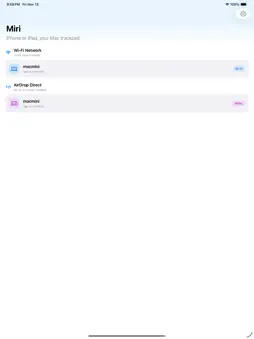
Miri turns your iPhone or iPad into a wireless trackpad for your Mac. No extra hardware — your phone becomes the precise trackpad you always carry with you. Three ways to connect, ready for any situation: • Wi-Fi — lowest latency across your whole home on the same network • AirDrop Direct — connects with just Wi-Fi turned on, no router needed • Bluetooth BLE — Bluetooth only, low power, all-day battery Native gestures, as intuitive as a real Mac trackpad: • One-finger slide — move the cursor with pixel precision • One-finger tap — left click (tap twice for double-click) • Touch and hold, then drag — drag windows and files • Two-finger tap — right-click menu • Two-finger scroll — mouse wheel with natural scrolling Two ways to type remotely, no compromise: • Function keyboard — F1–F12, arrow keys, Cmd/Opt/Ctrl modifiers • Text input — type on the native iOS keyboard, text syncs to your Mac in real time Tunable to your taste: • Cursor tracking speed and scroll speed • Natural / traditional scrolling direction • Drag delay, move and scroll dead zones to prevent mis-taps • Right-click via two-finger tap Design: • Full-screen immersive trackpad on iPhone, status bar auto-hides • Adaptive window and menu-bar icon on Mac • Built-in gesture tutorial — ready out of the box Free Mac companion: download Miri for Mac from GitHub Releases and grant Accessibility access to get started. Miri collects no personal data. No ads, no subscriptions. Pay once, use forever.
What's New
Version 3.2.3 2026-11-19
• Advanced features are now available as a one-time in-app purchase (Unlock Miri): keyboard, text input, shortcuts, virtual mouse, hot corners, and edge gesture...• Advanced features are now available as a one-time in-app purchase (Unlock Miri): keyboard, text input, shortcuts, virtual mouse, hot corners, and edge gestures. • Cursor move, tap, and two-finger scroll remain free. • Existing paid-download users of 3.0/3.1 stay unlocked automatically. • Minor stability improvements. • Update App Store screenshots • New keyboard layout options: choose Compact (Magic Keyboard) or Full Size with a numeric keypad — both match Apple's physical keyboard key for key. • Faster reconnection: Miri now reconnects automatically when you unlock your iPhone or iPad, no need to tap Connect again. • Fixed an issue where the app could stay stuck on "Reconnecting…" after the screen was locked. • Minor stability improvements. Technical Analysis
Package Overview Basic metadata
Bundle ID
JCZX.pad Current Version 3.2.3
Minimum iOS 17.0
Package Size App Store Size
Package Metadata 0 / 2 version records
Detailed binary, privacy manifest, framework, and Info.plist results have not been indexed for this package yet. The verified App Store and archive metadata above remains available.
Developer Information
Known Version Records
0 version records with stored package metadata • 2 known version records
Stored metadata does not guarantee a package is currently available to download.
| Details | Version / IDs | Version date | Action |
|---|---|---|---|
| Not archived | App Store ID: 889164983 | Unknown | Request Version |
| Not archived | App Store ID: 887930422 | Unknown | Request Version |