Preview




Description
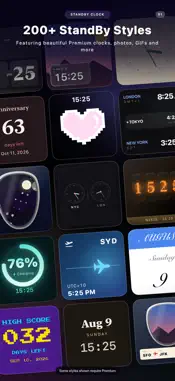
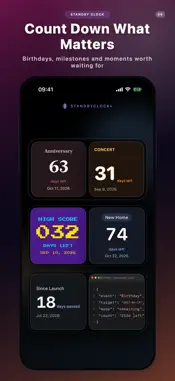
StandBy Clock — Make Your iPhone StandBy Screen Your Own Turn your charging iPhone into a bedside display that feels personal. Explore 240+ widget styles, including 125+ Premium designs, with flip clocks, GIF animations, photos, countdowns, calendars, battery displays and multi-time-zone layouts. Start with free designs, then unlock everything with weekly, annual or lifetime options. CLOCK WIDGETS • Analog Clock — Classic and modern faces with distinctive hands, markers and layouts. • Digital Clock — Bold, easy-to-read time displays made for desks and nightstands. • Calendar — See the date and day at a glance in a range of visual styles. • Single Time Zone — Focus on one city with rich, expressive layouts. • Dual Time Zone — Keep two cities visible for travel, remote work or someone far away. • Triple Time Zone — Follow three cities at once with flip boards, dashboards, neon styles and more. MORE THAN A CLOCK • Countdown — Count down to birthdays, anniversaries, trips and important moments. • Info Card — Put your own message or useful information on the StandBy screen. • Battery — Check the current charge level at a glance. • Photo Widget — Turn a favorite image into part of your bedside display. • GIF Widget — Add motion and personality with animated GIF designs. MAKE IT YOURS Customize colors, fonts, time formats, cities, labels, messages and photos. Save multiple named widgets for different moods and situations, then choose the design you want from the iOS widget picker. BUILT FOR iOS STANDBY StandBy Clock is designed for the landscape charging experience introduced in iOS 17. Place your iPhone on its side while charging to enter StandBy. Always-On Display is supported on compatible Pro iPhone models. HOW TO GET STARTED 1. Choose a free or Premium design. 2. Customize it and save it with a name. 3. Add StandBy Clock from the widget picker. 4. Select your saved design and enjoy your new StandBy screen. FREE AND PREMIUM A selection of designs is free to use. Premium unlocks 125+ additional designs and the complete customization library. Choose the option that suits you: weekly, annual or lifetime access. Available products and local prices are shown in the app before purchase. Download StandBy Clock and make every charging moment look like yours. Terms of Use (EULA): https://www.apple.com/legal/internet-services/itunes/dev/stdeula/
What's New
Version 2.0.1 2026-08-12
Create your first StandBy Widget more easily with our new guided setup. This update also improves Premium price loading, purchase feedback, Widget setup guidanc... Technical Analysis
Package Overview Basic metadata
Bundle ID
com.yvente.StandByClock Current Version 2.0.1
Minimum iOS 17.0
Package Size App Store Size
Package Metadata 0 / 11 version records
Detailed binary, privacy manifest, framework, and Info.plist results have not been indexed for this package yet. The verified App Store and archive metadata above remains available.
Known Version Records
0 version records with stored package metadata • 11 known version records
Stored metadata does not guarantee a package is currently available to download.
| Details | Version / IDs | Version date | Action |
|---|---|---|---|
| Not archived | App Store ID: 884703038 | Unknown | Request Version |
| Not archived | App Store ID: 862806967 | Unknown | Request Version |
| Not archived | App Store ID: 860220281 | Unknown | Request Version |
| Not archived | App Store ID: 860071383 | Unknown | Request Version |
| Not archived | App Store ID: 860042990 | Unknown | Request Version |
| Not archived | App Store ID: 859860588 | Unknown | Request Version |
| Not archived | App Store ID: 859783622 | Unknown | Request Version |
| Not archived | App Store ID: 859737489 | Unknown | Request Version |
| Not archived | App Store ID: 859593468 | Unknown | Request Version |
| Not archived | App Store ID: 859531931 | Unknown | Request Version |
| Not archived | App Store ID: 857762967 | Unknown | Request Version |