
Preview






Description
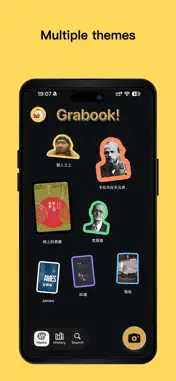
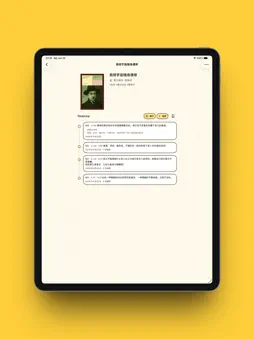
Grabook! is a collection book for people who read physical books. Photograph the book in your hands and it becomes a cover sticker you can keep — and every line you read, thought you write down, and page you stop on stays with that book. [ Shoot a book, get a cover sticker ] Place the whole book inside the dashed frame and Grabook cuts it out along the cover edge into an outlined sticker. Book mode frames a rectangular cover; Free mode lifts objects of any shape. Photos from your library work too. Ten sticker edge colors, pick whichever looks right. Confirm the sticker, add a title, author and reading status (Want to Read, Reading, Finished, Paused), and the book is in. [ Tap the words on the page ] Photograph a page and select the sentence you want to keep right on the image, or let OCR read the whole page and edit the result, or just type it in. Excerpts carry their page number automatically — no re-typing. [ Reflections and Cards ] Jot down what came to mind mid-chapter; turn ideas worth remembering into a flashcard — question on the front, answer on the back, one flip away. A reflection can link to an excerpt, or remember where you were reading. [ Timeline: your reading history ] Books, excerpts, reflections and cards lined up in time order — scroll down and it reads like the road you travelled. Filter with #want-to-read, #reading, #finished, #excerpt, #reflection to see just that stretch. [ Sticker canvas and timeline canvas ] One canvas keeps your cover stickers stuck up, the other sorts everything by date; the home look switches with your mood. The camera button in the corner is always ready for the next book. [ Search, tags and bookmarks ] Search by title or author, tag books and filter by tag. Save a bookmark to know exactly how far you got — the page you stopped on shows right above the bookmark. [ Home screen widget ] Keep the book you are reading on your home screen, so every glance reminds you to open it. [ Export to Markdown ] Export a book with its excerpts, reflections and cards into one Markdown file with front matter, ready for Obsidian, Bear or any notes app. [ iCloud Sync ] Turn it on and the books, excerpts, reflections and reading progress merge across your devices; turn it off and Grabook uses only what is already on this device. [ Paper, themes and languages ] Four visual themes — Cream & Indigo, Sunshine Yellow, Ink Brown, Night Reading — with light and dark following the system; canvas paper in blank, dots or grid. Available in English, 简体中文, 日本語, Français, Español and 한국어. About Grabook Pro The free plan saves up to 3 books. Grabook Pro removes the limit and unlocks Markdown export. · Annual subscription: renews automatically through the App Store, cancel anytime in system settings · Lifetime unlock: one purchase, permanent access The subscription renews automatically unless auto-renewal is turned off 24 hours before the end of the current period; payment is charged to your Apple ID at confirmation of purchase. Manage or cancel in system settings. Your data stays with you No account required. With iCloud Sync off, your books, excerpts, reflections and reading progress live only on this device. Privacy Policy: https://www.pollito-function.com/grabook/legal/privacy-policy-zh.html Terms of Use: https://www.apple.com/legal/internet-services/itunes/dev/stdeula/
What's New
Version 1.2 2026-10-25
Refreshed colors and refined book-detail interactions make the app look cleaner and feel easier to use. Technical Analysis
Package Overview Basic metadata
Bundle ID
com.paomiange.booka Current Version 1.2
Minimum iOS 17.0
Package Size App Store Size
Package Metadata 0 / 0 version records
Detailed binary, privacy manifest, framework, and Info.plist results have not been indexed for this package yet. The verified App Store and archive metadata above remains available.
Known Version Records
0 version records with stored package metadata
Stored metadata does not guarantee a package is currently available to download.
| Details | Version / IDs | Version date | Action |
|---|