
Preview




Description
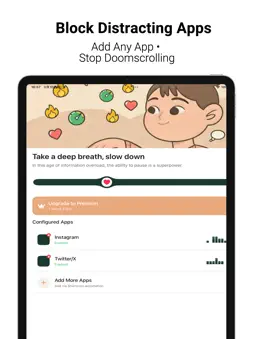
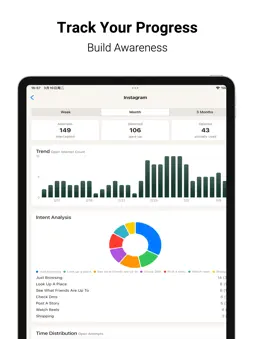
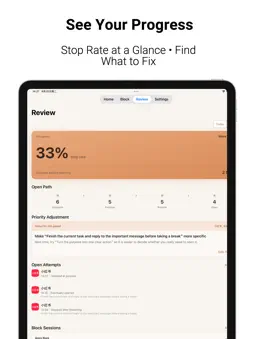
Trying to spend less time on your phone, but keep reaching for it anyway? A spare moment. A tiring day. Something you would rather put off. You open a familiar app for a quick look, and the time you meant to spend studying, working, or resting slips away. Focus Pause helps you change what happens in those small moments. Take a breath before opening an app and decide what you came to do. Block distractions when you need to focus. Then look back at when you stopped and when you kept going. You do not have to change every habit at once. Start with one pause, one focus session, and find a way of using your phone that works for you. PAUSE BEFORE YOU OPEN • Use iOS Shortcuts to add a pause before opening distracting apps. • Follow a breathing animation, then ask yourself: what am I opening this app for? • Choose your purpose and decide whether to continue or put your phone down. • Set a usage duration when you continue. Protection kicks in when time is up, giving you another chance to stop and choose. MAKE SPACE TO FOCUS • Quick Timer immediately blocks selected apps and categories for study, work, reading, or rest. • Choose 15, 30, or 60 minutes, or set a custom duration from 15 minutes to 24 hours. • An immersive full-screen timer keeps the remaining time in view. Minimize it and your session keeps going. • Follow your countdown with Live Activities on the Lock Screen and Dynamic Island on supported iPhones. BUILD FOCUS INTO YOUR DAY • Schedule app blocking for work, study, sleep, or any time you want fewer distractions. • Set multiple time periods, all-day blocks, or overnight periods. • Pause, resume, or adjust your schedules as needed. • Quick Timer and schedules can run together. Ending one leaves the others in place. UNDERSTAND YOUR HABITS • See whether you stopped or continued after each opening pause. • Review recent records, opening paths, and your stop rate to spot apps and purposes that tend to distract you. • Look back at Quick Timer and scheduled blocks, including completed, ended-early, and interrupted sessions. • Use your own choices to shape what you do next time. YOUR CHOICES. YOUR RECORDS. Focus Pause uses Apple’s Screen Time controls to select and block apps. Focus and review records stay on your device. You can end an active block early after confirmation when you need to. • Focus and review records stay on your device. RevenueCat receives an anonymous member ID and purchase history for access and subscription analytics. START FREE. UPGRADE WHEN YOU NEED MORE. The free version includes the opening pause for up to 2 apps, up to 5 purposes per app, Quick Timer, and your first 2 schedules with one active day each. Premium unlocks unlimited protected apps, schedules, and custom purposes, multiple active days, more breathing settings, and deeper review insights. Choose monthly, yearly, or Lifetime Premium. Less opening out of habit. More choosing for yourself. Make time for what you want to do, and for the life around you. SUBSCRIPTIONS Monthly and yearly subscriptions renew automatically unless canceled at least 24 hours before the current period ends. Manage or cancel them in your Apple Account subscription settings. Lifetime Premium is a one-time purchase and does not automatically cancel an existing subscription. Terms of Use: https://focuspause-privacy.pages.dev/terms Privacy Policy: https://focuspause-privacy.pages.dev/
What's New
Version 1.6 2026-10-26
New schedule templates make it easy to create a focus plan that works for you. Technical Analysis
Package Overview Basic metadata
Bundle ID
com.darren.focuspause Current Version 1.6
Minimum iOS 18.0
Package Size App Store Size
Package Metadata 0 / 7 version records
Detailed binary, privacy manifest, framework, and Info.plist results have not been indexed for this package yet. The verified App Store and archive metadata above remains available.
Developer Information
Known Version Records
0 version records with stored package metadata • 7 known version records
Stored metadata does not guarantee a package is currently available to download.
| Details | Version / IDs | Version date | Action |
|---|---|---|---|
| Not archived | App Store ID: 888560853 | Unknown | Request Version |
| Not archived | App Store ID: 888379855 | Unknown | Request Version |
| Not archived | App Store ID: 887633983 | Unknown | Request Version |
| Not archived | App Store ID: 887330879 | Unknown | Request Version |
| Not archived | App Store ID: 884098505 | Unknown | Request Version |
| Not archived | App Store ID: 883179429 | Unknown | Request Version |
| Not archived | App Store ID: 881347212 | Unknown | Request Version |