
Preview



Description
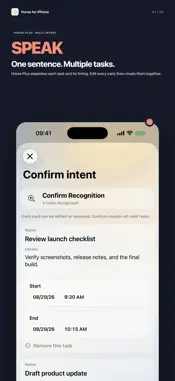
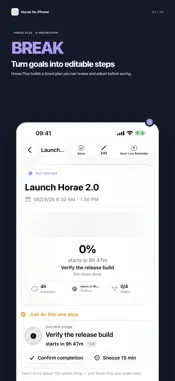
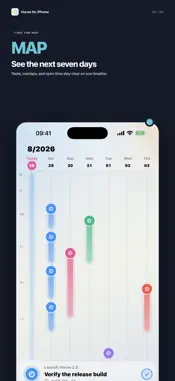
Too many things to do and not sure what comes first? Horae turns scattered tasks into clear plans with time boundaries, reminders, and actionable steps—so the next move is always easier to see. KEY FEATURES • Quick Capture Create tasks with text or voice. Recognized content appears as editable cards and is saved only after you confirm it. • Plan Breakdown Set start and end times, reminders, and actionable steps. Horae Plus can use AI to organize goals, constraints, and context into an editable plan. • Do This Next Horae considers time, priority, progress, and task status to highlight what deserves your attention now. • Multiple Reminders Add several reminders to one task. From a notification, complete the task or snooze it for 10 minutes, 1 hour, or until 9:00 AM tomorrow. • Event Inbox Capture ideas before they have a clear time, then schedule them when you are ready. • Flexible Ordering Switch between Smart, Time, and Manual ordering. Pin important tasks or drag to rearrange them. • Recurring Tasks Repeat tasks daily, on weekdays, weekly, or monthly. • Calendar and Apple Apps See tasks and free time in a seven-day view. You can also export tasks one way to Apple Calendar or Reminders. • Designed for iPhone and iPad Each platform has a layout tailored to its screen while keeping the core workflow consistent. HORAE PLUS Monthly, yearly, and lifetime plans unlock AI-enhanced planning, AI intent parsing, iCloud sync, and exclusive app icons. Restore purchases on supported platforms using the same Apple Account. Lifetime users can also configure a compatible AI provider. AI AND PRIVACY AI is optional. Before the first use, Horae clearly explains what data is sent, who receives it, and why. Only task text or transcripts created by Apple Speech Recognition are used for intent analysis; audio recordings are not sent to the Horae AI Gateway. AI results remain editable and are not saved as tasks until you confirm them. You may revoke consent at any time and continue using local planning. Privacy Policy: https://api-horae.gaimu.cn/privacy Terms of Use: https://api-horae.gaimu.cn/terms Support: https://api-horae.gaimu.cn/support Apple Standard EULA: https://www.apple.com/legal/internet-services/itunes/dev/stdeula/
What's New
Version 2.1.0 2026-11-24
• Turn chat screenshots and flight or train tickets into timed tasks. Image recognition can pick out multiple items and skip ones you’ve already saved. On iPhon...• Turn chat screenshots and flight or train tickets into timed tasks. Image recognition can pick out multiple items and skip ones you’ve already saved. On iPhone, a screenshot shortcut can create reminders directly. • Set reminders to repeat every few minutes or hours, or on a specific day of the month. Choose active hours for interval reminders to keep nights quiet, and pause or resume them as needed. • Voice input shows a live waveform and lets you review or retry the transcript before continuing. When you create a reminder with Siri, Horae asks for the task or time if it’s missing. • On wide iPad windows, navigation moves to the right and Plan shows your list and task details side by side. iPhone Duo has refined layouts for both displays and a landscape Task Sprint in tent mode. • Add the Two-Day Timeline widget to see today and tomorrow side by side. A tall layout is available in supported StandBy layouts on iPhone Duo. • Refined Calendar event cards, task details, and the in-app guide. The redesigned Horae Plus page makes benefits and plans easier to browse. Technical Analysis
Package Overview Basic metadata
Bundle ID
com.gaimu.horae Current Version 2.1.0
Minimum iOS 18.0
Package Size App Store Size
Package Metadata 0 / 0 version records
Detailed binary, privacy manifest, framework, and Info.plist results have not been indexed for this package yet. The verified App Store and archive metadata above remains available.
Known Version Records
0 version records with stored package metadata
Stored metadata does not guarantee a package is currently available to download.
| Details | Version / IDs | Version date | Action |
|---|