
Preview


Description
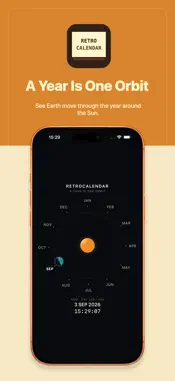
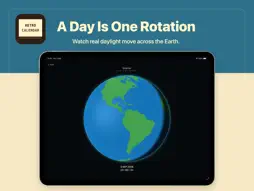
See time as motion. RetroCalendar is a visual calendar built around two simple ideas: A YEAR IS ONE ORBIT A DAY IS ONE ROTATION YEAR See the whole year as one orbit around the Sun. The twelve months form a circular calendar around the Sun, while the Earth moves through the year according to its astronomical orbital phase. The month markers follow the Earth’s orbital position at the beginning of each month, while the Earth shows its position at the current moment. The illuminated side of the Earth faces the Sun, making the relationship between the calendar year and the Earth’s orbit visible at a glance. The current month, day of year, date, and time update continuously. EARTH Tap the Earth to see the current day through the changing sunlight across the planet. RetroCalendar keeps the standard meridian associated with your current time zone facing you while the real day-and-night boundary moves across the Earth. The Earth view is calculated from the current date, time, and time zone. Daylight saving time does not shift the geographic center of the globe. No GPS or location permission is required. LOCAL CALCULATION RetroCalendar performs its calendar, orbital, Earth-orientation, and sunlight calculations on your device. The Earth land data is stored inside the app. No account is required. No advertising. No analytics or tracking. No subscription. No in-app purchases. No account-based cloud service. RetroCalendar is designed for iPhone, iPad, and Mac.
Technical Analysis
Package Overview Basic metadata
Bundle ID
com.xiehe.RetroCalendar Current Version 1.0.0
Minimum iOS 17.0
Package Size App Store Size
Package Metadata 0 / 0 version records
Detailed binary, privacy manifest, framework, and Info.plist results have not been indexed for this package yet. The verified App Store and archive metadata above remains available.
Developer Information
Known Version Records
0 version records with stored package metadata
Stored metadata does not guarantee a package is currently available to download.
| Details | Version / IDs | Version date | Action |
|---|