
Preview








Description
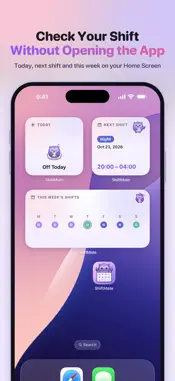
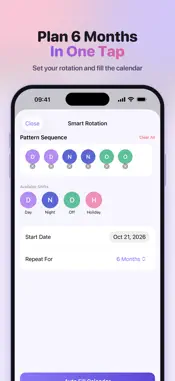
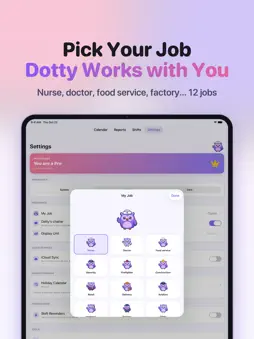
Master Your Shift Life with ShiftMate Stop using paper calendars and messy spreadsheets. ShiftMate is the shift calendar built for nurses, police, firefighters, factory and retail workers, and anyone working irregular hours. It combines an easy-to-use calendar with a precise wage and paycheck calculator, so you always know when you work and what you've earned. Use it as your work hours tracker, timesheet and time card — no time clock needed. KEY FEATURES 1. Paint Your Schedule Forget typing. Pick a shift type (Day, Night, Off…) and tap dates on the calendar — as easy as painting. Swipe left or right to switch months. 2. Two Jobs in One Day — NEW Working a morning job and an overnight job? Long-press a day to add a second shift. Each shift's hours, pay and overtime are calculated separately, and your monthly totals include both. 3. Precise Wage Calculator - Real-time earnings: see exactly how much you've earned this month - Smart overtime: calculated automatically (e.g. 1.5x) beyond your standard hours - Weekend & holiday premiums: set your own percentage per shift type - Unpaid breaks: for accurate net pay - Tips & extra income: log tips and they're added to that day's total 4. Smart Auto-Rotation Work a repeating pattern like "4 on, 2 off"? Set it once and ShiftMate fills in your calendar for the year ahead. 5. Day Details Long-press any scheduled day to see its shifts, hours, pay and tips — add or remove shifts in one place. 6. Monthly Snapshots & History Create a clean monthly summary card with one tap. Save it to Photos or share it with family. 7. Payslip Export (PDF & CSV) Export a formatted PDF payslip or a CSV time sheet for payroll, reimbursements, or keeping a work log of every hour. 8. Home Screen Widgets See your Next Shift, Today's Shift and This Week at a glance — without opening the app. On the Lock Screen, Next Shift shows the shift and the time, never your pay. 9. Shift Alarm Rings before each scheduled shift. On iOS 26 it still rings when the phone is muted or in Focus. Choose how early, and pick the sound. 10. Calendar Sync Sync shifts to your iPhone calendar — perfect for sharing your schedule with your partner or family. You can also photograph a paper roster and turn it into shifts. 11. Private & Secure No ads and no redirects. Your schedule and pay stay on your phone. You can export a backup file and import it later. The file stays on your device and is not uploaded. With iCloud sync on, data only goes to your own iCloud account. We never collect them. Available in English, Simplified and Traditional Chinese, Japanese, German, Spanish, Portuguese, Dutch and Russian. PERFECT FOR - Nurses & healthcare workers - Police & security officers - Firefighters & EMS - Retail, hospitality & factory workers - Part-timers and anyone working two jobs Download ShiftMate today and take control of your time and money! Terms of Use: https://open-vole-df1.notion.site/Terms-of-Use-2ba015a393e780fa9dcafb282910f8f9?pvs=73 Privacy Policy: https://open-vole-df1.notion.site/Privacy-Policy-2ba015a393e7805e9cb8c805a3ae1f93
What's New
Version 2.2 2026-11-11
ShiftMate keeps your rota and your pay on one calendar. Tap a date to schedule a shift and see what you've earned this month. What's new WEEK VIEW - Switch th...ShiftMate keeps your rota and your pay on one calendar. Tap a date to schedule a shift and see what you've earned this month. What's new WEEK VIEW - Switch the calendar to the week and see each day's shift, start, end, and hours - Change the hours for a single day, and add a note BACKUP FILE - Export a backup in Settings and import it back when you need it - The file stays on your iPhone. It is not uploaded LOCK SCREEN WIDGETS - See your next shift on the Lock Screen - Shift and time only. Pay is never shown Technical Analysis
Package Overview Basic metadata
Bundle ID
com.tqcy.ShiftMate Current Version 2.2
Minimum iOS 17.6
Package Size App Store Size
Package Metadata 0 / 5 version records
5.0 / 5.0 (1 ratings)
Detailed binary, privacy manifest, framework, and Info.plist results have not been indexed for this package yet. The verified App Store and archive metadata above remains available.
Known Version Records
0 version records with stored package metadata • 5 known version records
Stored metadata does not guarantee a package is currently available to download.
| Details | Version / IDs | Version date | Action |
|---|---|---|---|
| Not archived | App Store ID: 889065049 | Unknown | Request Version |
| Not archived | App Store ID: 888527377 | Unknown | Request Version |
| Not archived | App Store ID: 881522101 | Unknown | Request Version |
| Not archived | App Store ID: 881284419 | Unknown | Request Version |
| Not archived | App Store ID: 880199649 | Unknown | Request Version |