
Preview







Description
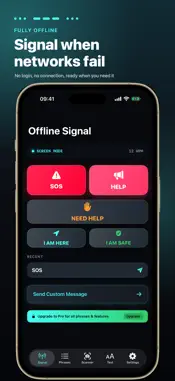
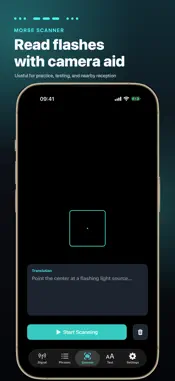
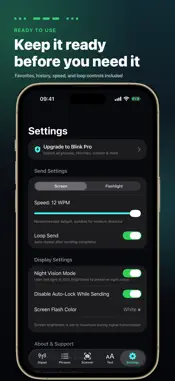
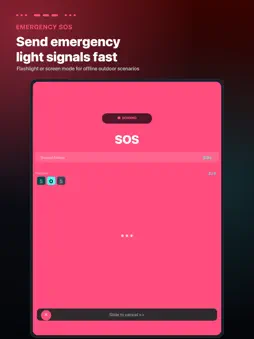
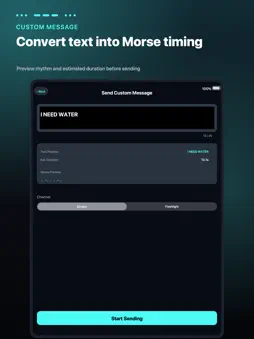
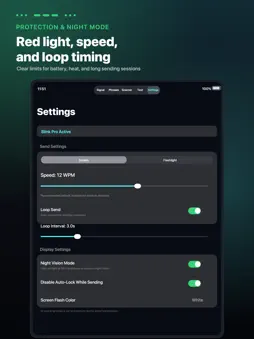
Blink is an offline light signaling app for sending SOS, preset phrases, and Morse-style flash patterns with your iPhone flashlight or screen. When you have no network, need a quiet way to get someone’s attention, or want a simple visual signal within sight range, Blink helps you send short, clear messages fast. It is designed for camping, hiking, night meetups, trail coordination, car-to-car reminders, and other short-range communication scenarios where sound or connectivity may not work well. You do not need to know Morse code before using Blink. Choose SOS, a preset phrase, or enter a short custom message, and the app converts it into a readable flash rhythm. Chinese text can be converted to pinyin before Morse encoding, and you can preview the rhythm before sending. Key Features SOS and preset signals • Send SOS and common emergency phrases quickly • 3-second countdown helps reduce accidental sends • Loop sending with clear stop controls • Live progress, current character, and rhythm display Two sending modes • Flashlight mode uses the rear LED for outdoor and night signaling • Screen mode uses full-screen light for close-range or quiet situations • Adjustable transmission speed for different distances and conditions Preset phrase library • Emergency, outdoor, medical, teamwork, silent communication, and direction phrases • Useful for common requests such as help, stay here, I am safe, need water, and more • Good for pre-arranged signals with friends, teammates, or family Custom messages and text signal tools • Turn short text into a Morse-style timing preview • Estimate transmission duration before sending • Large text, marquee, and flashing text modes for close-range silent cues Camera-assisted flash reading • Point your camera at a flashing light source to help read dot-dash rhythm • Useful for practice, testing, and nearby reception • Results depend on distance, alignment, brightness, motion, and ambient light Night mode and device protection • Red screen flash with reduced brightness for lower glare at night • Warnings or automatic fallback for heat and low battery situations • Pause protection during long repeated sending sessions • Auto-pause when the app goes to the background Blink Pro One-time purchase. No subscription. • Unlock all phrase categories • Save favorite phrases • Add custom phrases and longer custom messages • Customize screen flash colors • Access full history and quick resend • Use higher speed ranges • Adjust loop intervals Useful scenarios • Camping, hiking, and trail coordination • Night meetups and campsite signaling • Quiet, non-verbal reminders • Practice and testing for light-based signaling • Offline backup signaling when connectivity is unavailable Important safety note Blink is an auxiliary signaling tool. It does not contact emergency services, rescue agencies, or personal contacts. In a real emergency, use local emergency numbers, satellite SOS, a whistle, signal mirror, radio, or other more reliable rescue methods when available. Whether a light signal can be seen or understood depends on distance, obstacles, weather, ambient light, battery level, device brightness, receiver attention, and whether both sides understand the intended meaning. Do not rely on Blink as your only emergency option.
What's New
Version 1.0.3 2026-09-19
What's New in Version 1.0.3: 1. Auto-Enter Phrase on Launch: - You can now configure Blink to automatically begin countdown and transmit your preferred phras... Technical Analysis
Package Overview Basic metadata
Bundle ID
com.MASIYA.Blink Current Version 1.0.3
Minimum iOS 17.0
Package Size App Store Size
Package Metadata 0 / 2 version records
Detailed binary, privacy manifest, framework, and Info.plist results have not been indexed for this package yet. The verified App Store and archive metadata above remains available.
Known Version Records
0 version records with stored package metadata • 2 known version records
Stored metadata does not guarantee a package is currently available to download.
| Details | Version / IDs | Version date | Action |
|---|---|---|---|
| Not archived | App Store ID: 884921517 | Unknown | Request Version |
| Not archived | App Store ID: 884567572 | Unknown | Request Version |