
Preview


Description
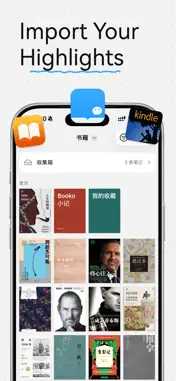
The lines you underlined shouldn't disappear into an app you never open again. Booko turns the highlights scattered across Kindle, Apple Books and every other reading app into cards you can actually browse — so the sentences that once moved you get seen again. And you can write down your own thoughts, ideas and journal entries too — what you read and what you think, kept in one place. WHY BOOKO Most highlights die where you made them. Booko gives them a shelf. No setup, no system to build. Import once, then browse, revisit and share. IMPORT YOUR HIGHLIGHTS Bring in highlights, excerpts and notes from Kindle (My Clippings) and Apple Books. Import once, browse forever. Book covers are matched automatically. Reading in Chinese? WeChat Reading, Dedao, Douban Read and iReader are supported too. CARD BROWSING Every highlight becomes a card you can flip through. Change the background, typeface, palette and layout until each passage looks the way it reads. RANDOM REVISIT Open Booko and run into a sentence you'd forgotten. It might come from a book you finished years ago — or answer exactly what today feels like. COVER WALL & SHELF Browse your library by cover. Multi-select, select all and batch delete keep things manageable even after a large import. NOTES & THOUGHTS Beyond organizing imported highlights, write down your own thoughts, ideas and journal entries anytime — no book required. Edit any single entry; multi-select and batch actions included. HOME SCREEN WIDGET Put a random highlight on your Home Screen. Choose which book categories it draws from, and how often it changes. No need to open the app at all. SHARE IN ONE TAP Export any excerpt as a finished card image for social, or save it to Photos. Markdown export is there too, if you'd rather pipe everything into your own notes system. MAC AND IPHONE Booko is now on Mac. One purchase covers iPhone, iPad and Mac. Organize on the Mac, revisit on your phone. ICLOUD SYNC Turn on iCloud sync and your books, notes and preferences follow you across devices. The line you underlined on your phone is already waiting on your Mac. WHO IT'S FOR - Readers who highlight a lot and revisit almost none of it - People who collect sentences - Anyone who wants reading notes as cards, not as homework - Anyone tired of heavy note-taking apps DESIGN Booko is small on purpose. Reading notes don't have to become tasks, a knowledge base, or a system. Some sentences only need to be seen again, slowly, once in a while. Import once. Browse often. Keep enjoying them. CONTACT Questions or ideas: [email protected] Booko Pro offers monthly and annual auto-renewable subscriptions, or lifetime access. Subscriptions renew automatically unless canceled in App Store account settings. Privacy: https://booko.cc/en/privacy/ Terms of Use: https://www.apple.com/legal/internet-services/itunes/dev/stdeula/
What's New
Version 2.1.1 2026-11-21
Selected books, categories, and collections now appear first when choosing what to review. Track your reading progress by page number or percentage from a book’...Selected books, categories, and collections now appear first when choosing what to review. Track your reading progress by page number or percentage from a book’s details. Updated the Apple Books import instructions. Added support for StandBy. Technical Analysis
Package Overview Basic metadata
Bundle ID
jinzhiyi.booko Current Version 2.1.1
Minimum iOS 18.0
Package Size App Store Size
Package Metadata 2 / 9 version records
Detailed binary, privacy manifest, framework, and Info.plist results have not been indexed for this package yet. The verified App Store and archive metadata above remains available.
Developer Information
Known Version Records
2 version records with stored package metadata • 9 known version records
Stored metadata does not guarantee a package is currently available to download.
| Details | Version / IDs | Version date | Action |
|---|---|---|---|
 Not archived | v2.0.2 App Store ID: 891793376Build: 2.0.2 | 2026-09-22 19:12:17 | Request Version |
| 45.88 MB | v2.0.1 App Store ID: 890262608Build: 2.0.1 | 2026-08-28 18:04:19 | Get Version |
| Not archived | v2.0.0 App Store ID: 890004836Build: 2.0.0 | 2026-08-24 20:20:54 | Request Version |
| 13.61 MB | v1.2.2 App Store ID: 889018167Build: 1 | 2026-07-29 12:31:54 | Get Version |
| Not archived | v1.2.1 App Store ID: 887851220Build: 1.2.1 | 2026-07-05 22:36:34 | Request Version |
| Not archived | v1.2 App Store ID: 887364271Build: 1.2 | 2026-06-24 19:01:57 | Request Version |
| Not archived | v1.1 App Store ID: 886005415Build: 1.1 | 2026-05-22 17:51:37 | Request Version |
| Not archived | v1.0.1 App Store ID: 885555934Build: 1.0.1 | 2026-05-15 16:21:12 | Request Version |
| Not archived | v1.0 App Store ID: 884162953Build: 1.0 | 2026-05-11 09:02:05 | Request Version |