Preview






Description
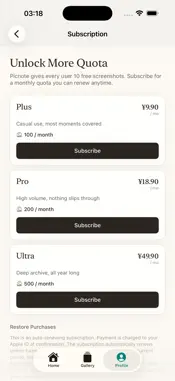
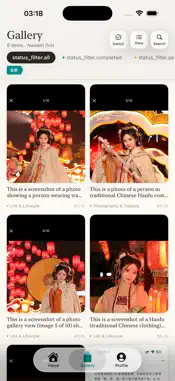
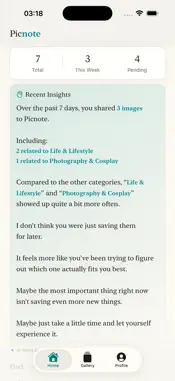
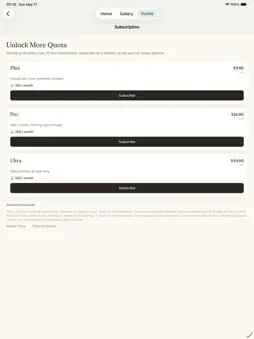
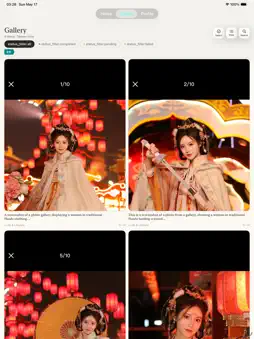
Picnote is a visual capture app built for turning screenshots and photos into a searchable, structured knowledge base. 【Why Picnote】 Every day you photograph street designs, menu prices, product packaging, and event posters. Every day you screenshot GitHub projects, AI tool pages, article snippets, and chat conversations. These are valuable visual records — but they sit in your camera roll with no title, no tag, no context. Three days later when you try to find something, you're stuck scrolling through photos, hoping a vague memory leads you to the right one. Picnote solves this: it turns visual records into structured assets that AI can read, notes apps can store, and knowledge bases can actually use. 【Almost Zero Friction】 Take a photo or screenshot, then share it to Picnote from the system share sheet. Done. No need to write a title, pick a category, or add a note. Picnote takes over all the organizing from there. 【AI That Goes Beyond OCR】 When an image arrives, Picnote's AI: · Extracts all visible text from the image · Identifies the content type (screenshot, poster, menu, article, conversation…) · Infers why you saved it ("tracking this project" / "remembering this restaurant" / "material for writing") · Extracts key facts (project URL, restaurant name and menu, author's argument, core data) · Generates structured tags · Writes a one-line value summary capturing what this image means to you None of this is simple transcription — it's content understanding based on why you saved it. 【Searchable, Filterable, Connected】 Filter by date, category, or tag. Type any word you remember into the search box — it searches OCR text, descriptions, and tags all at once. AI-generated related content links surface inspiration you'd completely forgotten you saved. 【Plug Into Your Knowledge Base】 Picnote isn't where your notes end up — it's the step that gets them organized: · Individual items: copy text, share the original image, export as Markdown · Bulk export: turn your entire library into a Markdown vault, ready for Obsidian, Notes, or any folder · CLI / AI agent friendly: exported Markdown can be read directly by Claude Code or local AI agents, turning your visual records into real context for downstream AI tasks 【Privacy First】 · Picnote never reads your photo library — it only receives images you actively share to it · Images and results are stored locally on your device · For AI processing, images are temporarily sent over an encrypted connection to a proxy — not retained after processing · Your device identifier is used only for quota checks, never for ads, profiling, or cross-app tracking Picnote is for: · Creators who photograph design inspiration, posters, menus, and products · Professionals who screenshot AI tools, open-source projects, and article snippets · Knowledge workers who pipe visual content into Obsidian or local AI agents · Anyone who's tired of hunting through their camera roll Terms of Use (EULA): https://www.apple.com/legal/internet-services/itunes/dev/stdeula/ Note for review: Subscription prices display in USD in the TestFlight sandbox — this is expected StoreKit behavior. Prices for mainland China are correctly configured in App Store Connect and will display in CNY for Chinese users once the app is live.
What's New
Version 1.2.4 2026-05-28
- Optimized tag classification logic. Technical Analysis
Package Overview Basic metadata
Bundle ID
com.lefenn.imagecut Current Version 1.2.4
Minimum iOS 17.0
Package Size App Store Size
Package Metadata 0 / 6 version records
Detailed binary, privacy manifest, framework, and Info.plist results have not been indexed for this package yet. The verified App Store and archive metadata above remains available.
Known Version Records
0 version records with stored package metadata • 6 known version records
Stored metadata does not guarantee a package is currently available to download.
| Details | Version / IDs | Version date | Action |
|---|---|---|---|
| Not archived | App Store ID: 886215056 | Unknown | Request Version |
| Not archived | App Store ID: 886207909 | Unknown | Request Version |
| Not archived | App Store ID: 886039007 | Unknown | Request Version |
| Not archived | App Store ID: 885806939 | Unknown | Request Version |
| Not archived | App Store ID: 885757019 | Unknown | Request Version |
| Not archived | App Store ID: 885410634 | Unknown | Request Version |