
Preview





Description
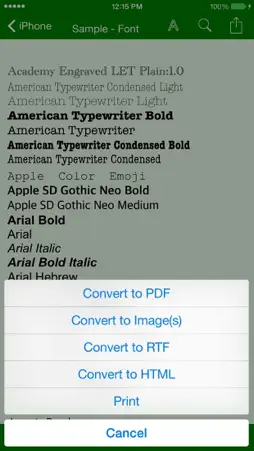
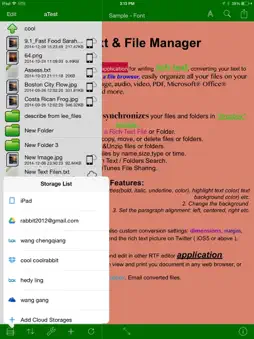
The Rich Text & File Manager app is an effective and efficient application for writing rich text and converting your rich text to images, html and so on. The simple UI lets you navigate fast and get the job done within minutes. Simply, find the file you want, edit and save - it’s as easy as 1-2-3. The intuitive file browser lets you see all of the files currently on your app with ease and you can sort your files by name, size, type or by the time that they were created. With this, you can easily organize all of your files on your iPhone or iPad, open and view images, audio, video, PDF, Microsoft® Office® documents, HTML, WebArchive and dozens more file varieties: 1 Box, Dropbox, Google Drive, and Microsoft OneDrive syncing: allows for automatic synchronization with your files and folders in your cloud account. 2 Create a RTF/OKRTF/TXT or Folder. 3 Rename, email, copy, move, or delete files or folders. 4 Zip&Unzip files or folders. 5 Sort your files by name,size,type or time. 6 In-text search & replace, as well as file’s & folder’s name search. 7 iTunes File Sharing; Share files through WiFi. You can open and edit RTF/OKRTF/TXT in the app. The RTF and OKRTF are Rich Text File format. The OKRTF is similar to RTF File, you can open RTF file in most application, but you can only open OKRTF file in Rich Text&File Manager. The current version supports the follow features: 1. Specify font size, type, and properties(bold, italic, underline, color), highlight text color( text background color) etc. 2. Change the background ( Only for OKRTF file format ) 3. Set the paragraph alignment: left, centered, right etc. 4. AirPrint. Accessory Keys: 1. These are keyboard extension, which can be found at the very top line of your keyboard. 2. They include arrow keys, word keys (to navigate between words), tab/select/copy/past/redo/undo/date/time keys, etc 3. You can add, remove, edit, and reorder your accessory keys in Settings→Accessory keys. or add your own keys into accessory key bar. Powerful Conversion 1. Convert rich text to images. You can also custom conversion settings: dimensions, margins, format ( Jpg, png ) and quality. 2. Support converting most common files such as RTF, OKRTF, Word, Excel, TXT, PPT, Web Pages, Webarchive, Pages, Numbers and more to a PDF or Image files. Support for PDF conversion option settings such as: PDF Title, subject, author, password, paper size etc. 3. You can convert the OKRTF to RTF or vice versa. 4. Convert to HTML, in which you can view and print you document in any web browser, or send it via mail in HTML format! 5. Save converted files to local storage, Dropbox. Email converted files.
What's New
Version 3.0 2015-04-05
This app has been updated by Apple to display the Apple Watch app icon. Support converting most common files such as RTF, OKRTF, Word, Excel, TXT, PPT, Web Pag... Technical Analysis
Package Overview Basic metadata
Bundle ID
com.okeyen.richlongtext Current Version 3.0
Minimum iOS 7.0
Package Size Latest Recorded Package Size
Package Metadata 1 / 1 version records
4.2 / 5.0 (279 ratings)
Detailed binary, privacy manifest, framework, and Info.plist results have not been indexed for this package yet. The verified App Store and archive metadata above remains available.
Known Version Records
1 version record with stored package metadata
Stored metadata does not guarantee a package is currently available to download.
| Details | Version / IDs | Version date | Action |
|---|---|---|---|
 10.83 MB | v3.0 App Store ID: 837066307Build: 3.0 | 2020-07-29 15:48:36 | Get Version |