Preview





Description
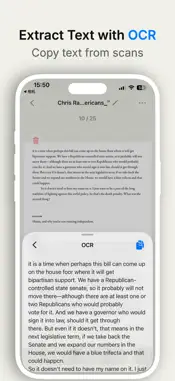
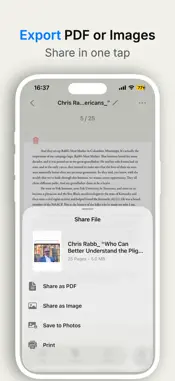
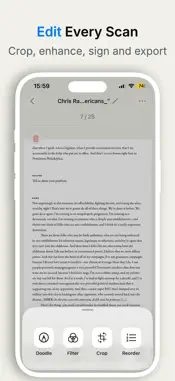
Turn your iPhone into a fast, private PDF scanner with no account required. SnapScan helps you scan paper documents, receipts, invoices, contracts, ID cards, notes, and forms, then turn them into clean digital files you can edit, sign, organize, and share in seconds. It is built for people who want a scanner that feels simple, focused, and respectful of their time. Image processing happens on your device, so you can scan and clean up documents without sending every page through a heavy cloud-first workflow. KEY FEATURES SMART DOCUMENT SCANNING - Scan paper documents with your camera - Detect document edges automatically - Correct perspective for cleaner pages - Create multi-page scans from several images - Import photos or files and turn them into documents PDF & IMAGE EXPORT - Export scans as high-quality PDF files - Share pages as images when you need a lighter format - Combine multiple pages into one document - Save, print, or send files through the iOS share sheet OCR TEXT RECOGNITION - Extract text from scanned pages - Copy recognized text for notes, messages, forms, or research - Turn printed content into usable digital text EDIT, SIGN & WATERMARK - Add handwritten signatures to documents - Apply custom watermarks - Crop, rotate, filter, and enhance scanned pages - Reorder pages and manage multi-page files ORGANIZED FILE MANAGEMENT - Keep documents in folders - Rename, sort, move, merge, and delete files - Manage receipts, invoices, contracts, ID cards, class notes, and work documents in one place PRIVATE BY DESIGN SnapScan works without login. Your scans stay under your control, and image processing is designed to happen on your device. You choose when to export, print, or share your documents. HOW IT WORKS 1. Scan or import a document. 2. Clean it up with OCR, crop, filters, signature, or watermark tools. 3. Export, print, or share as PDF or image. SnapScan is simple enough for quick receipts and powerful enough for everyday work documents. Use it whenever you need a clean PDF scanner in your pocket. Subscription Info: If you subscribe via Apple, payment will be charged to your App Store account upon confirmation. Subscriptions automatically renew unless auto-renew is turned off at least 24 hours before the end of the current period. Your account will be charged for renewal within 24 hours before the end of the current period at the selected plan’s rate. After purchase, you can manage or cancel your subscription in your Account Settings. Contact Us: We are dedicated to building a warm and easy-to-use time management tool. Feel free to share your suggestions by emailing us at [email protected]. Thank you for your support! Terms of Use: https://www.apple.com/legal/internet-services/itunes/dev/stdeula/ Privacy Policy: https://docs.google.com/document/d/1UoBRscxuV8FP6ST6JAmmCPWPZiXQht-jAAB-mo5QSFw/edit?usp=sharing
What's New
Version 1.2.0 2026-08-26
1. Improved membership status handling and the premium experience. 2. Bug fixes and stability improvements. Technical Analysis
Package Overview Basic metadata
Bundle ID
icu.yunqi.SnapScan Current Version 1.2.0
Minimum iOS 16.4
Package Size App Store Size
Package Metadata 0 / 3 version records
Detailed binary, privacy manifest, framework, and Info.plist results have not been indexed for this package yet. The verified App Store and archive metadata above remains available.
Developer Information
Known Version Records
0 version records with stored package metadata • 3 known version records
Stored metadata does not guarantee a package is currently available to download.
| Details | Version / IDs | Version date | Action |
|---|---|---|---|
| Not archived | App Store ID: 887147536 | Unknown | Request Version |
| Not archived | App Store ID: 886405204 | Unknown | Request Version |
| Not archived | App Store ID: 882543152 | Unknown | Request Version |