Preview


Description
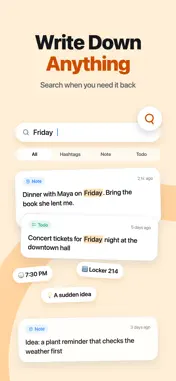
Capture fleeting thoughts instantly, and float what matters now back to the top. FlowIt is a fast, local-first note flow designed to capture your ideas, checklists, and calendar events in one seamless stream. Never switch between separate memo, todo, and reminder apps again — organize your day in a single unified flow. Float What Matters Today Some notes are urgent today but shouldn't stay pinned forever. FlowIt's signature "Float" action brings active notes back to the very top of your flow whenever you need them. Keep your daily priorities front and center without turning your workspace into a cluttered graveyard of permanent pins. Quick Capture First, Organize Later Capture as fast as you think. Jot down a quick brain dump, scratchpad idea, or meeting memo directly in the capture card without worrying about folders or formats. As your thoughts evolve, turn any note into an actionable checklist, or schedule it with start and end times and a timely reminder. Tags That Become True Workspaces Add tags naturally while writing. Open any tag to see every note, task, checklist, and scheduled event grouped under that topic. It's the lightweight organizer built for fast capture and easy retrieval. All Your Everyday Formats in One Flow: • Quick Notes: Fleeting ideas, brain dumps, scratchpads, and reading memos • Checklists: Errands, todo lists, follow-ups, and project planning • Events: Clear start and end times for scheduled commitments • Reminders: Timely notifications so nothing slips through the cracks • Tag Workspaces: Flexible, fluid topic organization • Full-Text Search: Instantly search across notes, tasks, and tags • Reading Mode: Distraction-free, immersive viewing for longer writing • Deleted Note Recovery: Easily restore accidentally deleted notes • Local-First Storage: Fast offline access with optional private iCloud sync Local-First & Private by Design Your notes stay on your device first. FlowIt works completely offline and requires no proprietary account; Sign in with Apple is used only for subscription access. Private iCloud sync keeps your notes in sync across your Apple devices using your own Apple ID. About FlowIt Pro Creating and editing notes, checklists, and events requires an active FlowIt Pro subscription (monthly auto-renewing) or a one-time FlowIt Pro Lifetime purchase. Eligible Apple IDs can try FlowIt Pro free for 1 week, followed by the monthly subscription. Without an active subscription, you can still view and browse all existing notes on your device. FlowIt Pro Monthly and FlowIt Pro Lifetime are available as in-app purchases. Subscriptions renew automatically unless canceled at least 24 hours before the end of the current period. Manage subscriptions in your Apple ID account settings. Privacy Policy: https://eekqabw.cn/privacy/ Terms of Use (EULA): https://www.apple.com/legal/internet-services/itunes/dev/stdeula/
What's New
Version 1.3 2026-10-28
Lock Screen and Home Screen widgets: see your notes and tick off todos with a tap Shortcuts: put FlowIt on the Action button, Back Tap or Siri and add a note wi... Technical Analysis
Package Overview Basic metadata
Bundle ID
com.lifenggu.flowit Current Version 1.3
Minimum iOS 17.0
Package Size App Store Size
Package Metadata 0 / 3 version records
Detailed binary, privacy manifest, framework, and Info.plist results have not been indexed for this package yet. The verified App Store and archive metadata above remains available.
Developer Information
Known Version Records
0 version records with stored package metadata • 3 known version records
Stored metadata does not guarantee a package is currently available to download.
| Details | Version / IDs | Version date | Action |
|---|---|---|---|
| Not archived | App Store ID: 886653200 | Unknown | Request Version |
| Not archived | App Store ID: 885769274 | Unknown | Request Version |
| Not archived | App Store ID: 883731311 | Unknown | Request Version |