
Preview





Description
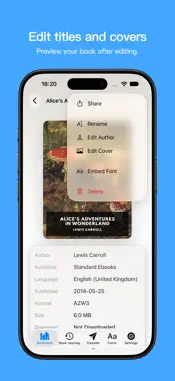
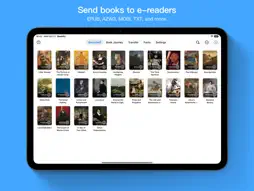
Send the books on your phone wirelessly to Kindle or Kobo. Bookify lets you import and transfer books directly from your iPhone or iPad, with no computer or cable needed. You don't need to sign in to Amazon to transfer books. Import books without manual conversion Bookify supports common formats including EPUB, KEPUB, MOBI, AZW3, and TXT, and automatically converts them for your chosen Kindle or Kobo. You can skip the extra conversion tools. Import books from the Files app, or share browser downloads and email attachments with Bookify. Make covers and fonts your own Choose a cover you like and edit the title and author to make books easier to recognize. You can also import TTF and OTF fonts and embed them in your books for use on supported readers. On Kindle, select the publisher font option to use embedded fonts. Kobo can use embedded fonts in supported EPUB/KEPUB books. Connect your reader and download 1. Choose Kindle or Kobo in Bookify, then import your books. 2. Connect your iPhone or iPad and reader to the same Wi-Fi network, then open “Transfer” in Bookify. Visit pair.bookify.top in your reader's browser and use Bookify to scan the QR code shown on the reader. 3. On the transfer page that opens on your reader, choose a book and download it. You can also connect manually by entering the transfer address shown in Bookify into your reader's browser. Keep Bookify open while downloading. Books transfer directly over your local network. Their contents are not uploaded to third-party servers. Free features and Pro Import as many books as you like for free, one at a time, up to 5 MB per book. Upgrade to Pro to import multiple books at once and books larger than 5 MB. Terms of Use (EULA): https://www.apple.com/legal/internet-services/itunes/dev/stdeula/ Privacy Policy: https://bookify.top/privacy
What's New
Version 1.6.0 2026-10-25
1. Added Kindle comic optimization. 2. Choose your Kindle model in the setup guide or change it more easily in Settings. 3. New Advanced Transfer Mode guidance ... Technical Analysis
Package Overview Basic metadata
Bundle ID
io.rainbend.shujing Current Version 1.6.0
Minimum iOS 16.4
Package Size App Store Size
Package Metadata 3 / 55 version records
0.0 / 5.0 (0 ratings)
Detailed binary, privacy manifest, framework, and Info.plist results have not been indexed for this package yet. The verified App Store and archive metadata above remains available.
Known Version Records
3 version records with stored package metadata • 55 known version records
Stored metadata does not guarantee a package is currently available to download.
| Details | Version / IDs | Version date | Action |
|---|---|---|---|
 29.9 MB | v1.5.7 App Store ID: 891025590Build: 1.5.7 | 2026-09-15 02:28:39 | Get Version |
| Not archived | App Store ID: 890877910 | Unknown | Request Version |
| Not archived | App Store ID: 890706436 | Unknown | Request Version |
| Not archived | App Store ID: 890530902 | Unknown | Request Version |
| 27.11 MB | v1.5.3 App Store ID: 890180762Build: 1.5.3 | 2026-08-31 02:49:41 | Get Version |
| Not archived | App Store ID: 889839752 | Unknown | Request Version |
| Not archived | App Store ID: 889482002 | Unknown | Request Version |
| Not archived | App Store ID: 889220303 | Unknown | Request Version |
| Not archived | App Store ID: 888629929 | Unknown | Request Version |
| Not archived | App Store ID: 888336242 | Unknown | Request Version |
| 25.79 MB | v1.4.5 App Store ID: 887859469Build: 363 | 2026-07-05 05:45:46 | Get Version |
| Not archived | App Store ID: 887517148 | Unknown | Request Version |
| Not archived | App Store ID: 887440886 | Unknown | Request Version |
| Not archived | App Store ID: 887237880 | Unknown | Request Version |
| Not archived | App Store ID: 886947482 | Unknown | Request Version |
| Not archived | App Store ID: 886701823 | Unknown | Request Version |
| Not archived | App Store ID: 886465710 | Unknown | Request Version |
| Not archived | App Store ID: 886381761 | Unknown | Request Version |
| Not archived | App Store ID: 886229518 | Unknown | Request Version |
| Not archived | App Store ID: 886015964 | Unknown | Request Version |
| Not archived | App Store ID: 885838989 | Unknown | Request Version |
| Not archived | App Store ID: 885706675 | Unknown | Request Version |
| Not archived | App Store ID: 885528746 | Unknown | Request Version |
| Not archived | App Store ID: 885387985 | Unknown | Request Version |
| Not archived | App Store ID: 884980755 | Unknown | Request Version |
| Not archived | App Store ID: 884920964 | Unknown | Request Version |
| Not archived | App Store ID: 884848649 | Unknown | Request Version |
| Not archived | App Store ID: 884682901 | Unknown | Request Version |
| Not archived | App Store ID: 884425516 | Unknown | Request Version |
| Not archived | App Store ID: 884256856 | Unknown | Request Version |
| Not archived | App Store ID: 884136085 | Unknown | Request Version |
| Not archived | App Store ID: 884001077 | Unknown | Request Version |
| Not archived | App Store ID: 883588725 | Unknown | Request Version |
| Not archived | App Store ID: 883385440 | Unknown | Request Version |
| Not archived | App Store ID: 883165108 | Unknown | Request Version |
| Not archived | App Store ID: 882706252 | Unknown | Request Version |
| Not archived | App Store ID: 882444291 | Unknown | Request Version |
| Not archived | App Store ID: 882334018 | Unknown | Request Version |
| Not archived | App Store ID: 882065534 | Unknown | Request Version |
| Not archived | App Store ID: 881853379 | Unknown | Request Version |