
Preview







Description
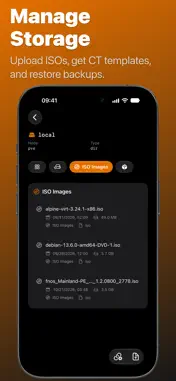
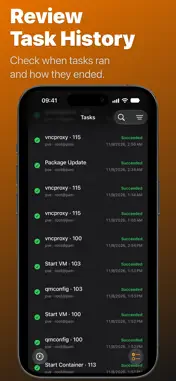
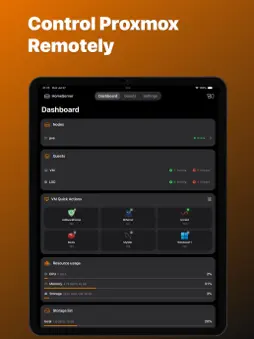
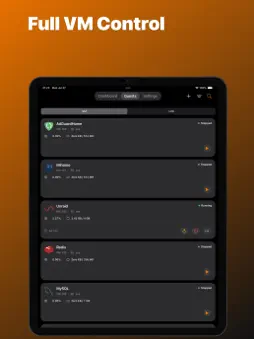
Manage your Proxmox VE infrastructure from iPhone and iPad. Prox Deck brings server monitoring, VM and LXC management, access controls, VNC, and SSH into one native iOS app. On wider screens, view lists and details side by side. Monitoring and Tasks • Check node, VM, and LXC status, CPU, memory, and storage usage. • Arrange Dashboard cards, configure quick power actions, and set an automatic refresh interval. • Inspect node disks, networking, DNS, logs, updates, repositories, and firewall information. • View tasks and logs in a dedicated tab and load more task history. VM and LXC Management • Browse, search, and filter workloads by node and status; view resource charts and configuration details. • Create VMs and LXCs. Start, shut down, reboot, pause, resume, hibernate, stop, or reset supported workloads. • Manage VM snapshots and backups: create, roll back, restore, delete, protect, and inspect configuration. • Import custom VM and LXC icons from your photo library. Storage Management • View capacity, historical trends, supported content types, and contents by category. • Manage ISO images, CT templates, and backup files. Add ISOs and CT templates via URL downloads or local uploads, or download templates from the official CT catalog. • View backup configuration, edit notes, change protection, restore, or delete backups. Access and Account Security • Manage users, groups, roles, permission rules, and resource pools. • Manage API Tokens, TOTP, and recovery codes; export recovery codes as a PDF. • Sign in to PVE accounts using TOTP or recovery codes for two-factor authentication. VNC and SSH • Open an in-app VNC console for running VMs. • Bind SSH profiles to nodes, VMs, or LXCs, with password or private-key authentication and host-key verification. • Verify SSH connections before saving and use a full-screen terminal with improved keyboard interaction. Smart Connect and Tailscale • Choose local, public, or Tailnet routes based on your network, with configurable priority. • Sign in to built-in app-level Tailscale without a system VPN. • Share one in-app Tailnet connection across servers, view connection status, and reset local Tailscale state. Privacy and Sync • PVE requests go directly to your server. Sensitive credentials are protected by iOS Keychain. • Self-signed certificate trust is scoped to the host and route. Protect servers with biometrics. • Opt in to iCloud sync for server configuration, SSH profiles, and preferences. PVE passwords sync through iCloud Keychain; SSH credentials and sessions do not sync. Pro Features Pro unlocks multi-server management, Dashboard quick actions, VM and LXC creation and advanced management, access-management changes, VNC, SSH, Tailscale/Tailnet remote connections, iCloud sync, and custom guest icons. Requirements • iOS 18.1 or later, a reachable Proxmox VE server you own or are authorized to manage, and an account with the required permissions. • SSH access for SSH features; a Tailscale account and configured route for Tailnet. Terms of Use (EULA): https://www.apple.com/legal/internet-services/itunes/dev/stdeula/ Privacy Policy: https://prox.mccray.app/privacy/
What's New
Version 1.1.1 2026-11-19
New Features: • Start, shut down, pause, or restart multiple VMs and LXC containers at once. • Sort VMs and LXC containers by multiple criteria, including statu...New Features: • Start, shut down, pause, or restart multiple VMs and LXC containers at once. • Sort VMs and LXC containers by multiple criteria, including status, name, and resource usage. • Match custom icons for multiple guests at once. Technical Analysis
Package Overview Basic metadata
Bundle ID
app.mccray.proxdeck Current Version 1.1.1
Minimum iOS 18.1
Package Size App Store Size
Package Metadata 0 / 0 version records
Detailed binary, privacy manifest, framework, and Info.plist results have not been indexed for this package yet. The verified App Store and archive metadata above remains available.
Known Version Records
0 version records with stored package metadata
Stored metadata does not guarantee a package is currently available to download.
| Details | Version / IDs | Version date | Action |
|---|