
Preview
Description
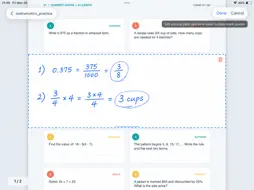
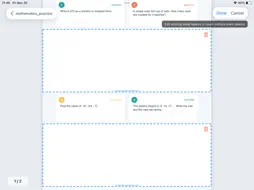
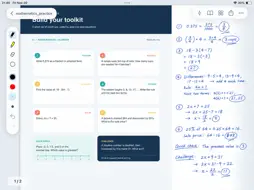
Need more room to write on a PDF? Just expand the page. RoomyNote is an iPad PDF note-taking app that lets you freely add more writing space wherever you need it. Traditional PDFs have fixed page layouts. When solving problems, doing calculations, or annotating documents, you may quickly run out of room and have to open a blank page or move your work somewhere else. With RoomyNote, simply add vertical space at the exact location you need. The PDF content below moves down naturally, and you can keep writing with Apple Pencil. Quick Insert Tap to instantly add a preset amount of writing space. You can also adjust the height afterward. Continuous Insert Add space at multiple locations while scrolling through a PDF. Ideal for preparing an entire worksheet, exam paper, or study document at once. Apple Pencil Handwriting Includes essential tools such as pen, highlighter, eraser, lasso, undo, and redo. Export PDF Keep writing directly in RoomyNote, or export the adjusted document as a new PDF and continue using it in another PDF reader or note-taking app. RoomyNote is especially useful for math and physics exercises, exam preparation, PDF worksheets, textbooks, lecture notes, and other documents that need more room for handwriting. Keep your questions, thoughts, and calculations together. Turn fixed PDFs into pages that fit the way you write.
What's New
Version 1.1 2026-11-21
Layout adjustments and English language support added. Technical Analysis
Package Overview Basic metadata
Bundle ID
com.tommysohappy.RoomyNote Current Version 1.1
Minimum iOS 16.0
Package Size App Store Size
Package Metadata 0 / 0 version records
Detailed binary, privacy manifest, framework, and Info.plist results have not been indexed for this package yet. The verified App Store and archive metadata above remains available.
Developer Information
Known Version Records
0 version records with stored package metadata
Stored metadata does not guarantee a package is currently available to download.
| Details | Version / IDs | Version date | Action |
|---|