
Preview






Description
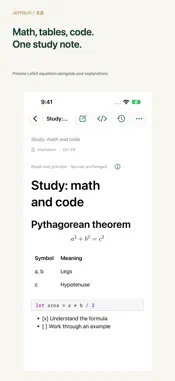
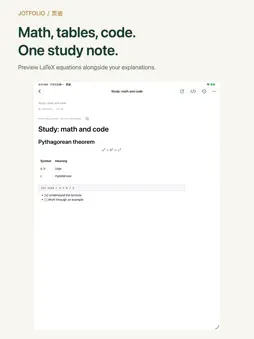
Write a new draft. Keep a way back. Jotfolio is an offline Markdown notebook with version history for iPhone and iPad. Compare saved versions, copy earlier text or restore a whole previous draft without removing your existing history. No account required. COMPARE AND RESTORE SAVED VERSIONS See what changed between a saved version and the current note or its preceding version. Restore an earlier draft as a new version; the version you came from and the rest of your history remain available. History records saved changes, separate from the editor's Undo and Redo. WRITE OFFLINE, WITHOUT AN ACCOUNT Create, read and edit notes on your own device. No Jotfolio sign-up, advertising or analytics SDKs. Tap Save or Done after editing and check the on-device save status. MARKDOWN FOR STUDY AND TECHNICAL NOTES Write headings, checklists, tables and code with the formatting bar. Insert local images and use the formula editor for LaTeX expressions. Lists continue on Return; another Return on an empty item returns to a normal paragraph. Switch to a read-only preview to review your text and equations, then refresh it after changes. Remote images load only after you allow them. VIEW 2FA CODES IN A RELATED NOTE Add optional TOTP credentials and view the current code and countdown in the note's preview, alongside your service instructions. Codes are generated on the device. Secrets stay in a separate encrypted local vault; Markdown contains a reference, not the secret. Secret export requires password confirmation and is separate from note export. This feature does not password-lock your notes. ORGANIZE NOTES AND RECOVER DELETED ITEMS Organize notes in nested folders and find them by title. Recently Deleted keeps removed notes and folders recoverable for 30 days, unless you choose permanent deletion. EXPORT YOUR MARKDOWN SOURCE Export the current saved note as a Markdown (.md) file through the system file picker. Syntax the preview does not support stays in your source. The export does not include history, the full library, local image files or 2FA secrets. WHAT LOCAL RECOVERY MEANS Notes, history and recovery drafts live on this device. Saved versions, recovery drafts and Recently Deleted serve different purposes; they are not a cloud backup. The current version has no iCloud recovery, cross-device sync or separate password lock for note contents. History cannot recover a library lost after uninstalling the app or losing the device. Keep independent copies of important notes, and handle images and 2FA credentials separately before changing devices. Supports English and Simplified Chinese on iPhone, iPad and iPhone Duo. Requires iOS 18 or later. Support: https://jotfolio.onetool.top/support/ Privacy: https://jotfolio.onetool.top/privacy/
Technical Analysis
Package Overview Basic metadata
Bundle ID
top.onetool.jotfolio Current Version 1.0
Minimum iOS 18.0
Package Size App Store Size
Package Metadata 0 / 0 version records
Detailed binary, privacy manifest, framework, and Info.plist results have not been indexed for this package yet. The verified App Store and archive metadata above remains available.
Developer Information
Known Version Records
0 version records with stored package metadata
Stored metadata does not guarantee a package is currently available to download.
| Details | Version / IDs | Version date | Action |
|---|