Preview





Description
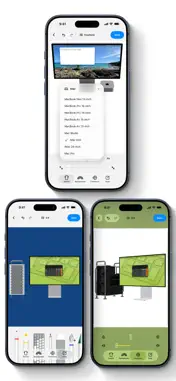
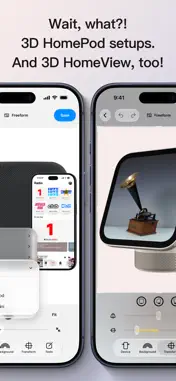
For years, we’ve shared what’s on our screens. Now, we can show it the way it was meant to be seen. Enlay App lets you place screenshots, screen recordings, and your favorite photos, videos and Live Photos on the screens of 3D device models. Familiar shapes, materials and details make your content look as though it’s displayed on a real device. Explore a rich library of 3D models, including a wide range of iPhone, iPad and Mac devices, monitors, cameras and picture frames, along with HomePod and HomePod mini combinations and HomeView. Pair monitors with desktop computers, or HomePod and HomePod mini with iPhone. The Apple Watch collection also offers different materials and bands to choose from. On MacBook and iPhone Duo models with adjustable opening or folding, you can freely change the screen opening or fold position and explore different viewpoints for a richer sense of depth. Choose your media from Photos, and Enlay App automatically loads the corresponding device model and places your content on its screen. Rotate the device and adjust the angle, background and composition to make a screenshot look like a product photograph, or a screen recording like a demonstration on a real device. Select several items of the same media type to arrange multiple 3D devices on one canvas, each showing its own content. Change each device’s model, position, size and 3D angle independently. Give your favorite photos another way to be shared. Discover picture frames, photo paper, film styles and even film camera models with three-dimensional details and material effects. Pair travel photos with photo paper or frame everyday moments in film, giving each image the care of a thoughtfully framed photograph before sharing it. Add text, shapes and hand-drawn annotations, choose a font you love, conceal private information with pixelation, or trim a video to keep just the moments you want to show. Choose a solid color, gradient or custom image for the background, or turn your selected media into a blurred background with one tap, naturally bringing it together with the content on your 3D device’s screen. For long images, Long Screenshot mode lets the frame become longer or shorter to match the image’s proportions. From device combinations to the finishing details, Enlay App is designed with care. Save your finished work as an image, Live Photo or video. Transparent PNGs make further layout work easy, while the App Store Screenshots aspect-ratio category helps you create store screenshots at specified pixel dimensions. Whether you’re showcasing an app, creating a product presentation or portfolio, or sharing everyday screenshots, screen recordings and beautiful photos you’ve taken, find a fitting way to present and share them. Terms of Use (EULA): https://www.apple.com/legal/internet-services/itunes/dev/stdeula/
What's New
Version 1.6.3 2026-11-20
Thanks for using Enlay App. This update brings more features, fewer bugs, and an easier, more flexible editing experience. 1. Select up to three items of the s...Thanks for using Enlay App. This update brings more features, fewer bugs, and an easier, more flexible editing experience. 1. Select up to three items of the same media type on the home screen. Combine multiple 3D devices on one canvas, each with its own content. You can switch device combinations with one item or several selected, and adjust each device’s position, size and 3D angle separately. 2. Tap a model in the editor to replace its media. On iPhone Duo, you can replace the inner and cover screen content separately. The photo library can stay open in a sidebar on iPad in landscape and on iPhone Duo when unfolded in landscape, so you can swap media without reopening the library. 3. The device library adds M9, Q2, X100V and EOS C70. You can also choose 3D cameras such as 503CW, X-T3 and Alpha III, along with Macintosh (1984), iPad 10, 3D Apple Watch and combinations of iPhone with HomePod or HomePod mini. 4. Long Screenshot mode is available from Device → Fit → Long Screenshot in the editor. 5. Choose a gradient or automatic background, pick a font when adding text, and find the new App Store Screenshots category in the canvas aspect-ratio menu. 6. Faster exports and a smoother saving experience. Export videos as GIFs or Live Photos. For video files, choose H.264 or HEVC and adjust the bitrate. 7. Improved storage management and model downloads. 8. The iPhone Duo canvas behaves better when opening the editor, switching tools or changing between screens. Fixed distorted content when framing multiple videos, certain Live Photos getting stuck while saving, incorrectly oriented widget photos, and verified one-time purchases occasionally not showing as unlocked. 9. Fixed several known issues. 10. Refined interface details throughout the app. Technical Analysis
Package Overview Basic metadata
Bundle ID
com.yuehaoli.enlay Current Version 1.6.3
Minimum iOS 26.0
Package Size App Store Size
Package Metadata 0 / 0 version records
Detailed binary, privacy manifest, framework, and Info.plist results have not been indexed for this package yet. The verified App Store and archive metadata above remains available.
Developer Information
Known Version Records
0 version records with stored package metadata
Stored metadata does not guarantee a package is currently available to download.
| Details | Version / IDs | Version date | Action |
|---|