
Preview





Description
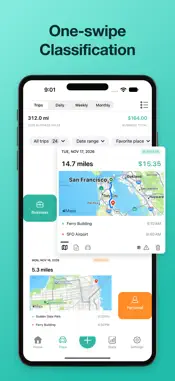
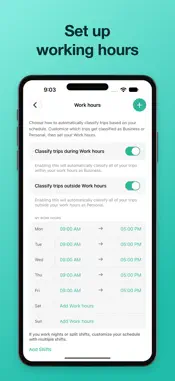
Turn work drives into organized mileage reports. Mileage Tracker automatically records your drives, helps you separate business and personal miles, and lets you export PDF or CSV reports for reimbursement and tax preparation. From client visits to delivery runs, keep your trip details together so you have less to sort out when a report is due. AUTOMATIC TRIP RECORDING Record routes and distances in the background with auto-detection. Add trips manually when you need to complete your log. BUSINESS AND PERSONAL, ORGANIZED Classify trips, add purposes, notes and tags, and review the details before sharing. Keep work and personal trips organized in one place. REPORTS YOU CAN SHARE Choose a month, year or custom date range. Filter by category or vehicle, then export PDF or CSV reports to share with your accountant or employer. LESS REPETITIVE SORTING Set work hours and frequent trip rules to help classify recurring drives. Save favorite places so familiar destinations are easier to recognize. THE DETAILS BEHIND YOUR MILES Manage multiple vehicles, save odometer readings, and add parking and tolls. Choose miles or kilometers and use a custom mileage rate when needed. YOUR TRIP RECORDS Start without creating an account. Trips and photos stay on your iPhone. Back up complete snapshots to your own iCloud Drive, or export a backup file. Restore a verified snapshot when you move devices. Restore Pro separately through the App Store. FREE AND PRO Basic includes 40 automatically detected trips each month, unlimited manual trips and CSV exports of accessible trips. Mileage Tracker Pro unlocks unlimited automatic trips, PDF reports, annual summary PDFs and complete report packages. Monthly and yearly auto-renewable subscriptions are available; current prices and any eligible free trial are shown in the app. Payment is charged to your Apple Account. Subscriptions renew automatically unless canceled at least 24 hours before the current period ends. Manage or cancel in App Store subscription settings. Canceling preserves your stored data. After Pro expires, automatic trips above the free monthly allowance require Pro to view or export. Subscription Terms of Use (Apple Standard EULA): https://www.apple.com/legal/internet-services/itunes/dev/stdeula/ Automatic tracking needs location and motion permissions, including background location access. Tracking availability depends on your permissions and iOS settings. Online address searches, route calculations and iCloud backup require an internet connection. Review your records and confirm which trips meet your tax or reimbursement requirements before submitting a report. Privacy Policy: https://www.happypig.cloud/static/com.mileagetrack.app/privacy-policy.html User Agreement: https://www.happypig.cloud/static/com.mileagetrack.app/user-agreement.html Support: https://www.happypig.cloud/static/com.mileagetrack.app/support.html
What's New
Version 1.2.0 2026-11-19
Start tracking trips without creating an account. Keep trips and photos on your device, with optional backups in your own iCloud Drive and backup-file export or...Start tracking trips without creating an account. Keep trips and photos on your device, with optional backups in your own iCloud Drive and backup-file export or restore. Restore Pro through the App Store independently of your trip backup. Improved street and place matching for trip endpoints. Technical Analysis
Package Overview Basic metadata
Bundle ID
com.mileagetrack.app Current Version 1.2.0
Minimum iOS 18.0
Package Size App Store Size
Package Metadata 0 / 0 version records
Detailed binary, privacy manifest, framework, and Info.plist results have not been indexed for this package yet. The verified App Store and archive metadata above remains available.
Developer Information
Known Version Records
0 version records with stored package metadata
Stored metadata does not guarantee a package is currently available to download.
| Details | Version / IDs | Version date | Action |
|---|