
Preview





Description
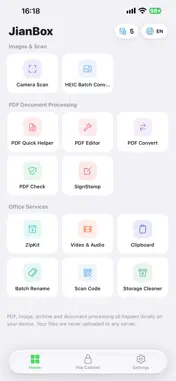
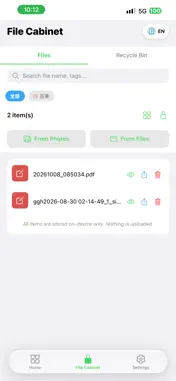
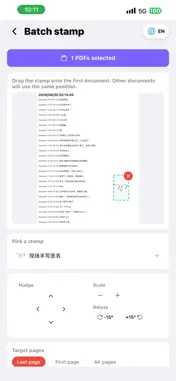
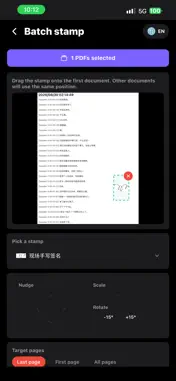
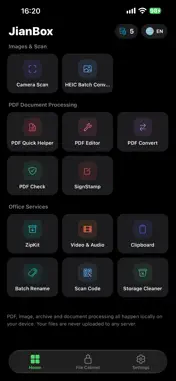
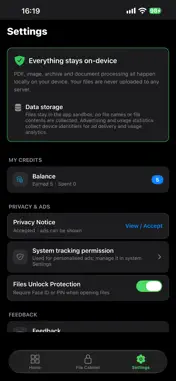
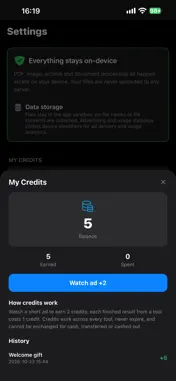
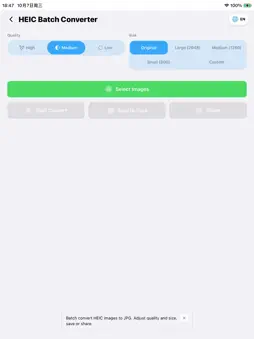
JianBox = Document Scanner + PDF Editor + File Unarchiver + Private Vault, all in one. 100% Local Processing. Your files never leave your device. One app, twelve capabilities, zero cloud uploads, zero account login required. Scan documents, convert formats, edit PDFs, extract archives, free up storage, encrypt files—everything happens offline on your iPhone and iPad. Documents & Scanning 【Camera Scanner】 Snap photos or import from album. Auto edge detection, enhancement, multi-page scanning, export as PDF. Contracts, receipts, notes, IDs—turn them into high-quality PDFs instantly. 【Image to PDF】 Select multiple images and merge them into a single PDF. Custom page sizes (A4/Letter), watermark support. Fully offline. 【PDF Editor】 Reorder, rotate, delete, or extract PDF pages with simple drag-and-drop gestures. 【PDF Verifier】 Professional PDF inspection tool: page consistency check, blank page detection, metadata viewer, SHA-256 hash verification. Auto-generates verification reports for compliance scenarios. 【Signature Tool】 Place personal signatures or company stamps on PDFs. Drag-and-drop positioning, resize, rotate, batch signing across multiple files. Final step for contract approval and formal delivery. Files & Compression 【HEIC Converter】 Batch convert iPhone HEIC/HEIF photos to universal JPG format. Adjustable quality and dimensions, text or image watermark support. Solves the "Windows can't open iPhone photos" problem. 【Unarchiver】 Extract ZIP, RAR, 7Z, TAR, GZIP, BZIP2, XZ. Also create password-protected ZIP archives from multiple files. Open compressed attachments directly without a computer. 【Batch Renamer】 Rename files or photos with prefix, suffix, numbering, find-replace, timestamps. Preview before applying, undo support. 【Storage Cleaner】 Scan large files, duplicate photos, and app caches. Free up space with one tap. Media Processing 【Video & Audio Toolkit】 Convert formats, compress files, trim videos, extract audio tracks. All processing happens locally with zero data usage. Privacy & Security 【Private Vault】 Encrypt and store sensitive files and photos. Face ID / Touch ID locked. Bank-level encryption protects your data even if your phone is lost. Productivity Tools 【Clipboard History】 Automatically saves copied text. Pin important items, search history, categorize. Never lose a copied verification code or address again. 【QR Scanner & Generator】 Scan QR codes and barcodes, or generate custom QR codes. History auto-saved for easy reference. Key Features • 100% Offline — Files stay on your device, never uploaded • 12-in-1 Toolkit — Replace 12 separate apps, save storage • Clean and Tidy — Clean, distraction-free interface • iPad Optimized — Full-screen support, split-view ready • Multi-Language — English, Chinese, Japanese, Korean Privacy & Security JianBox respects your privacy. All file processing occurs entirely on your device. We do not collect, upload, or store any of your file contents. The Private Vault uses device-level encryption. No account sign-up required. No usage tracking. No marketing notifications. Pro Version One-time purchase. iPhone + iPad universal. Lifetime access to all 12 tools. No subscription, no recurring fees, no account binding. Future updates included forever. Questions or feedback? Contact us through the in-app support feature.
What's New
Version 1.8 2026-10-30
New Features 1. File cabinet swipe actions: swipe left on any file to reveal "Share / Delete" (or "Restore / Delete forever" in the recycle bin) - cleaner rows... Technical Analysis
Package Overview Basic metadata
Bundle ID
com.liutao.jianbox Current Version 1.8
Minimum iOS 16.4
Package Size App Store Size
Package Metadata 0 / 0 version records
Detailed binary, privacy manifest, framework, and Info.plist results have not been indexed for this package yet. The verified App Store and archive metadata above remains available.
Developer Information
Known Version Records
0 version records with stored package metadata
Stored metadata does not guarantee a package is currently available to download.
| Details | Version / IDs | Version date | Action |
|---|