
Preview





Description
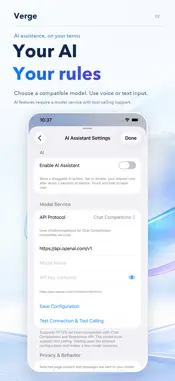
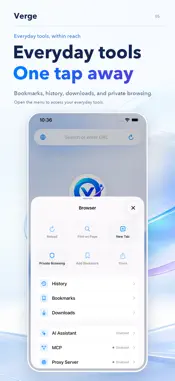
Verge brings everyday browsing and an optional AI assistant together in one app. Open your favorite websites, keep useful pages close, and ask for help without leaving the browser. Use voice or chat to describe what you want to do, while keeping the page and the assistant within reach. Connect the AI service you choose. Set your provider's Base URL, model name, and API key, then test the connection and tool support before starting a task. Verge supports compatible HTTPS services using Chat Completions or Responses API. Your selected model must support tool calling to operate the browser. AI is optional and can be enabled or disabled in Settings. Speak when typing feels inconvenient. Tap the floating AI button, say what you need, and let Verge submit your request after a short pause. You can also end recording and run the request yourself. Ask the assistant to open a website, search for information, read a page, or help you work through supported browser actions. Use the assistant for focused browser work. It can navigate, search, review visible text, click supported controls, enter text, choose options, scroll, find content, and manage task tabs. Some actions may ask for approval first. Prefer a conversation? Press and hold the AI button to open the chat panel. Type a request, review the assistant's replies and activity, and send a follow-up when the task is finished. Collapse the panel to return to the page while keeping the current conversation available during the same app session. Keep your assistant where it suits you. Drag the floating button to a comfortable spot on the screen. When the address bar and bottom toolbar are hidden, an active task appears in a compact status capsule beside the button. The capsule moves with it, giving you a quick way to reopen the conversation or stop the task. Stay involved as the assistant works. Check its current status, review requests for approval when required, or stop execution at any time. Turning AI off or moving the app into the background stops recording and active tasks. Private tabs are excluded from AI tasks, so start an assistant session from a regular tab. Browse with familiar essentials. Open and switch between tabs, revisit your history, save bookmarks, find text within a page, and share links. The start page offers quick access to websites, while the address field lets you enter a URL or search using Google, Bing, or DuckDuckGo. Make room for the content. Verge can tuck away the address bar and bottom toolbar as you browse, leaving more of the page visible while retaining a compact domain display. Choose the default website identity, Desktop Safari, or a custom User-Agent when a site needs a different presentation. Keep downloads organized. View downloaded files in the browser's download library and manage them alongside your browsing. Supported web videos can be saved when a downloadable source is available. Download availability depends on the website and the media format. For advanced workflows, Verge includes an optional Model Context Protocol service. Connect a compatible MCP client to supported browser tools, configure the service port, and manage its access key. Access to your regular browsing profile requires a separate setting and confirmation. You can also configure proxy profiles for browser and download traffic. Choose English or Simplified Chinese for the app, or follow your system language. The AI interface follows your selection, including settings, controls, and activity messages. Your own prompts and the model's replies stay in the language in which they were written. AI requests send the selected page content and conversation to the model service you configure. API keys are stored in the device's Keychain. Voice input prefers on-device recognition and may use Apple's speech service when needed. Model access, availability, and any usage charges depend on your provider. Verge gives you the tools to bring that service into your browsing routine.
What's New
Version 1.3.3 2026-10-23
bug fix. Technical Analysis
Package Overview Basic metadata
Bundle ID
com.thinkletlabs.browser Current Version 1.3.3
Minimum iOS 26.2
Package Size App Store Size
Package Metadata 0 / 3 version records
Detailed binary, privacy manifest, framework, and Info.plist results have not been indexed for this package yet. The verified App Store and archive metadata above remains available.
Known Version Records
0 version records with stored package metadata • 3 known version records
Stored metadata does not guarantee a package is currently available to download.
| Details | Version / IDs | Version date | Action |
|---|---|---|---|
| Not archived | App Store ID: 889651062 | Unknown | Request Version |
| Not archived | App Store ID: 889437739 | Unknown | Request Version |
| Not archived | App Store ID: 888487949 | Unknown | Request Version |