Preview


Description
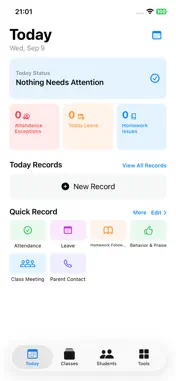
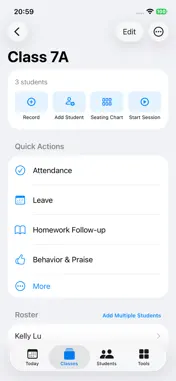
ClassThread is a local-first daily workspace for teachers who need a simple way to keep classroom work, student records, and follow-up organized. Instead of spreading daily notes across paper, spreadsheets, messaging apps, and separate classroom utilities, ClassThread keeps the work you actually do with your classes in one place. TODAY AT A GLANCE Start each day with a clear overview of: • Attendance exceptions • Student leave • Homework issues • Records created today • Items that need follow-up Quick Record gives you fast access to the tools you use most often. CLASSES AND STUDENTS Create your classes, organize student rosters, search students, manage seating, and open a student’s record whenever you need more context. Student management includes editing student information, transferring a student to another class, setting a current student status, and safely removing students while preserving historical records where required. STUDENT TIMELINE Student-related records can be viewed together in a chronological timeline. This makes it easier to review previous attendance issues, homework follow-up, praise, behavior notes, family communication, and other records before a conversation or follow-up. TEACHER TOOLS ClassThread includes built-in workflows for common teacher tasks: • Attendance • Leave • Homework Follow-up • Behavior & Praise • Parent Contact • Student Follow-up • Class Meeting • Duty • General Note Each tool keeps its own records while still fitting into the same classroom and student workflow. DAY AND HISTORY Use Day view to work with records for a selected date. Switch to History to review all records grouped by date, with the newest records first. You can also create backdated records when something needs to be entered for an earlier day. CREATE YOUR OWN TOOLS Every teacher works differently. With Custom Tools, you can create your own classroom workflow, choose what it is used for, define fields and choice options, and decide how it fits into your daily recording process. FOLLOW-UP Records that require another action can be given a follow-up date. Items that are due or overdue are surfaced in Today so important student matters are easier to revisit. BACKUP AND EXPORT ClassThread includes tools for backing up and exporting your data. Depending on the data you choose, you can export or share records using supported formats such as backup files, CSV, and PDF through the system share sheet. LOCAL-FIRST ClassThread is designed for normal use without an account or developer-operated server. Your classroom data is primarily stored locally on your device. Data leaves the app only when you explicitly choose to export, back up, or share it. ClassThread is designed to stay focused on the teacher’s daily workflow: record what happened, find it again later, and keep track of what still needs attention.
Technical Analysis
Package Overview Basic metadata
Bundle ID
com.yangliu.classtap Current Version 1.0
Minimum iOS 17.0
Package Size App Store Size
Package Metadata 0 / 0 version records
Detailed binary, privacy manifest, framework, and Info.plist results have not been indexed for this package yet. The verified App Store and archive metadata above remains available.
Developer Information
Known Version Records
0 version records with stored package metadata
Stored metadata does not guarantee a package is currently available to download.
| Details | Version / IDs | Version date | Action |
|---|