
Preview






Description
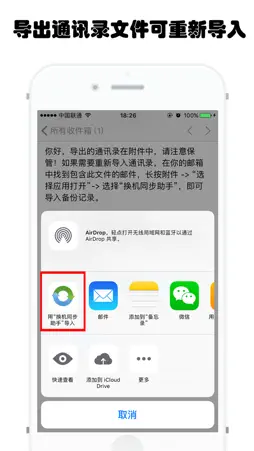
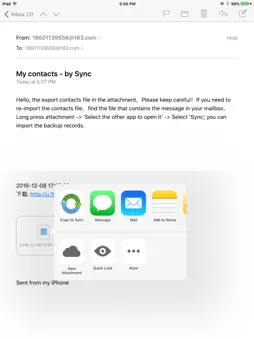
備份通訊錄,安全第一! 不再上傳到雲服務器,直接匯出為檔案,發送至您的安全信箱,並可下載到本地閱讀編輯! #.備份&匯出&編輯為Excel(CSV)或者網頁(htm)或 PDF檔案。 #.從郵箱簡單導入備份檔案。 #.通訊錄智慧分析,圖表展示,重複的連絡人智慧合併,缺失重要資訊的連絡人智慧清理。 操作方法: 1、備份&匯出&編輯為Excel(CSV)或者網頁(htm)或 PDF檔案 通訊錄中的連絡人,可以直接備份並匯出未CSV或者htm檔案。CSV檔案可以直接被Excel打開瀏覽,htm檔案可以直接被IE、Safari、chrome等瀏覽器瀏覽器。CSV文和htm檔案可以通過郵件直接發送備份。 如果使用Excel打開CSV檔案中出現亂碼,請先打開空白的Excel,選擇數據>自文字>選擇*.csv檔案,然後選擇英文逗號為分隔符號,選擇UTF8編碼格式,就能消除亂碼,正常打開。 2、從郵箱簡單導入備份檔案 你可以直接在程式的匯出記錄中選擇記錄,直接導入備份到連絡人。 如果你更換設備,也可以在郵件中(或者其他保存備份檔案的程式)打開備份檔案,選擇“其它程式打開”-》選擇“通訊錄備份清理專家”,關聯到程式後,[通訊錄備份清理專家]會自動分析記錄,並導入到通訊錄中。 對於自己寫或者編輯過的CSV和htm備份檔案,只要符合CSV和htm檔案格式,均可以被正確的導入。 3、通訊錄智慧分析,圖表展示。 會對你的連絡人進行智慧分析,包括連絡人的名稱、電話、eMail等,並對結果已表格和圖表的管道展示,讓你對你的通訊錄的內容一覽無遺。 4、重複的連絡人智慧合併。 對於連絡人的名稱、電話、eMail重複的連絡人,可以輕鬆的合併為一個新的連絡人,並可選擇是否删除老的連絡人。 5、缺失重要資訊的連絡人智慧清理 對於缺失連絡人的名稱、電話、eMail等重要資訊的連絡人,你可以一鍵删除,或者單獨删除,或者把他們補充完整。 注意:當程式啟動的時候,請運行程式訪問您的通訊率,否則無法進行清理,如果您開始點擊了否,請在系統設置->隱私->通訊錄,授權訪問通訊錄,重新開始即可。
What's New
Version 5.72 2018-02-12
優化了通訊錄同步導出的效率,修復了bug。 Technical Analysis
Package Overview Basic metadata
Bundle ID
com.wzh.emoji Current Version 5.72
Minimum iOS 8.0
Package Size Latest Recorded Package Size
Package Metadata 1 / 15 version records
Detailed binary, privacy manifest, framework, and Info.plist results have not been indexed for this package yet. The verified App Store and archive metadata above remains available.
Known Version Records
1 version record with stored package metadata • 15 known version records
Stored metadata does not guarantee a package is currently available to download.
| Details | Version / IDs | Version date | Action |
|---|---|---|---|
 11.38 MB | v5.72 App Store ID: 841469473Build: 18021201 | 2021-04-16 02:05:14 | Get Version |
| Not archived | App Store ID: 825974204 | Unknown | Request Version |
| Not archived | App Store ID: 825184474 | Unknown | Request Version |
| Not archived | App Store ID: 824429112 | Unknown | Request Version |
| Not archived | App Store ID: 824282938 | Unknown | Request Version |
| Not archived | App Store ID: 823476448 | Unknown | Request Version |
| Not archived | App Store ID: 821126699 | Unknown | Request Version |
| Not archived | App Store ID: 820470434 | Unknown | Request Version |
| Not archived | App Store ID: 820073892 | Unknown | Request Version |
| Not archived | App Store ID: 818573210 | Unknown | Request Version |
| Not archived | App Store ID: 812183120 | Unknown | Request Version |
| Not archived | App Store ID: 812168271 | Unknown | Request Version |
| Not archived | App Store ID: 738302694 | Unknown | Request Version |
| Not archived | App Store ID: 688702798 | Unknown | Request Version |
| Not archived | App Store ID: 654542892 | Unknown | Request Version |