
Preview






Description
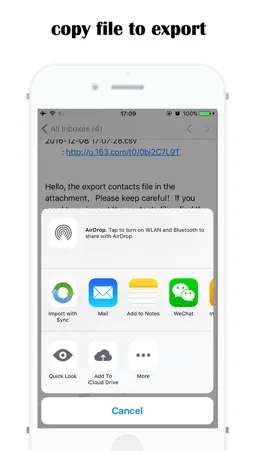
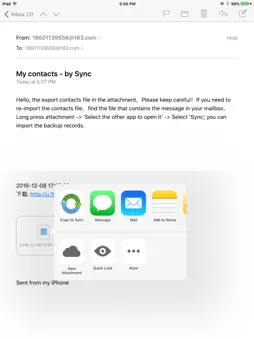
Backup Contacts, Safety First! Not uploaded to third-party servers, directly exported as a file, sent to your security mail box, and can be downloaded to the local reading editor! #. Backup & Export & Editor for Excel (CSV) or page (HTM) or PDF files. #. from simple mailbox into backup files. #. mail list intelligent analysis, graphic display, intelligent contact with duplication of contacts, lack of intelligent cleaning important information. Operation method: 1, backup & Export & edit for Excel (CSV) or page (HTM) or PDF file Contacts in the address book, you can directly back up and export files without CSV or htm. CSV files can be directly open to browse HTM, Excel files can be directly IE, Safari, chrome and other browser browser. CSV documents and HTM files can be sent directly through the mail back. If you use Excel to open the garbled CSV file, please open the blank Excel, Select > > select text data from the *.csv file, then select the English comma delimiter, UTF8 encoding format, can eliminate garbled, normally open. 2, from the mailbox simply import backup files You can directly select a record from the program's export records, directly import the backup to contact. If you replace the equipment, can also be in the mail (or other program to save backup files) open backup file, select "other programs open" - "select" mail list cleanup experts ", related to the program," mail list cleanup expert] will automatically analyze the records, and imported into the mail list. For their own write or edit the CSV and HTM backup files, as long as the CSV and HTM file format, can be properly imported. 3, address book intelligent analysis, graphic display. Will you contact intelligent analysis, including contact name, telephone, eMail, and the results have tables and charts show the way, make your mail list content at a glance. 4, repeated contact intelligent merger. For contact name, telephone, eMail duplicate contacts, you can easily merge into a new contact, and can choose whether to delete the old contact. 5, the lack of important information contact intelligent cleaning For the missing contact name, telephone, eMail and other important information of the contact, you can delete a key, or separate delete, or to add them to complete. Note: when the program starts, please run the program to access your communication rate, otherwise can not be cleaned up, if you click on the start or not, please in the system settings - > > Privacy mail list, authorized to access the mail list, you can start again.
What's New
Version 5.72 2018-02-12
Optimized contacts export & backup efficiency, bug fixes. Technical Analysis
Package Overview Basic metadata
Bundle ID
com.wzh.emoji Current Version 5.72
Minimum iOS 8.0
Package Size Latest Recorded Package Size
Package Metadata 1 / 15 version records
Detailed binary, privacy manifest, framework, and Info.plist results have not been indexed for this package yet. The verified App Store and archive metadata above remains available.
Known Version Records
1 version record with stored package metadata • 15 known version records
Stored metadata does not guarantee a package is currently available to download.
| Details | Version / IDs | Version date | Action |
|---|---|---|---|
 11.38 MB | v5.72 App Store ID: 841469473Build: 18021201 | 2021-04-16 02:05:14 | Get Version |
| Not archived | App Store ID: 825974204 | Unknown | Request Version |
| Not archived | App Store ID: 825184474 | Unknown | Request Version |
| Not archived | App Store ID: 824429112 | Unknown | Request Version |
| Not archived | App Store ID: 824282938 | Unknown | Request Version |
| Not archived | App Store ID: 823476448 | Unknown | Request Version |
| Not archived | App Store ID: 821126699 | Unknown | Request Version |
| Not archived | App Store ID: 820470434 | Unknown | Request Version |
| Not archived | App Store ID: 820073892 | Unknown | Request Version |
| Not archived | App Store ID: 818573210 | Unknown | Request Version |
| Not archived | App Store ID: 812183120 | Unknown | Request Version |
| Not archived | App Store ID: 812168271 | Unknown | Request Version |
| Not archived | App Store ID: 738302694 | Unknown | Request Version |
| Not archived | App Store ID: 688702798 | Unknown | Request Version |
| Not archived | App Store ID: 654542892 | Unknown | Request Version |