Preview







Description
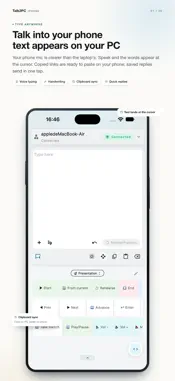
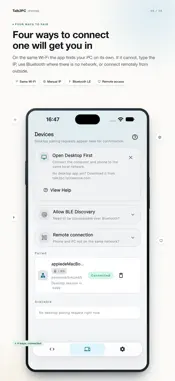
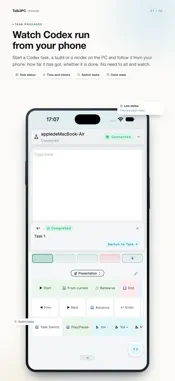
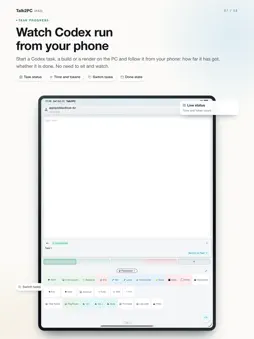
Check if any of these daily needs match yours: • You are a Lecturer or Presenter You want a versatile presentation remote and teacher remote. Walk freely during lectures, snap notes with a mobile document camera to zoom and annotate in real time on the big screen, and control slides without touching the podium or logging into personal messaging apps. • You are a Writer, Coder, or Support Specialist Laptop mics are noisy and inaccurate. You want to speak into your phone's clear mic to type directly onto your PC cursor, or handwrite non-Latin scripts and complex characters directly to your screen. • You are a Multi-Device Power User Text copied on your PC pastes instantly on your phone. Snap a sketch or select a file on your phone, and it inserts directly into your active PC window (like AI prompts such as Codex, code editors, or chat boxes) without digging through download folders. • You are an Office Worker with Wrist Strain Stiff wrists and muscle fatigue from holding a desk mouse all day. You want to lean back, stand, or lie down and use a handheld air mouse to navigate your PC. • You are a Tablet Remote Worker When remoting into your PC, you hate on-screen keyboards popping up and blocking half the display. Or you want to monitor background task progress and trigger custom software shortcuts from your phone. If any of these fit your routine, Talk2PC turns your smartphone into an all-in-one presentation clicker, wifi mouse, and ergonomic remote control for PC. Teaching & Presentations (For Lecturers & Speakers) Live Sync Zoom Whiteboard & Document Camera: Snap physical documents, printouts, or capture your PC screen as a background. When you pinch-to-zoom on your phone, the big screen or projector zooms and pans simultaneously in real time. Pens & Evaluation Stamps: Highlight key steps, write notes, and apply grading/evaluation stamps directly from your phone screen. Air Mouse, Spotlight & Slide Control: Wave your phone in the air to guide the cursor. Turn on Spotlight or Halo mode to dim the background and highlight key points. Use it as a dedicated presentation remote and ppt remote for slide flipping. Private Direct File Transfer: Send presentations directly to public computers without logging into personal social media or messaging accounts on public displays. Text Input & Streamlined Workflow (For Typing & Multi-Tasking) Send Photos & Files Directly to the Active Window: When writing code, prompting AI (such as Codex), or chatting on PC: snap a sketch or document on your phone, and it inserts directly into your active focused window. No hunting through download folders or dragging files. PC Clipboard Auto-Sync to Phone: Copy text, links, or codes on your PC (Ctrl+C), and your phone clipboard syncs instantly for one-tap pasting. Native Mobile Keyboard Power on PC: Bring your familiar mobile keyboard straight to your PC cursor. High-accuracy voice typing (via your phone's superior mic), touchscreen handwriting, non-Latin scripts, and live translation type directly onto your computer screen. Talk2PC Quick Phrases Panel: Save frequent replies and templates on your phone. Tap once, and the full paragraph is pasted directly into your active PC window. Ergonomic Comfort & Posture Freedom (Relieve Wrist Strain & Remote Desktop) Free Your Posture with Handheld Air Mouse: Prolonged desk mouse usage strains your wrist. Switch to comfortable, natural postures using the gyro air mouse: Work Lying Down Work Standing Up Wrist Relief Tablet Remote Companion (No Screen Blocking): Keep your tablet full-screen for remote display, using your phone as a dedicated remote mouse and wireless typing keyboard. Custom Software Macro Deck: Map complex multi-key shortcuts for design, 3D, and editing apps into large, accessible buttons on your phone. Terms of Use: https://www.apple.com/legal/internet-services/itunes/dev/stdeula/
What's New
Version 1.2.0 2026-11-03
What's New Mouse Control — Take full control of your computer with your mouse. Custom Keyboard — Type easily with a customizable on-screen keyboard. Spotlight ...What's New Mouse Control — Take full control of your computer with your mouse. Custom Keyboard — Type easily with a customizable on-screen keyboard. Spotlight — Draw attention to key areas of the screen with an adjustable spotlight. Whiteboard — Sync your phone's drawing board to the big screen in real time. File Transfer — Send files instantly during your session. Quick Phrases — Send frequently used messages with a single tap. Technical Analysis
Package Overview Basic metadata
Bundle ID
com.lycheenow.talk2pcclient Current Version 1.2.0
Minimum iOS 15.0
Package Size App Store Size
Package Metadata 0 / 0 version records
Detailed binary, privacy manifest, framework, and Info.plist results have not been indexed for this package yet. The verified App Store and archive metadata above remains available.
Developer Information
Known Version Records
0 version records with stored package metadata
Stored metadata does not guarantee a package is currently available to download.
| Details | Version / IDs | Version date | Action |
|---|