
Preview



Description
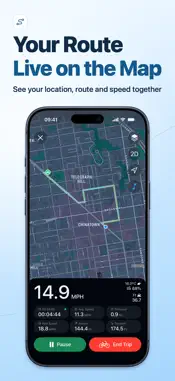
Turn your iPhone into a GPS speedometer and trip log. See your speed and distance as you move, record your route, and replay it in 3D when the trip is over. LIVE SPEED & HUD Read current, average, and top speed in mph, km/h, or knots. Switch to a large landscape HUD with an optional mirrored display for windshield reflection. Check altitude and compass heading, and open weather details such as wind and humidity when available. Pro lets you change gauge themes, set a speed threshold for alerts, and see hourly forecasts when available. TRIP LOG & 3D REPLAY Choose from six modes: walk or run, bike, drive, train, boat, or fly. Track distance, elapsed time, and your route. Open a saved trip to review the map and speed or elevation charts, replay the route in 3D, or export it as a GPX file or route video. The walk/run mode also shows pace. With Pro, you can save unlimited trips and sync them through iCloud. LOCK SCREEN & TRIP MUSIC Follow a trip with Live Activities on the Lock Screen or Dynamic Island on supported devices. Choose a Simple, Detailed, or Health layout, or turn it off. Add Lock Screen or Home Screen widgets for a trip summary or quick access to the app. Use the draggable in-app music controls with songs and playlists from your music library or make your own collections. The interactive music widget requires iOS 17 or later. OPTIONAL HEALTH DATA With permission, walking and running can show steps. Walking, running, and cycling can show heart rate and active energy when samples are available. Health data read for trips stays on the device and is excluded from iCloud trip sync. GPS speed and route recording require location access. Readings vary with signal and surroundings. Set up the app while parked. Terms of Use: http://cpux.gmud.top/web/gpsfit/termsofservice.html Privacy Policy: http://cpux.gmud.top/web/gpsfit/privacypolicy.html Support: [email protected]
What's New
Version 1.3.2 2026-11-14
• Optimized for iPhone Duo and iOS 27 • Follow your trip with Live Activities on the Lock Screen and Dynamic Island. Choose from Simple, Detailed, and Health st...• Optimized for iPhone Duo and iOS 27 • Follow your trip with Live Activities on the Lock Screen and Dynamic Island. Choose from Simple, Detailed, and Health styles • Control music during a trip with floating playback controls. The interactive music widget requires iOS 17 or later • Tap the weather, altitude, or compass next to the speedometer to see more details • Improved GPS speed measurement and route filtering • Improved usability and stability Technical Analysis
Package Overview Basic metadata
Bundle ID
com.benchu.GPSFit Current Version 1.3.2
Minimum iOS 16.0
Package Size App Store Size
Package Metadata 2 / 5 version records
5.0 / 5.0 (7 ratings)
Detailed binary, privacy manifest, framework, and Info.plist results have not been indexed for this package yet. The verified App Store and archive metadata above remains available.
Developer Information
Known Version Records
2 version records with stored package metadata • 5 known version records
Stored metadata does not guarantee a package is currently available to download.
| Details | Version / IDs | Version date | Action |
|---|---|---|---|
 6.57 MB | v1.3.1 App Store ID: 887066568Build: 1.3.1 | 2026-08-04 18:21:15 | Get Version |
| 3.73 MB | v1.2.1 App Store ID: 869666142Build: 16 | 2024-10-14 11:09:50 | Get Version |
| Not archived | App Store ID: 868166822 | Unknown | Request Version |
| Not archived | App Store ID: 866747625 | Unknown | Request Version |
| Not archived | App Store ID: 866361488 | Unknown | Request Version |