Preview


Description
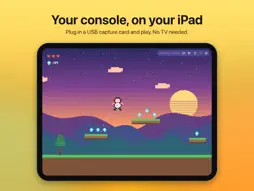
Built for one thing: the lowest latency possible. DockView turns your Mac or iPad into a game screen for your console, using a USB capture card — and gets every frame from the HDMI cable onto your display faster than anything else we've tried. STRAIGHT TO METAL • Every frame goes from the capture card directly to the GPU through Metal — no video player, no buffering queue, no extra frame of delay • On Mac, full screen hands frames straight to the display, bypassing the window compositor • Measured on a MacBook Pro with a 1080p60 capture card: about 22 ms from the capture card's timestamp to on screen — barely more than the card itself needs to deliver the frame • Turn off vertical sync on Mac to shave off the last few milliseconds • Live latency statistics show exactly how fast every frame arrives and appears — see it for yourself PLUG AND PLAY • Your capture card is detected automatically and starts the moment it's connected • Pick your console once and DockView chooses the fastest resolution, frame rate and uncompressed format, including 120 fps when your capture card supports it • Step-by-step tips for each console's video settings (resolution, RGB range, HDR, HDCP) • Stays put through HDMI resolution changes when a game starts, and recovers automatically after unplugging or sleep LOW-LATENCY SOUND • Game audio plays through a direct low-latency path to your speakers or headphones • Mute or adjust the volume instantly DESIGNED FOR MAC AND IPAD • Mac: native app with full screen, keep-on-top window and keyboard shortcuts • iPad: full-screen video with tap-to-show controls, Stage Manager and keyboard shortcuts • English, Simplified Chinese and Japanese PRIVATE BY DESIGN DockView works entirely on your device. Nothing is recorded, uploaded or tracked. COMPATIBILITY Works with Nintendo Switch, Nintendo Switch 2, Steam Deck, PlayStation 4, PlayStation 5 and any device with HDMI output. Requires a UVC-compatible USB capture card (most HDMI-to-USB capture cards). iPad requires a USB-C iPad with iPadOS 17 or later. Nintendo Switch, PlayStation and Steam Deck are trademarks of their respective owners. DockView is not affiliated with or endorsed by them. Terms of Service & Privacy Policy - https://www.apple.com/legal/internet-services/itunes/dev/stdeula/ - https://dockview.portrays.app/privacy
What's New
Version 1.2.0 2026-11-05
Fixed some known issues. Technical Analysis
Package Overview Basic metadata
Bundle ID
com.fly.dockview.mac Current Version 1.2.0
Minimum iOS 17.0
Package Size App Store Size
Package Metadata 0 / 0 version records
Detailed binary, privacy manifest, framework, and Info.plist results have not been indexed for this package yet. The verified App Store and archive metadata above remains available.
Known Version Records
0 version records with stored package metadata
Stored metadata does not guarantee a package is currently available to download.
| Details | Version / IDs | Version date | Action |
|---|