
Preview


Description
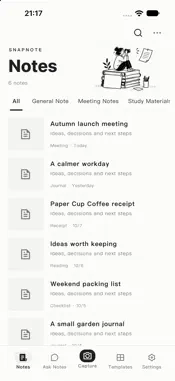
Turn photos into notes you can use. SnapNote organizes receipts, tables, meeting notes, study materials, and everyday documents into readable, editable, searchable notes. After downloading and activating a local model, text recognition, organization, and Ask Notes run on your device. No app account or cloud AI API is required. From photos to notes Capture pages with the camera or import images from your photo library. Review, crop, and rotate pages, then choose a document type or template. Keep the original images, OCR text, and organized result together so you can check and edit the output. Ask your own documents Select saved notes to summarize key points, compare information, or create action lists. Source references help you return to the relevant note and verify the answer. Preview, save, and share generated Markdown and CSV files within the app. Organize your way Manage your library with document types, tags, favorites, and search. Use built-in templates for common tasks, or define your own structure and instructions with custom templates. Export note results in multiple formats for further editing or archiving. Made for iPhone Duo Browse a list and its details side by side on the inner display. Split views cover Notes, Ask Notes, Generated Files, Templates, and Settings. The outer display and standard iPhones retain a comfortable single-column experience. On-device processing and privacy Photos, recognized text, and notes are processed and stored on your device rather than sent to our document-processing servers. Initial model setup and model updates require an internet connection and sufficient storage. Once a model is ready, core features can work offline. AI output may contain mistakes; check it against the original material. Free and Pro Basic recognition, note management, and the basic model are free, with no per-use processing charge. Optional auto-renewable SnapNote Pro subscriptions unlock advanced models, multi-page batch recognition, PDF import, custom templates, and CSV export from Ask Notes. Monthly and annual plans are available. Prices, features, and availability are shown in the app's purchase screen. Apple handles payment; manage or cancel subscriptions in your Apple Account settings. Support: https://snapnote.bitanoworks.com/en/support Privacy Policy: https://snapnote.bitanoworks.com/en/privacy Terms of Use (EULA): https://www.apple.com/legal/internet-services/itunes/dev/stdeula/
What's New
Version 1.0.3 2026-10-10
• Added iPhone Duo split views for Notes, Ask Notes, Generated Files, Templates, and Settings. • Improved generated-file browsing with a separate list and conte...• Added iPhone Duo split views for Notes, Ask Notes, Generated Files, Templates, and Settings. • Improved generated-file browsing with a separate list and content preview. • Refined note-type filters, sidebar sizing, menus, and dialog placement. • Improved keyboard dismissal and navigation while preserving your input. • Improved layouts on standard iPhones, across orientations, and with larger text. • Refined Chinese and English interfaces and fixed interaction issues. Technical Analysis
Package Overview Basic metadata
Bundle ID
com.chaisen.snapnote Current Version 1.0.3
Minimum iOS 26.0
Package Size App Store Size
Package Metadata 0 / 0 version records
Detailed binary, privacy manifest, framework, and Info.plist results have not been indexed for this package yet. The verified App Store and archive metadata above remains available.
Developer Information
Known Version Records
0 version records with stored package metadata
Stored metadata does not guarantee a package is currently available to download.
| Details | Version / IDs | Version date | Action |
|---|