
ShelfStream - Comic Reader App Icon

ShelfStream - Comic Reader

4+ v2.1 Recorded price: Free App Store →
★★★★★
★★★★★
(2 App Store ratings)
🏆 Best: #69 Top Grossing (IDN)
IPA Analysis
Technical Specs
Bundle ID jp.co.remosia.shelfstream
Version 2.1
App Store Size 21.99 MB
Minimum iOS 17.0
Devices iPhone, iPad, iPod touch
Catalog release date 2026-01-15
Latest recorded version date 2026-10-23
Features & Support
Advisory 4+
Languages (4)
EN, JA, KO, ZH
Top In App Purchases
No In App Purchases Listed

Preview

ShelfStream - Comic Reader screenshot 1 ShelfStream - Comic Reader screenshot 2 ShelfStream - Comic Reader screenshot 3 ShelfStream - Comic Reader screenshot 4 ShelfStream - Comic Reader screenshot 5 ShelfStream - Comic Reader screenshot 6 ShelfStream - Comic Reader screenshot 7 ShelfStream - Comic Reader screenshot 8 ShelfStream - Comic Reader screenshot 9 ShelfStream - Comic Reader screenshot 10 ShelfStream - Comic Reader screenshot 11 ShelfStream - Comic Reader screenshot 12 ShelfStream - Comic Reader screenshot 13 ShelfStream - Comic Reader screenshot 14 ShelfStream - Comic Reader screenshot 15 ShelfStream - Comic Reader screenshot 16 ShelfStream - Comic Reader screenshot 17 ShelfStream - Comic Reader screenshot 18 ShelfStream - Comic Reader screenshot 19 ShelfStream - Comic Reader screenshot 20

Description

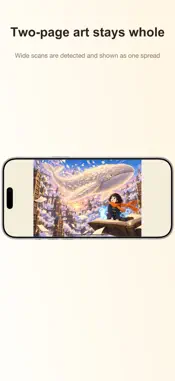
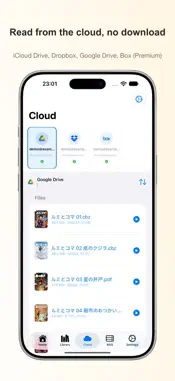
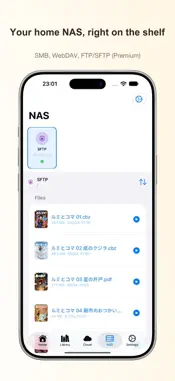
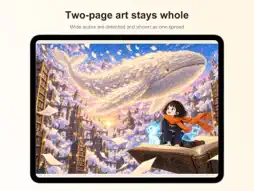
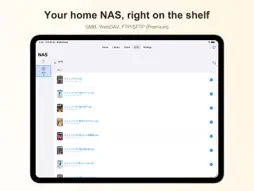
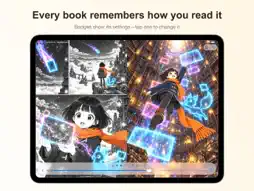
【The Ultimate Comic & Manga Viewer】 ShelfStream is the next-generation viewer designed for comic enthusiasts who want the best reading experience for their scanned ebook and comic collection. ■ iPhone Duo Support • Open your iPhone Duo and keep reading the same page—the fold becomes the book's spine and you read in a two-page spread • Scanned two-page spreads open as one image, centered on the fold • Half-open in portrait: read on the top half, browse and turn pages on the bottom half • Right-to-left and left-to-right books are laid out just like printed books ■ Cloud Storage Support (Premium) • Works with iCloud Drive, Dropbox, Google Drive, and Box • Read your files where they are, without copying them to your device ■ NAS & Server Connection (Premium) • SMB, WebDAV, FTP/SFTP protocols supported • Open books on your home server without copying them • Handle massive libraries effortlessly ■ Comfortable Reading Experience • ZIP/CBZ files prefetch page by page, so you can start reading without waiting for the whole file (RAR/CBR/7z/PDF are retrieved in full before display) • 7 reading styles (single page, two-page spread, vertical scroll (Webtoon), and more) • Right-to-left and left-to-right reading support • New Page Curl mode: pages curl like paper as you turn them (not available for vertical reading or scrolling) • Save display settings per book and series ("Apply to Series" for batch setup) • Set the fit method separately for portrait/landscape, plus a landscape layout option ■ Extensive Format Support • ZIP, CBZ, RAR, CBR, PDF, 7z compatible • Image files (JPEG, PNG, WebP) ■ Easy Library Management • Organize by series • Bookmarks and reading history (reading position is stored on this device) • Intuitive library controls • Works on iPhone, iPad, and iPhone Duo ■ Pricing • Free: local file reading, all 7 reading styles, series management, bookmarks • ShelfStream Premium: cloud and NAS connections with streaming  Monthly plan (1 month, auto-renewing) US$0.49 / Yearly plan (1 year, auto-renewing) US$5.99  Both include a 7-day free trial • No ads, including on the free plan Subscriptions renew automatically unless auto-renew is turned off at least 24 hours before the end of the current period. You can manage or cancel your subscription in your App Store account settings. The ultimate viewer for digital comic collectors. Start free today. --- Terms of Use: https://www.apple.com/legal/internet-services/itunes/dev/stdeula/ Privacy Policy: https://shelfstream.remosia.biz/privacy/

What's New

Version 2.1 2026-10-23
■ Put cloud and NAS books on your Library shelf (Premium) • Add books from cloud storage or NAS to the Remote shelf in your Library without downloading them in ...■ Put cloud and NAS books on your Library shelf (Premium) • Add books from cloud storage or NAS to the Remote shelf in your Library without downloading them in full • Switch with Local / Remote at the top of the Library, and tap a book to continue where you left off • In a cloud or NAS list, touch and hold a book and choose "Add to Library" to put it on the shelf • The Remote shelf also supports sorting, search, series view, book editing, and AI Series Auto-Detection • Tap "Select" in a list to choose several books, then "Import", "Add to Library", or "Add to Favorites" all at once • Batch imports show their progress, and you can stop them partway through • Tapping a book in a list now opens it right away instead of showing a menu ("Import to Device" and other options are available by touching and holding) ■ Importing books • Fixed files sent from other apps (with "Open in" and similar) not being added to your Library • ShelfStream now appears as a share destination for CBZ, CBR, and RAR files • When a book can't be imported, you now see the file name and the reason (including when some books inside a ZIP can't be imported) ■ Zoom • Pinch and double-tap zoom now center on where your finger is • Fixed the page staying shifted, or pages no longer turning, after zooming back out to normal size • Fixed Vertical Continuous Scroll and Webtoon still zooming with "Pinch Zoom" and "Double-Tap Zoom" turned off ■ Display language • Errors, dates, file sizes, and numbers now appear in the language you chose in the app • A wrong password or a server that can't be reached on an SMB or SFTP NAS is now reported with guidance on what to do ■ Keep your reading records when connections change • If you change your NAS's address, replace your NAS, or set up a connection again, your reading position, bookmarks, and Library books now carry over (when needed, you're asked once which connection the books belong to) • If you reconnect a cloud service with a different account, your books' records no longer mix with those from the previous account ■ Fixes • Fixed books not appearing in the list after adding iCloud Drive (connections you added earlier will ask for permission again when you open them) • Fixed "Your sign-in has expired" appearing by mistake when you returned to a Google Drive (or other cloud) book after leaving it open for a day or two • Fixed cloud and NAS books that couldn't be added to Favorites, didn't appear in Favorites on Home, or disappeared when you used "Delete Reading History" • Covers for books from cloud storage or NAS are now made at the same detail as books on your device (for newly made covers) • Fixed the bottom bar shown while selecting books going blank or being hidden behind the tab bar when you open, close, or rotate iPhone Duo

Technical Analysis

Package Overview Basic metadata
Bundle ID jp.co.remosia.shelfstream
Current Version 2.1
Minimum iOS 17.0
Package Size App Store Size
Package Metadata 0 / 10 version records
0.0 / 5.0 (0 ratings)
Detailed binary, privacy manifest, framework, and Info.plist results have not been indexed for this package yet. The verified App Store and archive metadata above remains available.

Developer Information

Known Version Records

0 version records with stored package metadata • 10 known version records

Stored metadata does not guarantee a package is currently available to download.

Details Version / IDs Version date Action
ShelfStream - Comic Reader icon
Not archived
App Store ID: 887847760 Unknown Request Version
ShelfStream - Comic Reader icon
Not archived
App Store ID: 887586911 Unknown Request Version
ShelfStream - Comic Reader icon
Not archived
App Store ID: 887364733 Unknown Request Version
ShelfStream - Comic Reader icon
Not archived
App Store ID: 886839335 Unknown Request Version
ShelfStream - Comic Reader icon
Not archived
App Store ID: 886776278 Unknown Request Version
ShelfStream - Comic Reader icon
Not archived
App Store ID: 883665448 Unknown Request Version
ShelfStream - Comic Reader icon
Not archived
App Store ID: 883629926 Unknown Request Version
ShelfStream - Comic Reader icon
Not archived
App Store ID: 881818723 Unknown Request Version
ShelfStream - Comic Reader icon
Not archived
App Store ID: 881592539 Unknown Request Version
ShelfStream - Comic Reader icon
Not archived
App Store ID: 881388904 Unknown Request Version