
Preview




Description
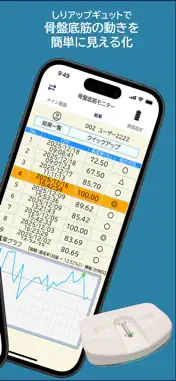
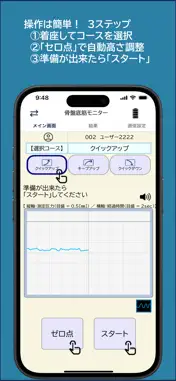
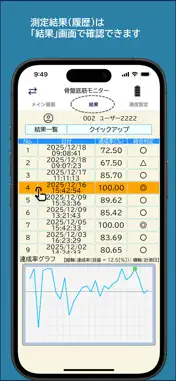
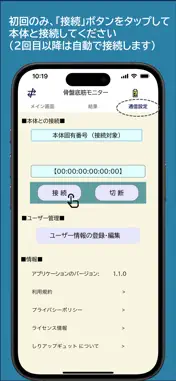
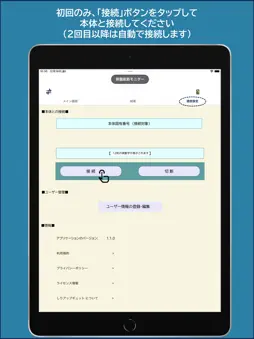
株式会社IDEALの骨盤底筋モニター「しりアップギュット」用のアプリです。 「しりアップギュット」本体には骨盤底筋の上下の動きを感知するセンサーが装備されています。 このアプリは、本体のセンサー情報をBluetoothを経由してリアルタイムに取得し、波形グラフとして表示します。 またアプリでは、取得したセンサー情報に基づいて骨盤底筋の動きを採点(数値化)します。 【測定(採点)の手順】 1)本体の電源を入れ、アプリを立ち上げます。 2)本体とアプリがBluetoothで接続されるのを待ちます。(接続完了後は本体LEDが青色点滅に変わります) 注:初回のみ、通信設定タブで手動接続してください。 3)本体に座り、アプリで測定コースを選択します。 4)正しい姿勢で「ゼロ点」をタップし、そのままの姿勢をキープして終了を待ちます(約10秒で終了します)。 5)「スタート」をタップ、ガイダンスに従って骨盤底筋を動かします。 6)終了後、結果タブでスコア(採点結果)を確認。 結果タブでは、過去の測定履歴(採点結果)を一覧とグラフで確認することが出来ます。(一覧は上下にスクロールできます) ユーザーIDを設定すると、設定したユーザーの測定結果のみが表示されます。複数人で一つの端末を共用する場合には、ユーザーIDを設定して活用すると便利です。 ユーザーIDの設定はメイン画面で行い、登録・編集は、通信設定タブの「ユーザー情報の登録・編集」ボタンから行います。 This is an app for IDEAL Co., Ltd.'s pelvic floor muscle monitor, "Shiri-Up Gyutto." The "Shiri-Up Gyutto" device is equipped with a sensor that detects the up and down movement of your pelvic floor muscles. This app receives sensor information from the device in real time via Bluetooth and displays it as a waveform graph. The app also scores (quantifies) the movement of your pelvic floor muscles based on the received sensor information. [Measurement (Scoring) Procedure] 1) Turn on the device and launch the app. 2) Wait for the device and app to connect via Bluetooth. (Once connected, the device's LED will flash blue.) Note: For the first time only, please connect manually in the Communication Settings tab. 3) Sit in front of the device and select a measurement course in the app. 4) While maintaining correct posture, tap "Zero Point," maintain that posture, and wait for it to finish (it will take about 10 seconds). 5) Tap "Start" and follow the guidance to exercise your pelvic floor muscles. 6) After completing the test, check your score (scoring results) in the Results tab. In the Results tab, you can view your past measurement history (scoring results) in a list and graph format. (You can scroll the list up and down.) By setting a user ID, only the measurement results for that user will be displayed. Setting a user ID is convenient when multiple people share a single device. User IDs are set on the main screen, and registration and editing can be done using the "Register/Edit User Information" button in the Communication Settings tab.
What's New
Version 1.2.0 2026-07-24
・測定終了時、結果をポップアップ表示する機能を追加 ・電池残量アイコン(インジケータ)の精度改善 - Added a function to display the results in a pop-up window when measurement is complete. - Improved the accu...・測定終了時、結果をポップアップ表示する機能を追加 ・電池残量アイコン(インジケータ)の精度改善 - Added a function to display the results in a pop-up window when measurement is complete. - Improved the accuracy of the battery level icon (indicator). Technical Analysis
Package Overview Basic metadata
Bundle ID
jp.co.KKideal.PFMSensorApp Current Version 1.2.0
Minimum iOS 15.0
Package Size App Store Size
Package Metadata 0 / 4 version records
Detailed binary, privacy manifest, framework, and Info.plist results have not been indexed for this package yet. The verified App Store and archive metadata above remains available.
Developer Information
Known Version Records
0 version records with stored package metadata • 4 known version records
Stored metadata does not guarantee a package is currently available to download.
| Details | Version / IDs | Version date | Action |
|---|---|---|---|
| Not archived | App Store ID: 882624000 | Unknown | Request Version |
| Not archived | App Store ID: 882211394 | Unknown | Request Version |
| Not archived | App Store ID: 881475537 | Unknown | Request Version |
| Not archived | App Store ID: 880753068 | Unknown | Request Version |