
Preview



Description
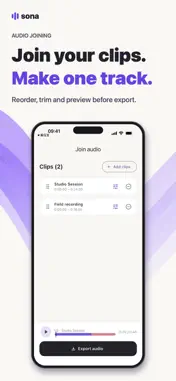
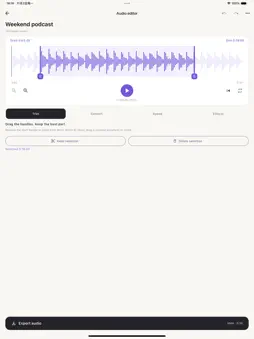
Trim audio, extract sound from video, and export your finished clip — all on your device. Join audio clips into one file. Drag to reorder, trim each clip, adjust volume and fades, and preview the full sequence before exporting. Wi-Fi transfer lets you upload media from a browser and download files saved in Sona on the same network. Audio Trimmer - MP3 Cutter is a simple offline audio editor for music clips, voice recordings and podcasts. Import an audio file or a video, then use one workspace to trim, convert, adjust speed and add fades. TRIM THE PART YOU WANT • Select a section with draggable waveform handles. • Pinch to zoom and scroll for a closer view. • Preview from your new start point as soon as you release the handle. • Keep the selection or delete it and join the remaining sections. • Undo, redo or restore the original audio. VIDEO TO AUDIO Import a video from Photos or Files and extract its audio track. Trim the result and export it as MP3, M4A or WAV. CONVERT AND EXPORT Choose MP3, M4A or WAV, name your file and select the available quality settings. Listen to the finished export, save it to Files or share it using the iOS share sheet. SET THE PACE Adjust speed from 0.5× to 2× while preserving pitch. Change the volume and add adjustable fade-in and fade-out effects for a softer start and finish. SAVE AND PICK UP LATER Projects save automatically, including your selection, edit history, effects and waveform view. Reopen a recent project and continue editing. Your original file stays intact. LOCAL BY DESIGN No registration or ads. Media stays on your devices when you transfer over local Wi-Fi. Core editing works offline with files already on your device. Files stored only in iCloud or another provider may need to download first. The interface is available in 17 languages. It follows your preferred system languages, and you can also choose a language in Settings. Supported exports: MP3, M4A and WAV. Processing depends on the source file, its audio tracks and available device storage. Compressed formats may include small amounts of encoder padding. SONA PRO Try 3 successful audio exports free. Pro unlocks unlimited exports with an auto-renewable subscription: US$2.90/month or US$9.90/year in the US storefront. Eligible annual subscribers get a 3-day free trial, then the displayed annual price. Local prices and eligibility are shown before purchase. Manage or cancel in Apple Account settings at least 24 hours before renewal. Restore purchases in Settings. Terms of Use (EULA): https://www.apple.com/legal/internet-services/itunes/dev/stdeula/ Privacy Policy: https://docs.qq.com/doc/DWk16cW9BRXBHWUx4
What's New
Version 1.1.3 2026-11-21
Join audio clips in Studio. Reorder and trim clips, adjust volume and fades, and preview the sequence before exporting. Wi-Fi import now supports browser upload...Join audio clips in Studio. Reorder and trim clips, adjust volume and fades, and preview the sequence before exporting. Wi-Fi import now supports browser uploads and downloads of files saved in Sona. Technical Analysis
Package Overview Basic metadata
Bundle ID
cn.lhtt.audiokit Current Version 1.1.3
Minimum iOS 15.0
Package Size App Store Size
Package Metadata 0 / 0 version records
Detailed binary, privacy manifest, framework, and Info.plist results have not been indexed for this package yet. The verified App Store and archive metadata above remains available.
Known Version Records
0 version records with stored package metadata
Stored metadata does not guarantee a package is currently available to download.
| Details | Version / IDs | Version date | Action |
|---|