
Preview



Description
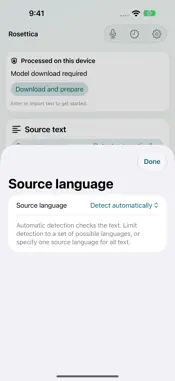
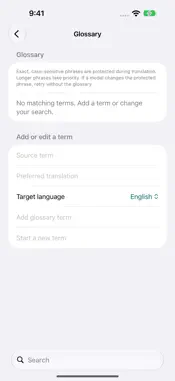
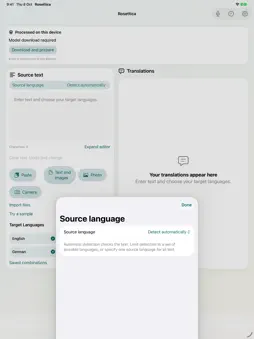
One input. Many languages. Rosettica helps you translate text into several languages on iPhone, iPad and Mac. Choose where translation happens: on your device, on a nearby Mac, or on a translation server you configure. TRANSLATE YOUR WAY Choose your source language or use automatic detection. Select several target languages and save combinations for work, study or everyday use. Follow each language's progress, stop a task, retry a failed translation and keep results that have already finished. START WITH TEXT, PHOTOS OR FILES Paste text, import text and image files, or extract text from photos. On iPhone and iPad, capture text with the camera and review the recognized words before translating. Send text from other apps to Rosettica, then review it in the app. KEEP YOUR WORK ORGANIZED Search translation history, mark favorites and reuse earlier inputs. Copy, export and share completed results. Add glossary terms to specify preferred translations for exact phrases. Optional iCloud backup lets you back up and restore your history. A WORKSPACE FOR EACH DEVICE Use a touch-friendly layout on iPhone and iPad. On Mac, work with source text and translations side by side, keep your main actions within reach and expand the editor when you need more room. SPEAK AND LISTEN Use speech recognition, translation and system voices in conversation mode. Speech recognition may require an internet connection, and available languages and voices depend on your device and Apple services. CHOOSE WHERE YOUR TEXT GOES On-device text translation runs locally after the required model has been downloaded and prepared on a compatible device. Nearby-Mac mode sends text to the Mac you pair with on your local network. Remote mode sends text to the server you select; its operator determines processing and retention. The app identifies the selected processing location so you can choose the workflow that suits your content. On-device translation requires a compatible device, an initial model download and sufficient free storage. Rosettica checks readiness before preparation. Camera input is available on iPhone and iPad. Network-based translation requires an available Mac or configured server; translation quality depends on the selected model and language.
What's New
Version 1.2.17 2026-11-07
This update makes Rosettica easier to use across your devices and improves translation reliability. - A more compact Mac workspace with source text and transla...This update makes Rosettica easier to use across your devices and improves translation reliability. - A more compact Mac workspace with source text and translations side by side. - Clearer language search, input editing, translation progress and retries for individual languages. - More reliable remote-server and nearby-Mac translation, including interrupted responses and cancellation. - Improved file imports, shared text, translation history and backup restoration. - Smoother text editing on iPhone, iPad and Mac. - Clearer controls at larger text sizes and better keyboard behavior in language search. - Improved handling of saved server credentials and speech input. - Updated privacy and support links. Technical Analysis
Package Overview Basic metadata
Bundle ID
jzm.rosettica Current Version 1.2.17
Minimum iOS 17.0
Package Size App Store Size
Package Metadata 0 / 4 version records
Detailed binary, privacy manifest, framework, and Info.plist results have not been indexed for this package yet. The verified App Store and archive metadata above remains available.
Known Version Records
0 version records with stored package metadata • 4 known version records
Stored metadata does not guarantee a package is currently available to download.
| Details | Version / IDs | Version date | Action |
|---|---|---|---|
| Not archived | App Store ID: 885365048 | Unknown | Request Version |
| Not archived | App Store ID: 884110482 | Unknown | Request Version |
| Not archived | App Store ID: 883882437 | Unknown | Request Version |
| Not archived | App Store ID: 882748389 | Unknown | Request Version |