Preview




Description
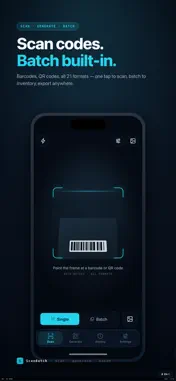
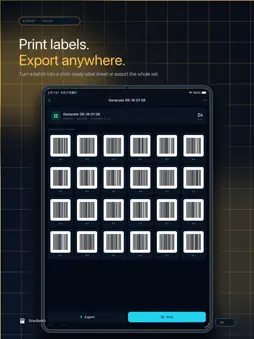
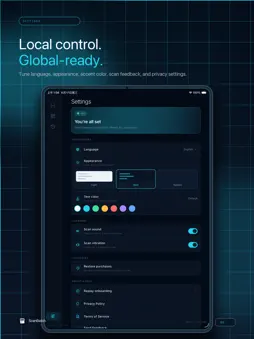
ScanBatch is a batch barcode and QR-code tool built for warehouse inventory, retail labels, event check-in and everyday code scanning. Single scan is free for everyone; upgrade to Pro to unlock batch scanning, batch generation, data import, label printing and full export. — Why ScanBatch — · 21 code formats: QR, Data Matrix, Aztec, PDF417, EAN-13/8, UPC-A/E, Code-128/39/93, Codabar, ITF, ITF-14, ITF-16, GS1-128, ISBN, EAN-5/2, Telepen, RM4SCC and POSTNET. · Inventory in minutes: continuous scanning with automatic deduplication and counting. Multi-frame detection picks the right code, and quantity is editable inline. · Multi-code in one frame: point the camera at a sheet of labels and tap the one you need — perfect for case-packs and pallet tags. · Photo scanning: pick a photo from the library when the code is far away or already captured. If a code can't be re-rendered, we show your original photo so you never lose context. · Take your data anywhere: export scan history to Excel, CSV or PDF; export generated codes as a PNG ZIP, print-ready PDF labels, or share to any app. · Spreadsheet-driven generation: map columns from Excel or CSV and batch-generate hundreds of codes onto print-ready label sheets. · QR beautification: colors, logos, dot styles, eye shapes — apply one of 21 preset templates or customize freely. · Local & offline: all data lives on your device. No account, no sign-in, no upload. — Built for — · Warehouse / inventory: monthly counts, receiving and outbound, SKU counting and reconciliation. · Retail / shops: batch price labels, brand-colored QR codes, label printing. · Events / ticketing: continuous ticket check-in, attendance export. · Publishing / logistics: real-world ISBN, GS1-128 and ITF-14 recognition and generation. · Personal: scan to open links, generate vCards, beautify and share QR codes. — Pro Subscription — · Four levels unlock the same Pro feature set: Weekly, Monthly, Yearly, and Lifetime as a one-time (limited time event) purchase. · Pricing, currency and trial eligibility are pulled live from the App Store and clearly shown on the subscription page. · Subscriptions auto-renew unless cancelled at least 24 hours before the trial ends. Manage or cancel anytime in your Apple ID account settings. · The one-time lifetime purchase unlocks every Pro feature permanently with no renewals. · See the Terms of Use and Privacy Policy linked at the bottom of the subscription page. — Privacy & Offline — · No accounts, no sign-in, no upload of scan content to any server. · Camera permission is used solely for live scanning; Photos permission only for image-based scanning and exports. · Purchase data is handled by RevenueCat and Apple — never touches our servers. — SUPPORT — Questions, bugs, feature requests: [email protected] Privacy policy: https://www.aivoxx.com/scan/privacy.html Terms of service: https://www.aivoxx.com/scan/terms.html
What's New
Version 1.4 2026-09-07
· Batch Continuation Scan: Completed batches can be scanned and records appended at any time, and batches can be switched with one click during the scanning pro... Technical Analysis
Package Overview Basic metadata
Bundle ID
com.scanbatch.scanbatch Current Version 1.4
Minimum iOS 15.0
Package Size App Store Size
Package Metadata 0 / 4 version records
Detailed binary, privacy manifest, framework, and Info.plist results have not been indexed for this package yet. The verified App Store and archive metadata above remains available.
Known Version Records
0 version records with stored package metadata • 4 known version records
Stored metadata does not guarantee a package is currently available to download.
| Details | Version / IDs | Version date | Action |
|---|---|---|---|
| Not archived | App Store ID: 887288199 | Unknown | Request Version |
| Not archived | App Store ID: 887065015 | Unknown | Request Version |
| Not archived | App Store ID: 886429168 | Unknown | Request Version |
| Not archived | App Store ID: 885963071 | Unknown | Request Version |