
Preview


Description
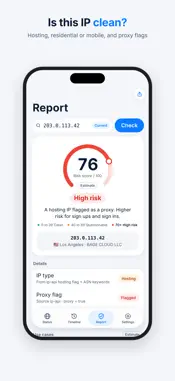
Your public IP, recent changes, and IP risk information — at a glance. IP Glance shows your network's public IP address, puts your last checked result in Home Screen and Lock Screen widgets, and keeps a timeline of detected changes. No account required. CHECK YOUR IP FROM A WIDGET • Choose small or medium Home Screen widgets, or a Lock Screen widget. • See your last checked public IP, country or region, city, and data timestamp. • Tap the widget body to open the app and refresh. iOS manages widget updates, so the displayed result may not reflect your current connection. REVIEW DETECTED CHANGES • The app attempts to refresh and compare your public IP at launch, when you return to it, and when it detects network changes while running. Widget refreshes can also record detected changes. • Review old and new IP addresses, timestamps, cities, and network types in a daily timeline. Export your history as CSV. • With notifications enabled and permission granted, changes detected by the app can trigger local alerts. Widget refreshes record changes without sending alerts. • IP Glance does not check continuously in the background and may miss changes between checks. UNDERSTAND IP TYPE AND RISK FLAGS • The Purity Report uses public data and rules to estimate whether an IP belongs to a data center, residential network, or mobile network. It shows proxy flags and an estimated risk score from 0 to 100. • Look up a specific public IPv4 or IPv6 address and share the report as an image or text. • Guidance for streaming, banking and payments, and AI services is inferred from public flags. It is not a connection test or a guarantee of service access or account safety. SEE THE DATA AND ITS LIMITS • Compare available results from multiple public sources, with detected disagreements highlighted. • View IPv4 / IPv6, ISP, ASN, local IP, network type, and an estimated IP location. • Locations, classifications, proxy flags, and scores are for reference. They do not provide precise device location or certify that an IP is safe. NO ACCOUNT. HISTORY ON YOUR DEVICE. • No servers of our own and no analytics. • Query cache, change history, and settings are stored on your device. • Queries connect to public services (ipwho.is, ipapi.co, ip-api.com, and icanhazip.com), which receive the IP addresses needed for the query and standard network request information. See our Privacy Policy for details. IP Glance does not provide VPN or proxy connections. LEGAL Privacy Policy: https://ipglance.app/privacy Terms of Service: https://ipglance.app/terms EULA: https://www.apple.com/legal/internet-services/itunes/dev/stdeula/
Technical Analysis
Package Overview Basic metadata
Bundle ID
app.ipglance.tool Current Version 1.0
Minimum iOS 17.0
Package Size App Store Size
Package Metadata 0 / 0 version records
Detailed binary, privacy manifest, framework, and Info.plist results have not been indexed for this package yet. The verified App Store and archive metadata above remains available.
Developer Information
Known Version Records
0 version records with stored package metadata
Stored metadata does not guarantee a package is currently available to download.
| Details | Version / IDs | Version date | Action |
|---|