Preview
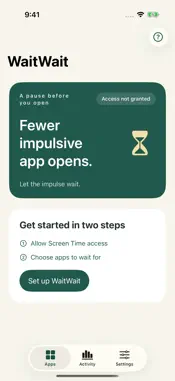

Description
Fewer impulsive app opens. Let the impulse wait. WaitWait adds a short wait before the apps you want to open less often. Choose your apps and set a waiting time and a time per session for each one. Open an app as usual, then start waiting on the system blocking screen. When the wait ends, access is restored automatically. You do not need to return to WaitWait to confirm. Changed your mind? Cancel the wait. • Set a wait of 1–60 minutes for each app. Choose a preset session time or enter a custom whole number of minutes. • Limits return when the session ends. Reopening an app during an allowed session does not start another wait. • See cancelled opens, waits started and access restored, so you can understand what happens before you open an app. • Removing an app’s limit takes a two-minute wait followed by confirmation. • All features are free. No ads or account required. Tips are optional, one-time in-app purchases. They are not subscriptions and do not unlock features. WaitWait keeps your settings and activity records on your device and does not use them for advertising or tracking. Screen Time and optional purchases are handled by Apple’s system services. WaitWait requires Screen Time access. Available for iPhone and iPad in Simplified Chinese, English and Spanish. Access is restored by the system when the wait ends; system scheduling may cause a short delay.
Technical Analysis
Package Overview Basic metadata
Bundle ID
com.allojohn.slowdown Current Version 1.0.0
Minimum iOS 16.0
Package Size App Store Size
Package Metadata 0 / 0 version records
Detailed binary, privacy manifest, framework, and Info.plist results have not been indexed for this package yet. The verified App Store and archive metadata above remains available.
Known Version Records
0 version records with stored package metadata
Stored metadata does not guarantee a package is currently available to download.
| Details | Version / IDs | Version date | Action |
|---|