
Preview






Description
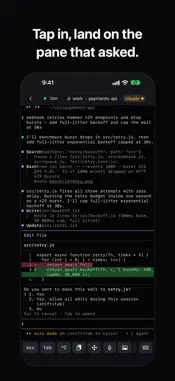
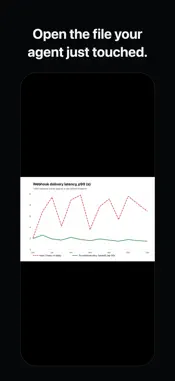
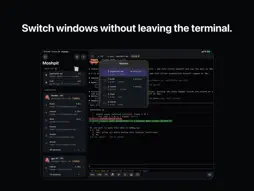
Your coding agents don't stop when you stand up. Moshpit is the terminal that lets you answer them from anywhere — a lock-screen alert the moment an agent needs you that drops you into the pane that asked, a glance at Claude Code or Codex from the Dynamic Island, and a brand-new isolated task started from your phone. A REAL TERMINAL FIRST • SSH and Mosh — sessions that survive Wi-Fi/5G handoffs, sleep, and bad hotel networks • tmux control mode: native rendering, swipe between windows and panes, create/rename/kill — no tiny fake desktop squeezed onto a phone • herdr support: the multiplexer built for coding agents, rendered one full-width pane at a time • iPad: hosts on the left, the terminal on the right, tmux pickers as popovers • Hardware-keyboard friendly — ⌘K, ⌘1–⌘9, ⌘W on iPad — custom themes, seven terminal fonts, nine Liquid Glass icons BUILT FOR AGENT WORK • See every agent at a glance: who needs you, who's working, for how long • Needs-you pings on the lock screen, sealed end to end and delivered even with the app closed — tap one and you are in the pane that asked • Start an agent on a fresh git worktree from your phone: pick a repo, name a branch, optionally hand it the first prompt • Agent status needs ZERO host-side setup on herdr; a one-line hook install on tmux HONEST BY DESIGN • One-time purchase. No subscription, no accounts, no feature tiers. • Nothing is collected. No analytics, no tracking — your keys stay in the iOS Keychain on your device and your traffic goes only to your own servers. • Moshpit never installs anything on your host silently, never creates sessions behind your back, and tells you when it degrades instead of quietly switching transports. Works with any SSH server. Mosh, tmux and herdr are optional — install guides are built in.
What's New
Version 1.1.0 2026-11-21
New: connect through a jump host. If the machine you work on can only be reached through another one, like a university cluster behind its login node or a serv...New: connect through a jump host. If the machine you work on can only be reached through another one, like a university cluster behind its login node or a server behind a bastion, open its connection and pick that other saved connection under Jump Host › Connect via. Moshpit goes through it the way ssh -J does. If the connection fails, its card on Home says which of the two hosts didn't answer, and why. Through a jump host the connection uses SSH, since mosh needs UDP straight to the host. 1.1.0 also moves the whole app onto a new core, and every screen was rebuilt on it. Some of what came with that: • Tap any part of the top bar, session, window or pane, for a quick list of all of them, with what each pane runs and whether it waits on you. Swipe sideways in the terminal to step between panes, with a live peek at the next one. Show All Panes puts every pane of a window side by side, tmux and herdr alike. • Home lists the agents that need you first, across all your hosts. A host can carry an emoji. • An empty Home has an egg on it. It hatches into one of six pixel companions that keeps you company while agents work, also on the Dynamic Island, and you can make it the app icon. • Voice input has a new on-device model that copes with Chinese and English in one sentence. It also listens for the names on your screen, such as file names and branches, so they come out spelled right. • With tmux 3.8 or later, switching windows or sessions on the phone leaves your desktop where it was. Also: • A host that can't be reached says why: refused, not found, timed out, or the Local Network permission. • When the tmux server on a host has gone away, Home says so and offers a new session instead of an empty terminal. • On a new iPhone, keys that didn't come along are listed under Not on this iPhone with Import Again, and hosts you trusted are still trusted. • Turning Moshpit's notifications off also stops your hosts from sending them. Technical Analysis
Package Overview Basic metadata
Bundle ID
com.cluas.moshpit Current Version 1.1.0
Minimum iOS 18.0
Package Size App Store Size
Package Metadata 0 / 0 version records
Detailed binary, privacy manifest, framework, and Info.plist results have not been indexed for this package yet. The verified App Store and archive metadata above remains available.
Price History (USA store)
3 recorded price change points. These are historical observations, not a guarantee of the current price.
| Recorded at | Price | Currency |
|---|---|---|
| 2.99 | USD | |
| 6.99 | USD | |
| 2.99 | USD |
Developer Information
Known Version Records
0 version records with stored package metadata
Stored metadata does not guarantee a package is currently available to download.
| Details | Version / IDs | Version date | Action |
|---|