Preview






Description
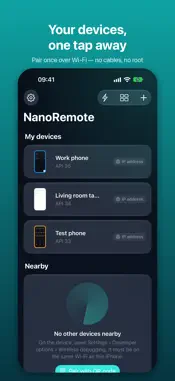
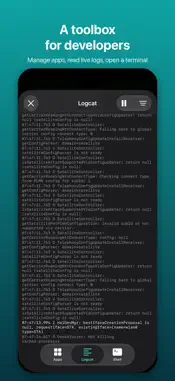
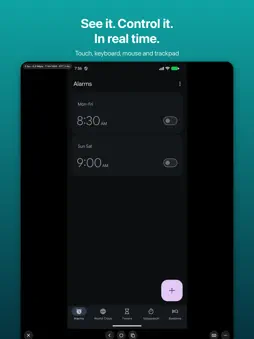
NanoRemote shows your phone or tablet on your iPhone or iPad and lets you control it — over Wi‑Fi, without cables or root, and without installing anything on the device. It uses the device's built‑in Wireless debugging (ADB). Pair once by scanning a QR code or entering the code shown on the device; after that, connect with one tap whenever both are on the same network. MIRROR AND CONTROL • Smooth, low‑latency mirroring with hardware video decoding • Touch and multi‑finger gestures; swipe in from the edges for Back and Home • On iPad: hardware keyboard, mouse and trackpad — typing, shortcuts, right‑click for Back, scrolling • Type in any language: Chinese and other scripts are pasted through the device's clipboard • Follows the device's rotation, or lock the orientation you prefer • Live stats: frame rate, bitrate, resolution and network round trip FREE Mirror and control one device at a time — no time limit, no ads, no account. NANOREMOTE PRO — ONE‑TIME PURCHASE • Device audio on your iPhone • Picture in Picture: keep watching while you use other apps • Device wall: live thumbnails of all your nearby devices • Clipboard sync in both directions • Send photos, videos and files, or install an APK • Quick actions: shell commands, key sequences or app launches on any of your devices — also from Shortcuts, Siri, widgets and Control Center • Toolbox: manage installed apps, watch the live system log, open a terminal • Mirror a single app on its own virtual screen while the phone stays free • Use a phone's camera as a live view • Remote access through your own VPN, with quality tuned for cellular networks • Up to 120 fps on ProMotion displays, or choose resolution, frame rate and bitrate yourself PRIVATE BY DESIGN NanoRemote talks only to your own devices. There is no account, no server and no analytics. The key your device trusts is created on this iPhone or iPad, kept in its keychain and never synced. NanoRemote never reads your clipboard on its own. REQUIREMENTS • A phone or tablet with Wireless debugging (system version 11 or later); the camera view needs version 12 or later • Both devices on the same Wi‑Fi network — or connected through your own VPN for remote access • Use NanoRemote only with devices you own or are authorized to manage. Pairing requires hands‑on access to the device. During a session NanoRemote runs the open‑source scrcpy server (Apache License 2.0) on the device.
What's New
Version 1.1.0 2026-11-14
• iPhone Duo support: with the inner display open, the device's screen and a new control panel sit on either side of the fold. The panel shows the model, system...• iPhone Duo support: with the inner display open, the device's screen and a new control panel sit on either side of the fold. The panel shows the model, system version and battery level, live connection stats, your quick actions and a text field, with Back, Home and Recent apps at the bottom. Hide the panel any time to make the screen bigger. • On the iPhone Duo inner display, your device list and the device wall line up in even columns. Orientation lock applies to the outer display. • The stats overlay is now a small latency badge. Tap it to see frame rate, bitrate and resolution; it collapses again after 5 seconds. • Audio, clipboard and file transfer notices now use dark glass, so they stay readable over bright screens. Technical Analysis
Package Overview Basic metadata
Bundle ID
com.levi87.nanoremote Current Version 1.1.0
Minimum iOS 18.0
Package Size App Store Size
Package Metadata 0 / 0 version records
Detailed binary, privacy manifest, framework, and Info.plist results have not been indexed for this package yet. The verified App Store and archive metadata above remains available.
Known Version Records
0 version records with stored package metadata
Stored metadata does not guarantee a package is currently available to download.
| Details | Version / IDs | Version date | Action |
|---|