Preview







Description
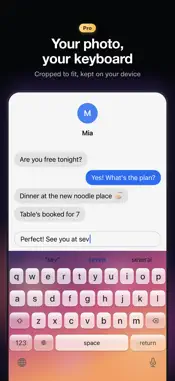
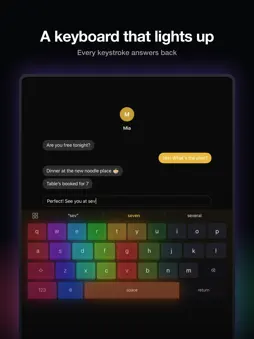
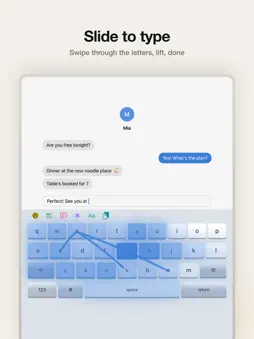
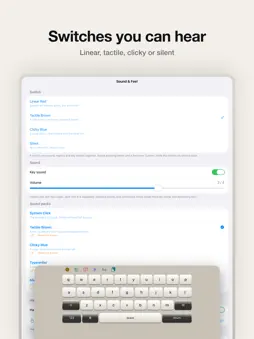
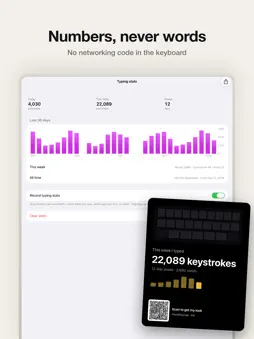
Watch your keyboard light up. NanoKeycap turns the keyboard on your iPhone and iPad into a mechanical one: keycaps you can see, switch sounds you can hear, lighting that answers every keystroke — and nothing you type ever leaves your device. Typing languages: English, Spanish, German, French, Chinese (Pinyin, simplified or traditional), Japanese (flick or romaji) and Korean (2-Set). LOOK • 18 themes in four families — solid, gradient, 3D keycaps and glass — including two high-contrast themes • 7 lighting effects that react as you type, from a soft bloom to a full RGB wave • 12 curated looks that set theme, lighting and background in one tap • Share your look as a QR card: a friend scans it and gets the same keyboard • Your own photo as the keyboard background (Pro) • Light and dark mode, adjustable height and key corners, optional number row FEEL • 4 switch presets with their own sounds: Linear Red, Tactile Brown, Clicky Blue and Silent • Haptic feedback on every key TYPE • Chinese Pinyin input on a full keyboard or 9-key; fuzzy pinyin and traditional characters are optional • Japanese input with flick or romaji, and kana-to-kanji conversion • Korean input on the standard 2-Set layout • One language key switches between the languages you turn on; everything is converted and learned on your device • Swipe typing: slide through the letters of a word and lift — the word is typed for you • Autocorrect, word suggestions and next-word prediction • Learns your words from what you type — on your device only • Follows along when you switch between your typing languages • Phrases: your own ready-made sentences, one tap to send • Fancy text: pick one of 17 styles and type, or restyle a sentence you already typed • Emoji with skin tones, kaomoji and 360+ symbols such as ⌘ → ≈ €: circled numbers, checkmarks, units, Greek letters • Hold the space bar to move the cursor like a trackpad • Custom dictionaries for names and jargon — from a link, a file or pasted text • Portrait and landscape, iPhone and iPad; VoiceOver support; respects Reduce Motion EASY MODE • One switch for bigger keys, bigger letters and high contrast, with the extras tucked away • Read aloud: hear the sentence you just typed (needs Full Access) • Switch it off and every setting goes back to how it was TYPING STATS • Keystrokes this week, words and your streak, with a card to share • Numbers only — never what you type, which app you're in, or when PRIVACY FIRST • The keyboard contains no networking code. What you type stays on your device. • Chinese, Japanese and Korean input work fully offline: no cloud suggestions, nothing to upload. • No account, no analytics, no ads, no tracking. • Full Access is optional. The keyboard works fully without it; it is only needed for clipboard history, haptics, the switch sound packs, Easy Mode's read aloud, and showing your typing stats in the app. NANOKEYCAP PRO — ONE-TIME PURCHASE Everything above is included unless marked Pro. Pro is a single purchase, not a subscription, and adds: • Your own lighting effects • Symbols or emoji on any keycap • Your own key layout • Haptic strength and sharpness tuning • Your own photo as the keyboard background • Clipboard history, kept on your device; unpinned items clear after 7 days
What's New
Version 1.4.0 2026-11-14
New in 1.4: • Make your own theme: start from any theme and change the background, keys, text and accent color (Pro — try it free, save with Pro) • Keycap fonts...New in 1.4: • Make your own theme: start from any theme and change the background, keys, text and accent color (Pro — try it free, save with Pro) • Keycap fonts: Default, Rounded, Serif or Mono, for every theme • Swipe trails: Accent, Neon, Rainbow, Comet and Stardust • Easter eggs: type "happy birthday", "good night" or "love you" and the keyboard plays a small effect • Emoji suggestions after a word, and search in the emoji panel • Chinese: sentences that read right, using common word pairs (你睡了吗, not 你谁了吗), plus next-word suggestions • One-tap paste: copy something and a Paste button waits in the suggestion bar (Full Access) • One-handed keyboard: hold 123 to move the keys left or right • Your Text Replacement shortcuts from Settings now work here • The language key now shows where you are and where it goes next, e.g. 中/EN • Year in review: from December, your typing year as a card to share • Lower memory use and steadier first launch Technical Analysis
Package Overview Basic metadata
Bundle ID
com.levi87.nanokeycap Current Version 1.4.0
Minimum iOS 18.0
Package Size App Store Size
Package Metadata 0 / 0 version records
Detailed binary, privacy manifest, framework, and Info.plist results have not been indexed for this package yet. The verified App Store and archive metadata above remains available.
Known Version Records
0 version records with stored package metadata
Stored metadata does not guarantee a package is currently available to download.
| Details | Version / IDs | Version date | Action |
|---|