Preview


Description
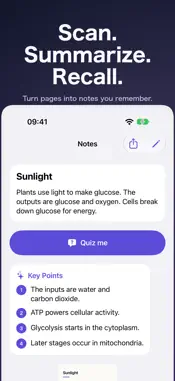
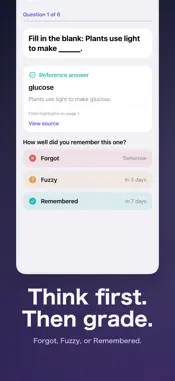
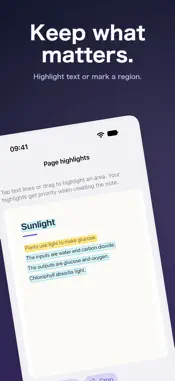
Turn textbook pages, lecture slides, and screenshots into notes you actually remember. CaptureNote reads the text in your images, writes a summary with key points, then quizzes you at the right time so it sticks. OCR, the local summary fallback, review scheduling, and reminders all work on your device, with no account. HOW IT WORKS • Scan or import pages: capture several pages at once, then reorder, crop, rotate, and highlight what matters. • Get a clear note: a title, summary, and key points from the Apple on-device model on supported iPhones. When it isn’t available, CaptureNote builds the summary from sentences in your own text and tells you which one you got. • Quiz yourself: reveal the answer, then grade yourself — Forgot, Fuzzy, or Remembered. Questions come from your notes, including fill-in-the-blank cards that need no AI. • Review on a schedule: cards return after 1, 3, 7, 14, and 30 days. The Library shows what is due today, and a round is at most 10 cards, about two minutes. • Optional reminders: a local notification, only on days when cards are due. • Export to Markdown: share any note as a .md file with its summary, key points, and your highlights. MORE • Shortcuts: add Summarize Screenshot or Recognize Screenshot Text after Take Screenshot. • Folders and search: organize, edit, move, share, or delete notes. • Keep the context: the source image, full text, summary, and key points stay together. • Bring your own key: connect an OpenAI-compatible API and model. Only OCR text is sent; provider fees are separate. • Local first: OCR and local processing happen on device. Content is never uploaded without your explicit consent. Ideal for lecture slides, textbook screenshots, web research, reading highlights, and exam prep. CaptureNote is free to download. Basic OCR, editing, folders, search, Markdown export, and reviewing your notes are free, and 5 complete smart summaries are included. Unlimited smart summaries and summary Shortcuts require a one-time Lifetime Pro in-app purchase.
What's New
Version 1.4.0 2026-11-08
Notes you remember, not just save. • Review loop: reveal each answer, grade yourself (Forgot, Fuzzy, Remembered), and cards come back after 1, 3, 7, 14, and 30... Technical Analysis
Package Overview Basic metadata
Bundle ID
i3.QuickNote Current Version 1.4.0
Minimum iOS 18.0
Package Size App Store Size
Package Metadata 0 / 2 version records
Detailed binary, privacy manifest, framework, and Info.plist results have not been indexed for this package yet. The verified App Store and archive metadata above remains available.
Developer Information
Known Version Records
0 version records with stored package metadata • 2 known version records
Stored metadata does not guarantee a package is currently available to download.
| Details | Version / IDs | Version date | Action |
|---|---|---|---|
| Not archived | App Store ID: 888720496 | Unknown | Request Version |
| Not archived | App Store ID: 888171517 | Unknown | Request Version |