
Preview


Description
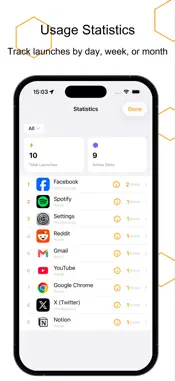
Honeycomb Launcher is an innovative iOS quick-launch tool that redefines "one-tap launch" with its unique honeycomb gesture. No more searching through screens full of icons, no more swiping between pages. Press the honeycomb center, slide to your target, and release to launch — one fluid motion, faster than you can imagine. 【KEY FEATURES】 ■ Honeycomb Gesture Launch Press the center slot to reveal six surrounding slots, slide to the target slot and release to execute. 3 honeycomb groups with 21 launch slots in total — your most-used actions are always one touch away. ■ Four Launch Panels Default / Home / Work / Commute — 12 launch slots per panel. Freely organize by scenario, everything in its place. ■ Smart Time & Location Switching Panels can be linked to time rules and geofences. The work panel appears automatically when you arrive at the office, and the home panel takes over when you're back. The right panel, at the right time, in the right place. ■ Rich Launch Types Supports system apps, third-party apps, Shortcuts, and custom URL Schemes — make calls, scan QR codes, open websites, run Shortcuts, all with one tap. ■ Deep Shortcuts Integration Automatically detects Shortcut icons and names for effortless setup, and runs your carefully crafted automation workflows directly. ■ Custom Icons Freely combine SF Symbols with text, adjust icon color and background color as you like, to create launch slots that are uniquely yours. ■ Six Curated Presets Built-in templates for six user types (productivity pros, home living, navigation, and more). Ready to use out of the box, or fully customizable on top of that. ■ Centralized Honeycomb Management Manage all honeycombs on a single screen. Long-press and drag to freely move and reorder across groups — efficient and intuitive organization. ■ Usage Statistics View launch counts by day / week / month. Understand your usage patterns and see which features you use most at a glance. ■ Usage Limits & Reminders Set daily caps for any launch slot, with smart reminders when the limit is reached. Helps you control how often you use certain apps, so you can spend time on what matters more. 【WHY HONEYCOMB LAUNCHER】 • Original honeycomb gesture — launch speed far exceeds traditional icon tapping • Smart panels auto-switch by time and location — scenario-based management, well organized • Pure native development, no third-party libraries — fast launch, small size, more stable • 100+ built-in app presets, ready to use out of the box Make every launch, one step ahead. Terms of Use: https://www.apple.com/legal/internet-services/itunes/dev/stdeula/
Technical Analysis
Package Overview Basic metadata
Bundle ID
com.zhangzhong.HexHiveLaunch Current Version 1.0
Minimum iOS 17.0
Package Size App Store Size
Package Metadata 0 / 0 version records
Detailed binary, privacy manifest, framework, and Info.plist results have not been indexed for this package yet. The verified App Store and archive metadata above remains available.
Developer Information
Known Version Records
0 version records with stored package metadata
Stored metadata does not guarantee a package is currently available to download.
| Details | Version / IDs | Version date | Action |
|---|