
Preview



Description
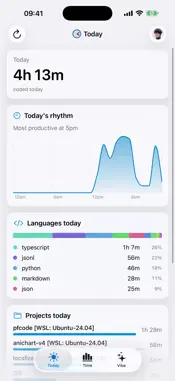
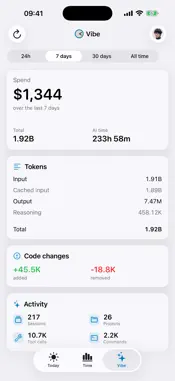
Code Time turns the time you spend in your editor into clear charts and totals. See your day at a glance: total coding hours, your most productive time of day, which languages you used, and which projects you worked on. Look back: 7-day, 30-day, 90-day, and yearly trends. Compare days. See your active streak. Track AI: if you use Claude Code, Cursor, or other AI assistants, Code Time pulls in token usage, sessions, tool calls, and AI-assisted code changes — so you can see how much your work is actually augmented by AI. Home screen widgets: Today's coding time, this year's activity heatmap, top languages, and recent AI usage — all updating throughout the day. Sources: Code Time tracks via official editor plugins for VS Code and JetBrains IDEs, plus an agent CLI for terminal-based AI assistants. The mobile app is a read-only companion to your dashboard at codetime.dev. Privacy: We only store anonymized telemetry — coding times, project names, and language breakdowns. We never read your code. Full details at codetime.dev/privacy. Free to use. Sign in with Apple, Google, or GitHub.
What's New
Version 1.9 2026-08-14
What's new in 1.9 • Widgets and watch complications now follow the app's language setting instead of the device language. • Fixed a case where a dashboard coul... Technical Analysis
Package Overview Basic metadata
Bundle ID
dev.codetime.ios Current Version 1.9
Minimum iOS 18.0
Package Size App Store Size
Package Metadata 0 / 9 version records
Detailed binary, privacy manifest, framework, and Info.plist results have not been indexed for this package yet. The verified App Store and archive metadata above remains available.
Developer Information
Known Version Records
0 version records with stored package metadata • 9 known version records
Stored metadata does not guarantee a package is currently available to download.
| Details | Version / IDs | Version date | Action |
|---|---|---|---|
| Not archived | App Store ID: 889105534 | Unknown | Request Version |
| Not archived | App Store ID: 888751789 | Unknown | Request Version |
| Not archived | App Store ID: 886839479 | Unknown | Request Version |
| Not archived | App Store ID: 886608230 | Unknown | Request Version |
| Not archived | App Store ID: 886457897 | Unknown | Request Version |
| Not archived | App Store ID: 886321889 | Unknown | Request Version |
| Not archived | App Store ID: 886267752 | Unknown | Request Version |
| Not archived | App Store ID: 886176851 | Unknown | Request Version |
| Not archived | App Store ID: 885943964 | Unknown | Request Version |